







Question: Problem 3 : Remove Additive Cosine Noise [ 1 5 points ] The noisy image boy _ noisy.gif has been generated by adding some noise
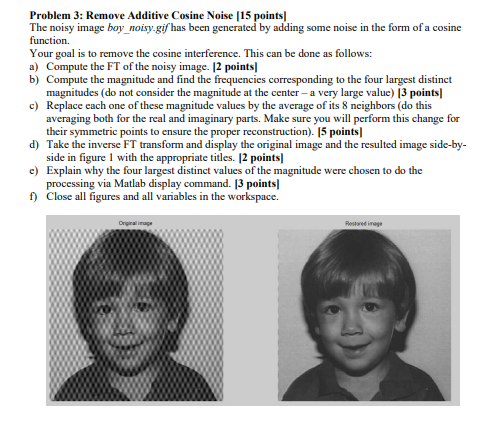
Problem : Remove Additive Cosine Noise points The noisy image boynoisy.gif has been generated by adding some noise in the form of a cosine function. Your goal is to remove the cosine interference. This can be done as follows: a Compute the FT of the noisy image. points b Compute the magnitude and find the frequencies corresponding to the four largest distinct magnitudes do not consider the magnitude at the center a very large value points c Replace each one of these magnitude values by the average of its neighbors do this averaging both for the real and imaginary parts. Make sure you will perform this change for their symmetric points to ensure the proper reconstruction points d Take the inverse FT transform and display the original image and the resulted image sidebyside in figure with the appropriate titles. points e Explain why the four largest distinct values of the magnitude were chosen to do the processing via Matlab display command. points f Close all figures and all variables in the workspace. Problem : Remove Additive Cosine Noise points
The noisy image boynoisy.gif has been generated by adding some noise in the form of a cosine function.
Your goal is to remove the cosine interference. This can be done as follows:
a Compute the FT of the noisy image. points
b Compute the magnitude and find the frequencies corresponding to the four largest distinct magnitudes do not consider the magnitude at the center a very large value points
c Replace each one of these magnitude values by the average of its neighbors do this averaging both for the real and imaginary parts. Make sure you will perform this change for their symmetric points to ensure the proper reconstruction points
d Take the inverse FT transform and display the original image and the resulted image sidebyside in figure with the appropriate titles. points
e Explain why the four largest distinct values of the magnitude were chosen to do the processing via Matlab display command. points
f Close all figures and all variables in the workspace.
Step by Step Solution
There are 3 Steps involved in it
1 Expert Approved Answer
Step: 1 Unlock

Question Has Been Solved by an Expert!
Get step-by-step solutions from verified subject matter experts
Step: 2 Unlock
Step: 3 Unlock
 Study Help