







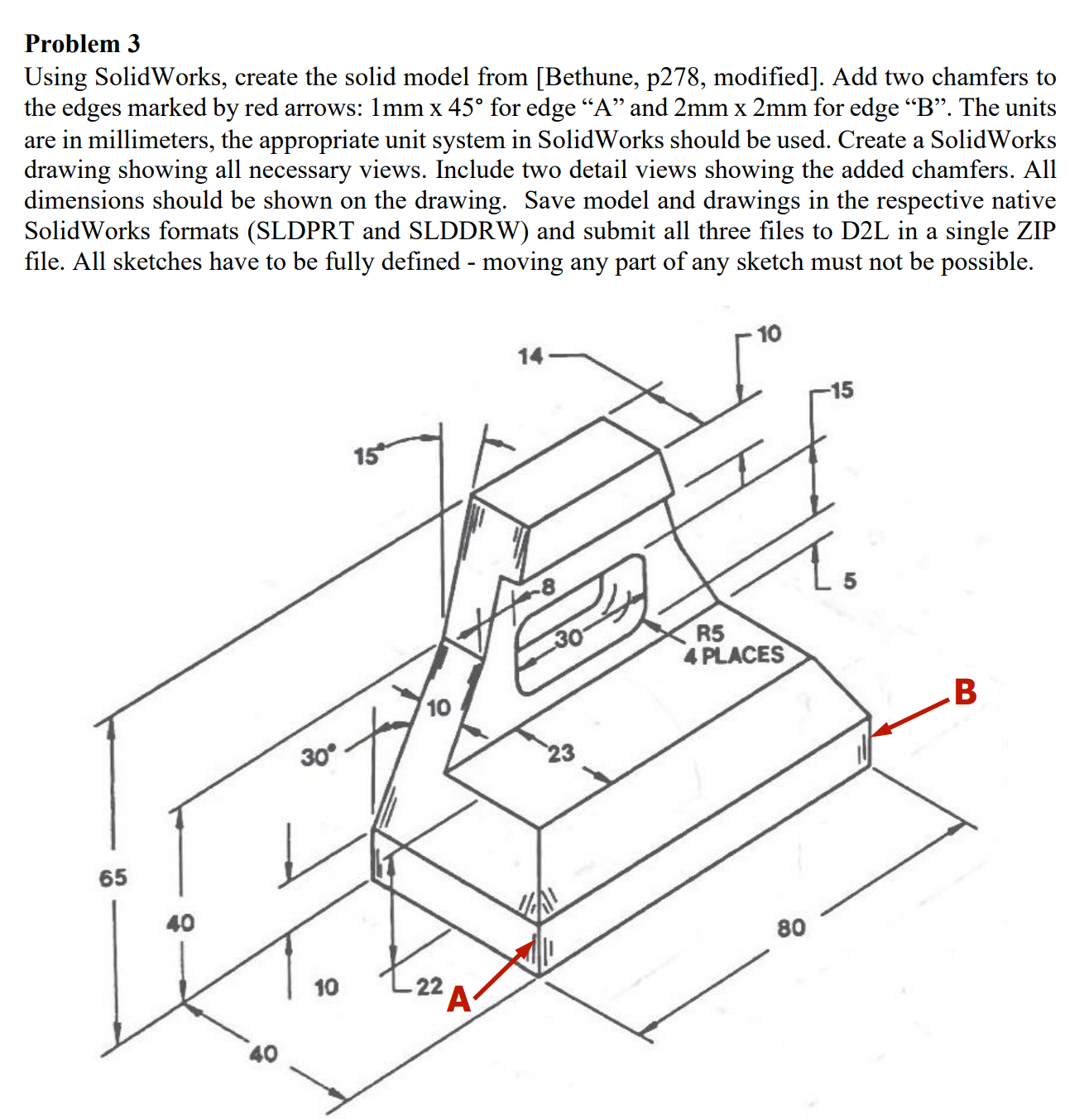
Question: Problem 3 Using SolidWorks, create the solid model from [ Bethune , p 2 7 8 , modified ] . Add two chamfers to the
Problem
Using SolidWorks, create the solid model from Bethune p modified Add two chamfers to the edges marked by red arrows: mathrm~mmtimes circ for edge A and mathrm~mmtimes mathrm~mm for edge B The units are in millimeters, the appropriate unit system in SolidWorks should be used. Create a SolidWorks drawing showing all necessary views. Include two detail views showing the added chamfers. All dimensions should be shown on the drawing. Save model and drawings in the respective native SolidWorks formats SLDPRT and SLDDRW and submit all three files to DL in a single ZIP file. All sketches have to be fully defined moving any part of any sketch must not be possible.
Step by Step Solution
There are 3 Steps involved in it
1 Expert Approved Answer
Step: 1 Unlock

Question Has Been Solved by an Expert!
Get step-by-step solutions from verified subject matter experts
Step: 2 Unlock
Step: 3 Unlock
 Study Help