







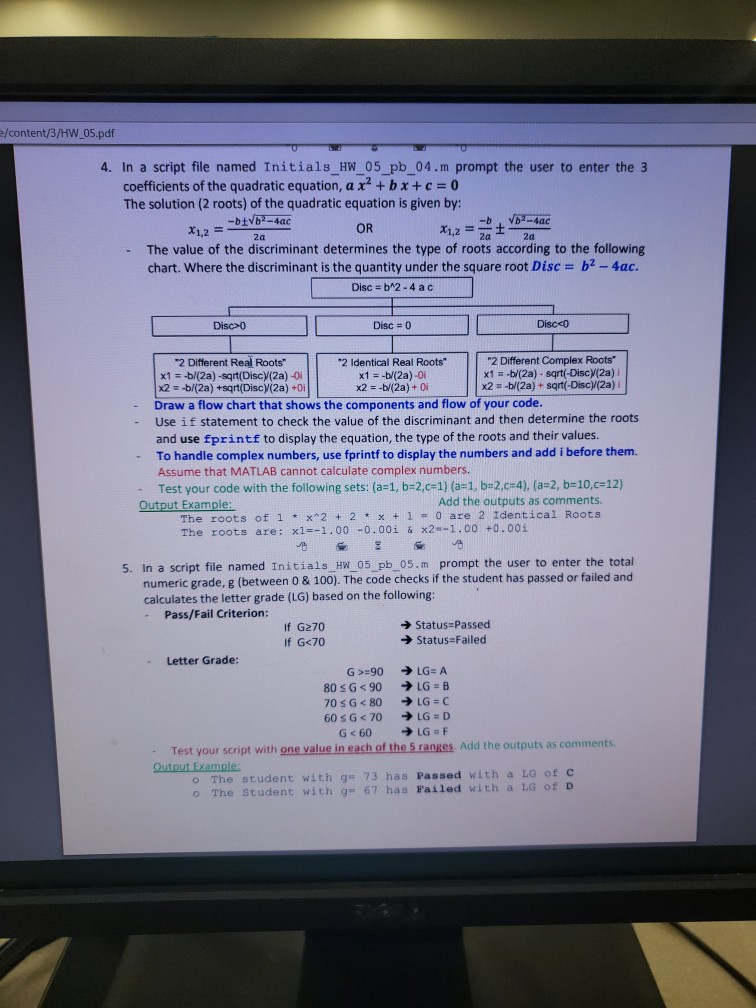
Question: problem 4 e/content/3/HW 05.pdf 4. In a script file named Initials HW 05 pb_04.m prompt the user to enter the 3 coefficients of the quadratic
problem 4
e/content/3/HW 05.pdf 4. In a script file named Initials HW 05 pb_04.m prompt the user to enter the 3 coefficients of the quadratic equation, a x2 +bx+c 0 The solution (2 roots) of the quadratic equation is given by: 1,2 OR 2a The value of the discriminant determines the type of roots according to the following chart. Where the discriminant is the quantity under the square root Disc b2-4ac Disc-b^2-4ac - Disc>0 Disc 0 Discco 2 Different Complex Roots x1 s-b/(2a) - sqrt(-Discy(2a) i x2- -b/(2a) + sqrt(-Disc(2a) i 2 Different Real Roots" x1b/(2a) -sqrt(Disc (2a) -0 x2b/(2a) +sqrt(Disc)(2a) +0i Draw a flow chart that shows the components and flow of your code. Use if statement to check the value of the discriminant and then determine the roots 2 Identical Real Roots" x1--bl(2a)-0i - and use fprintf to display the equation, the type of the roots and their values To handle complex numbers, use fprintf to display the numbers and add i before them. Assume that MATLAB cannot calculate complex numbers. - 1, b+2.c-4), (a-2, b-10,c:12) -Test your code with the following sets: (a-1, b-2,C#1) (a Output Example Add the outputs as comments. The roots of 1 x22 x1- 0 are 2 Identical Roots The roots are: x1-1.00-0.001 & x2-1.00 +0.00i 5. In a script file named Initials HW 05 pb_05.m prompt the user to enter the total numeric grade, g (between 0 & 100). The code checks if the student has passed or failed and calculates the letter grade (LG) based on the following Pass/Fail Criterion: If G270 If G Status Passed Status:Failed - Letter Grade: Add the outputs as comments. Test your script witih Qutout Example: one value in each of the 5 ranges The student with g- 73 has Passed with a LG otc o The Student with g= 67 has Failed with LG of D
Step by Step Solution
There are 3 Steps involved in it

Get step-by-step solutions from verified subject matter experts
 Study Help