







Question: Problem 5 : An environment ( ( 1 0 times 1 0 ) grid ) is presented below where the black colored
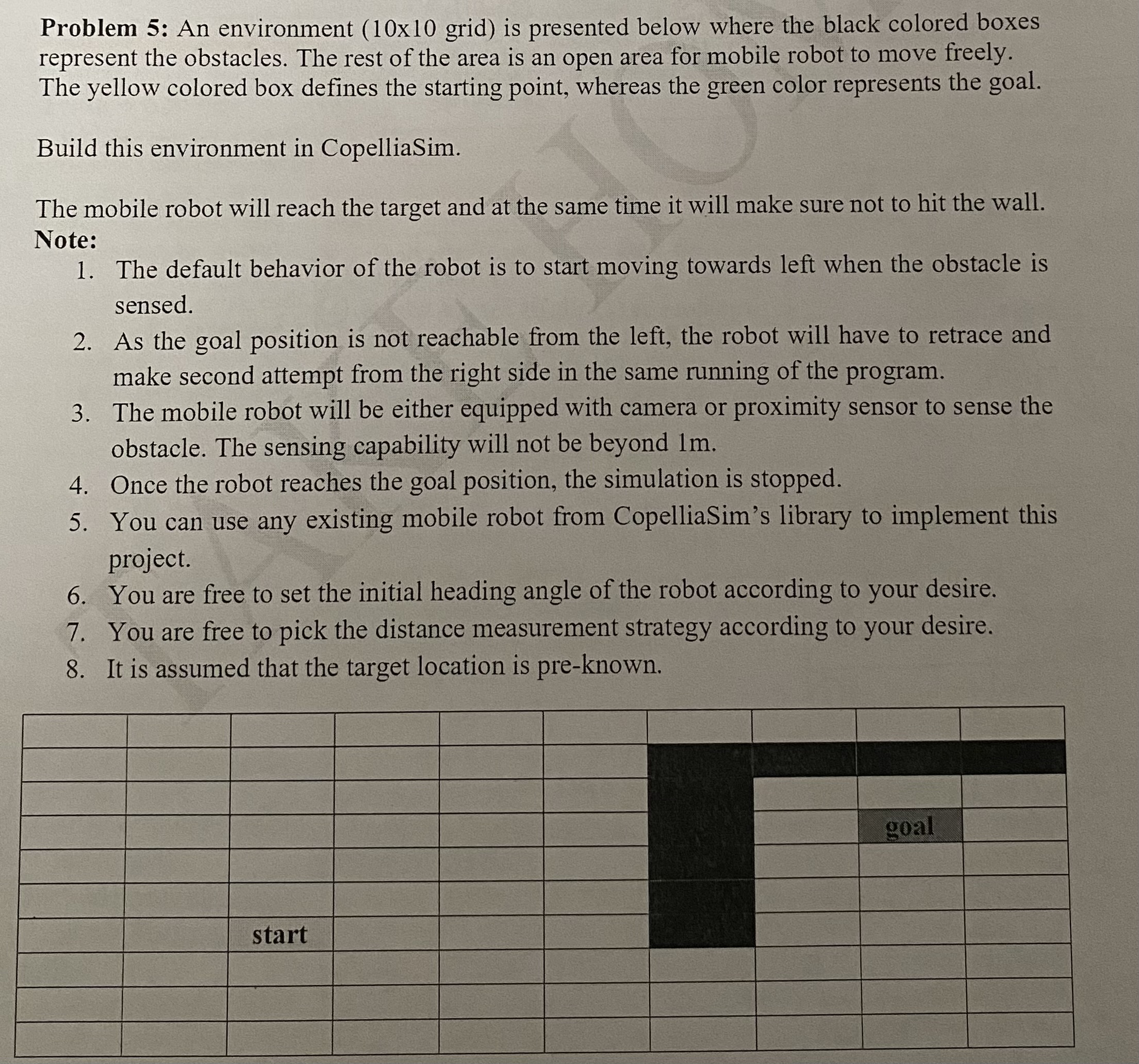
Problem : An environment times grid is presented below where the black colored boxes represent the obstacles. The rest of the area is an open area for mobile robot to move freely. The yellow colored box defines the starting point, whereas the green color represents the goal.
Build this environment in CopelliaSim.
The mobile robot will reach the target and at the same time it will make sure not to hit the wall. Note:
The default behavior of the robot is to start moving towards left when the obstacle is sensed
As the goal position is not reachable from the left, the robot will have to retrace and make second attempt from the right side in the same running of the program.
The mobile robot will be either equipped with camera or proximity sensor to sense the obstacle. The sensing capability will not be beyond m
Once the robot reaches the goal position, the simulation is stopped.
You can use any existing mobile robot from CopelliaSim's library to implement this project.
You are free to set the initial heading angle of the robot according to your desire.
You are free to pick the distance measurement strategy according to your desire.
It is assumed that the target location is preknown.
Problem : Plot the Accelerometer or position using GPS data obtained from MATLAB
mobile application and GNSSloggerApp or similar application.
The frequency of both applications should be the same otherwise data length will not be the
same.
MATLAB mobile application will be running on one cell phone and the other application will
be running on the other cell phone. Both applications must start logging the data at the same
time.
You might have to make some coordinate transformation to correspond data from both devices. Can you please write me correctly, explain step by step, please, can you explain how we do it in the coopelia sim application, one by one? Could you make Coppelia sim for someone who doesn't know anything about it and matlab
Step by Step Solution
There are 3 Steps involved in it
1 Expert Approved Answer
Step: 1 Unlock

Question Has Been Solved by an Expert!
Get step-by-step solutions from verified subject matter experts
Step: 2 Unlock
Step: 3 Unlock
 Study Help