







Question: Problem 5. Solve the same problem using Matlab's fsolve routine. To run this program, type options optinset ('Display', 'iter'); x0 = [0.5,0.5] [x,fval] fsolve (0fcnns
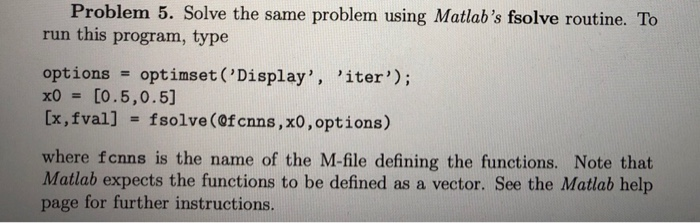
Problem 5. Solve the same problem using Matlab's fsolve routine. To run this program, type options optinset ('Display', 'iter'); x0 = [0.5,0.5] [x,fval] fsolve (0fcnns , x0 , options) where fcnns is the name of the M-file defining the functions. Note that Matlab expects the functions to be defined as a vector. See the Matlab help page for further instructions Problem 5. Solve the same problem using Matlab's fsolve routine. To run this program, type options optinset ('Display', 'iter'); x0 = [0.5,0.5] [x,fval] fsolve (0fcnns , x0 , options) where fcnns is the name of the M-file defining the functions. Note that Matlab expects the functions to be defined as a vector. See the Matlab help page for further instructions
Step by Step Solution
There are 3 Steps involved in it

Get step-by-step solutions from verified subject matter experts
 Study Help