







Question: Problem 6 : Applying the Model to New Data In the last problem, we will apply our model to a new set of observations. Suppose
Problem : Applying the Model to New Data
In the last problem, we will apply our model to a new set of observations. Suppose that this new set of data
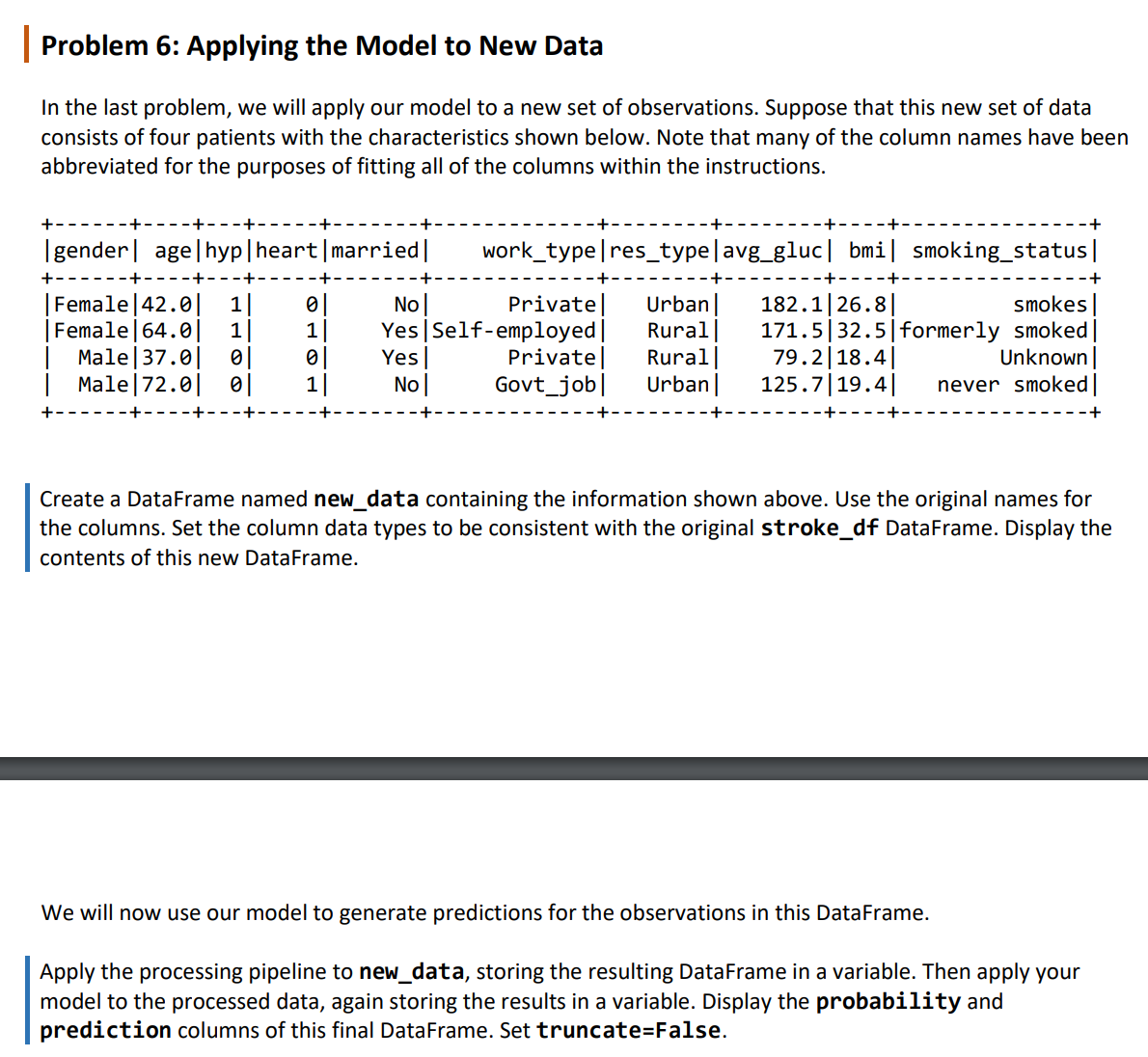
consists of four patients with the characteristics shown below. Note that many of the column names have been
abbreviated for the purposes of fitting all of the columns within the instructions.
Create a DataFrame named newdata containing the information shown above. Use the original names for
the columns. Set the column data types to be consistent with the original strokedf DataFrame. Display the
contents of this new DataFrame.
We will now use our model to generate predictions for the observations in this DataFrame.
Apply the processing pipeline to newdata, storing the resulting DataFrame in a variable. Then apply your
model to the processed data, again storing the results in a variable. Display the probability and
prediction columns of this final DataFrame. Set truncateFalse.Problem : Applying the Model to New Data
In the last problem, we will apply our model to a new set of observations. Suppose that this new set of data
consists of four patients with the characteristics shown below. Note that many of the column names have been
abbreviated for the purposes of fitting all of the columns within the instructions.
gender agehypheartmarried worktyperestypeavggluc bmi smokingstatus
Female No Private Urban smokes
Female YesSelfemployed Ruralformerly smoked
Male Yes Private Rural Unknown
Male No Govtjob Urban never smoked
Create a DataFrame named newdata containing the information shown above. Use the original names for
the columns. Set the column data types to be consistent with the original strokedf DataFrame. Display the
contents of this new DataFrame.
We will now use our model to generate predictions for the observations in this DataFrame.
Apply the processing pipeline to newdata, storing the resulting DataFrame in a variable. Then apply your
model to the processed data, again storing the results in a variable. Display the probability and
prediction columns of this final DataFrame. Set truncateFalse.
Step by Step Solution
There are 3 Steps involved in it
1 Expert Approved Answer
Step: 1 Unlock

Question Has Been Solved by an Expert!
Get step-by-step solutions from verified subject matter experts
Step: 2 Unlock
Step: 3 Unlock
 Study Help