







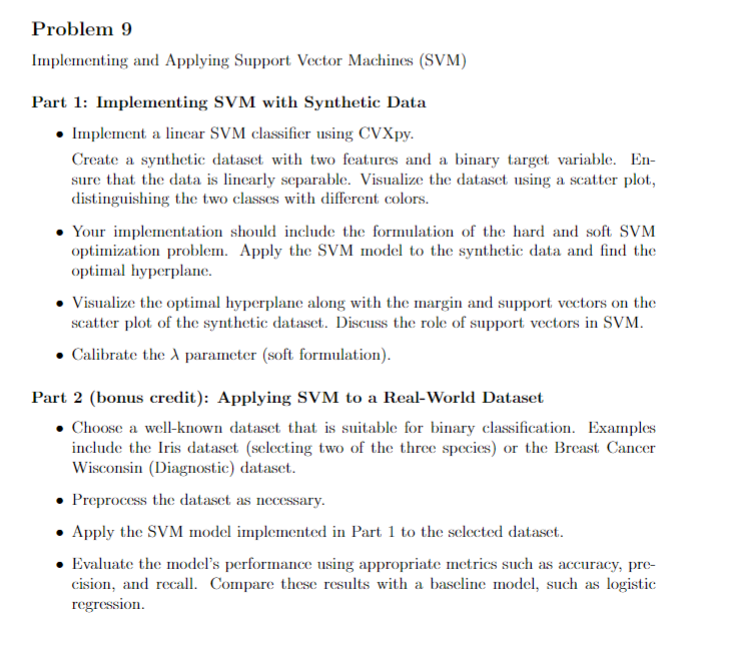
Question: Problem 9 Implementing and Applying Support Vector Machines ( SVM ) Part 1 : Implementing SVM with Synthetic Data Implement a linear SVM classifier using
Problem
Implementing and Applying Support Vector Machines SVM
Part : Implementing SVM with Synthetic Data
Implement a linear SVM classifier using CVXpy
Create a synthetic dataset with two features and a binary target variable. En
sure that the data is linearly separable. Visualize the dataset using a scatter plot,
distinguishing the two classes with different colors.
Your implementation should include the formulation of the hard and soft SVM
optimization problem. Apply the SVM model to the synthetic data and find the
optimal hyperplane.
Visualize the optimal hyperplane along with the margin and support vectors on the
scatter plot of the synthetic dataset. Discuss the role of support vectors in SVM
Calibrate the parameter soft formulation
Part bonus credit: Applying SVM to a RealWorld Dataset
Choose a wellknown dataset that is suitable for binary classification. Examples
include the Iris dataset selecting two of the three species or the Breast Cancer
Wisconsin Diagnostic dataset.
Preprocess the dataset as necessary.
Apply the SVM model implemented in Part to the selected dataset.
Evaluate the model's performance using appropriate metrics such as accuracy, pre
cision, and recall. Compare these results with a baseline model, such as logistic
regression.Implement a linear SVM classifier using CVXpy
Create a synthetic dataset with two features and a binary target variable. En
sure that the data is linearly separable. Visualize the dataset using a scatter plot,
distinguishing the two classes with different colors.
Your implementation should include the formulation of the hard and soft SVM
optimization problem. Apply the SVM model to the synthetic data and find the
optimal hyperplane.
Visualize the optimal hyperplane along with the margin and support vectors on the
scatter plot of the synthetic dataset. Discuss the role of support vectors in SVM
Calibrate the lambda parameter soft formulation
Step by Step Solution
There are 3 Steps involved in it
1 Expert Approved Answer
Step: 1 Unlock

Question Has Been Solved by an Expert!
Get step-by-step solutions from verified subject matter experts
Step: 2 Unlock
Step: 3 Unlock
 Study Help