







Question: Problem A. (7 points) Invert Colors First, you will be implementing the invert function. (Reminder: all of these functions take in a three-dimensional list, and
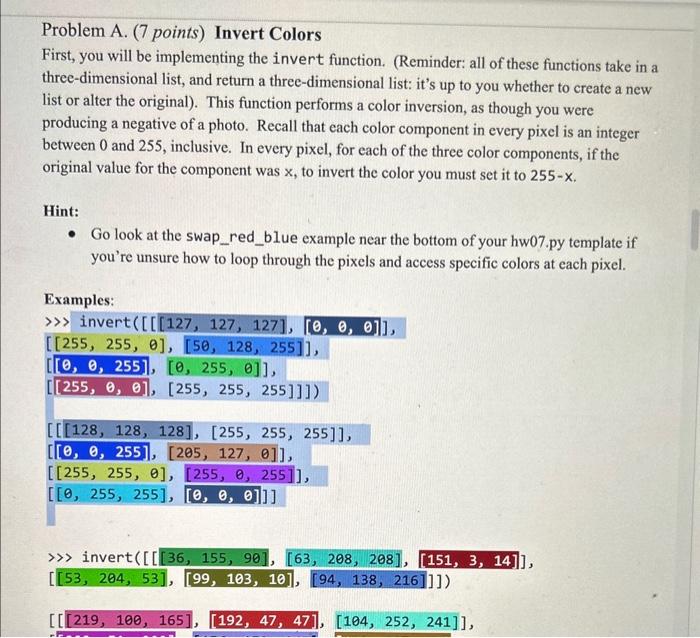
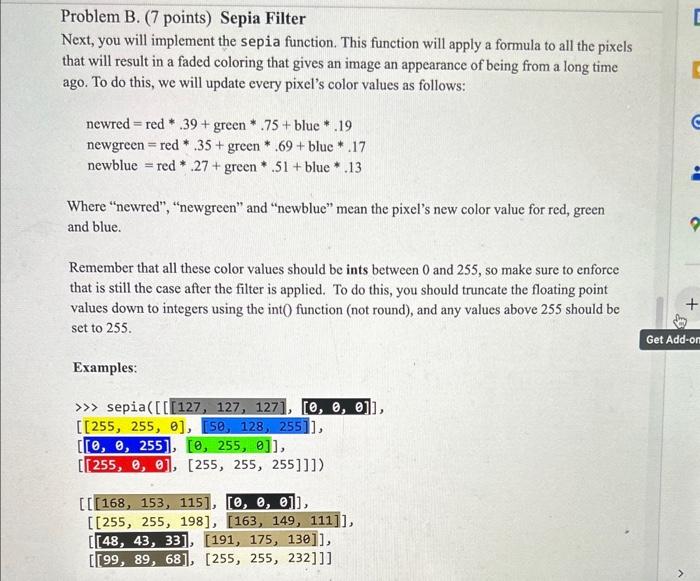
Problem A. (7 points) Invert Colors First, you will be implementing the invert function. (Reminder: all of these functions take in a three-dimensional list, and return a three-dimensional list: it's up to you whether to create a new list or alter the original). This function performs a color inversion, as though you were producing a negative of a photo. Recall that each color component in every pixel is an integer between 0 and 255 , inclusive. In every pixel, for each of the three color components, if the original value for the component was x, to invert the color you must set it to 255x. Hint: - Go look at the swap_red_blue example near the bottom of your hw07.py template if you're unsure how to loop through the pixels and access specific colors at each pixel. Examples: Problem B. (7 points) Sepia Filter Next, you will implement the sepia function. This function will apply a formula to all the pixels that will result in a faded coloring that gives an image an appearance of being from a long time ago. To do this, we will update every pixel's color values as follows: newred=red.39+green.75+blue.19newgreen=red.35+green.69+bluc.17newblue=red.27+green.51+blue.13 Where "newred", "newgreen" and "newblue" mean the pixel's new color value for red, green and blue. Remember that all these color values should be ints between 0 and 255 , so make sure to enforce that is still the case after the filter is applied. To do this, you should truncate the floating point values down to integers using the int 0 function (not round), and any values above 255 should be set to 255 . Examples
Step by Step Solution
There are 3 Steps involved in it

Get step-by-step solutions from verified subject matter experts
 Study Help