







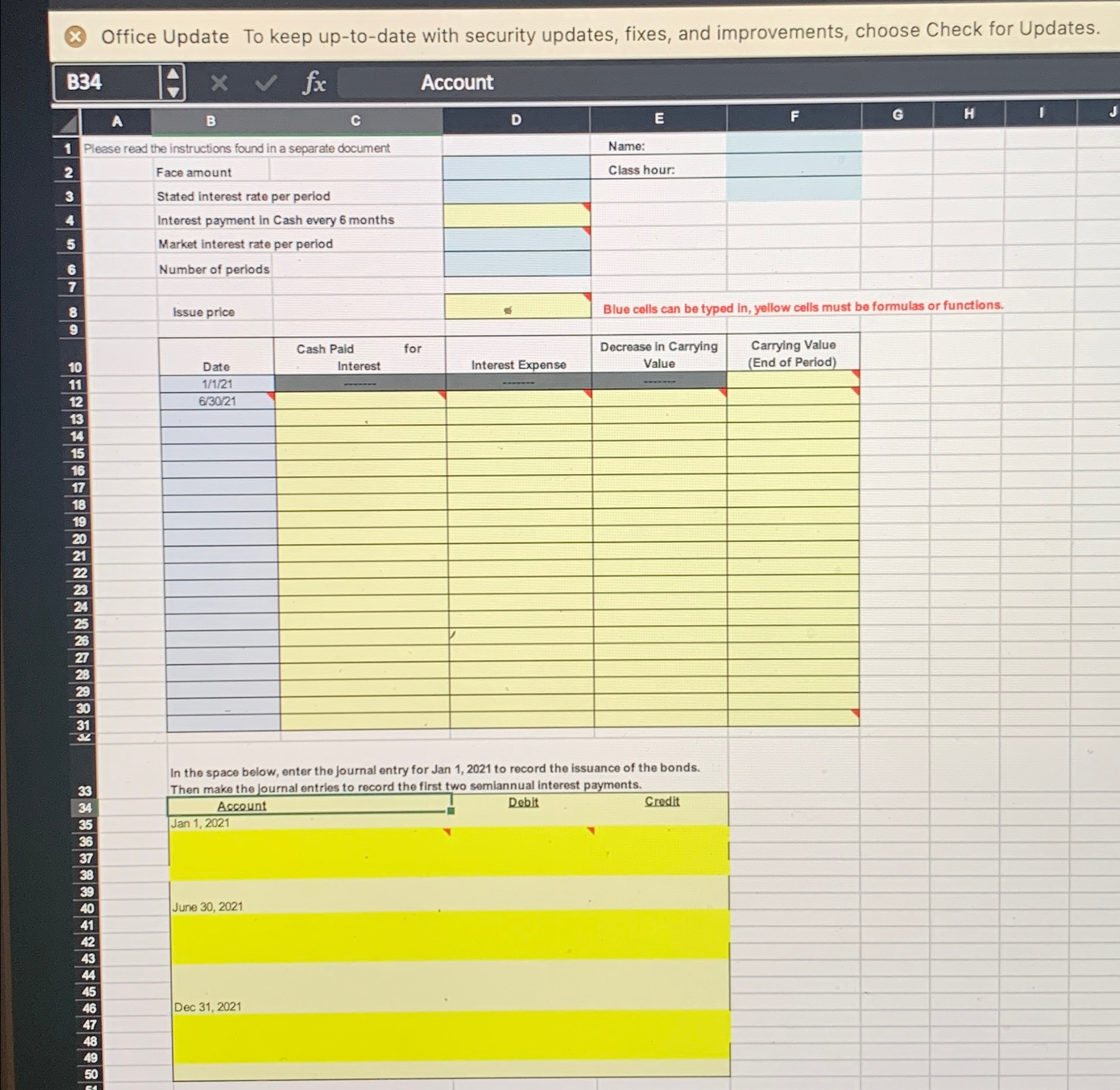
Question: Problem Data:Bond Discount Problem: On January 1 , 2 0 2 1 , Waterfall Lodge & Amusement Park issued$ 6 , 0 0 0 ,
Problem Data:Bond Discount Problem: On January Waterfall Lodge & Amusement Park issued$ of bonds, due in years. The market interest rate for bonds of similar risk andmaturity is Interest is paid semiannually on June and December each year.Bond Premium Problem: Assume that the market interest rate is instead of Assume all other given amounts are the same as stated in the bond discount problem.Required: Enter the given problem data in the Bond Discount worksheet. Then use the PresentValue function in Excel to calculate the issue price of the bonds.To use the Present Value function, click in cell C Type PVand then use cell references to enter the arguments for the PV function:The syntax of the PV function is: PVrate nper, pmtfvtypeRate Market interest rate, divided by in this problem because interest is paidsemiannually.Nper Number of periods.Pmt The amount of the semiannual cash interest payment. The formula to calculate is:Face amount of the bonds x Stated interest rate : Fv Fv stands for future value. When working with bonds, this is the face amount ofthe bonds.Type Leave this field blank. Doing so indicates payments are made at the end of theperiod, which is true for bonds payable.Check figure: Issue price $Note: Excel will automatically return a negative number. To make it positive you canmultiply the formula by negative or put a minus sign in between the sign andthe P example: PVrate nper, pmtfvtype Use cell references and Excel formulas to construct an amortization schedule for theentire life of the bonds. Note everything below the data should be a cell reference orformula containing a cell reference. example BB is ok is notHold your cursor over the red triangles in the corners of selected cells for help creating theformula for that cell.Your schedule should look similar to Illustration from our text: In the space below the table, enter three journal entries: January to record the issuance of the bonds; June to record the first semiannual interest payment; and December to record the second semiannual interest payment Complete the Bond Premium worksheet. Use the given problem data for the bondpremium problem to compute the issue price of the bonds present value construct anamortization schedule, and record the three journal entries.Check figure: Issue price $Your schedule should look similar to Illustration from our text:overVw DL HY In the space below the table, enter three journal entries: January to record the issuance of the bonds; June to record the first semiannual interest payment; and December to record the second semiannual interest payment Save and attach in Canvas in the drop box for this lab. Make sure your name isincluded in the file name.
Step by Step Solution
There are 3 Steps involved in it
1 Expert Approved Answer
Step: 1 Unlock

Question Has Been Solved by an Expert!
Get step-by-step solutions from verified subject matter experts
Step: 2 Unlock
Step: 3 Unlock
 Study Help