







Question: Problem Solving Skills (Troubleshooting): The network technician lab has set up a VPN configuration for the purpose of supporting Covid-19 online work between the branches.
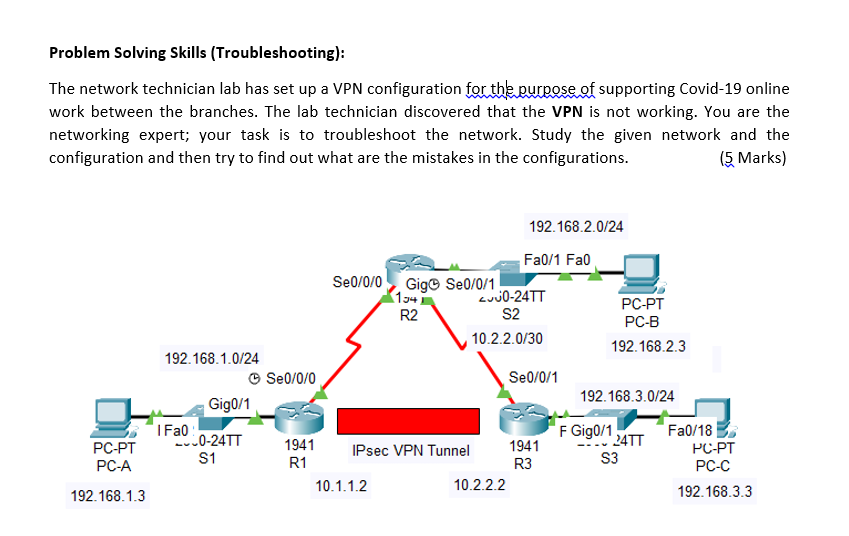
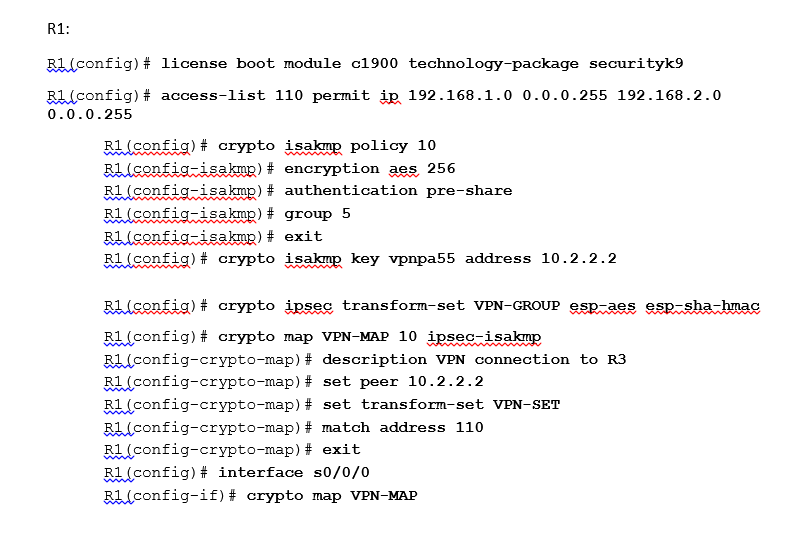
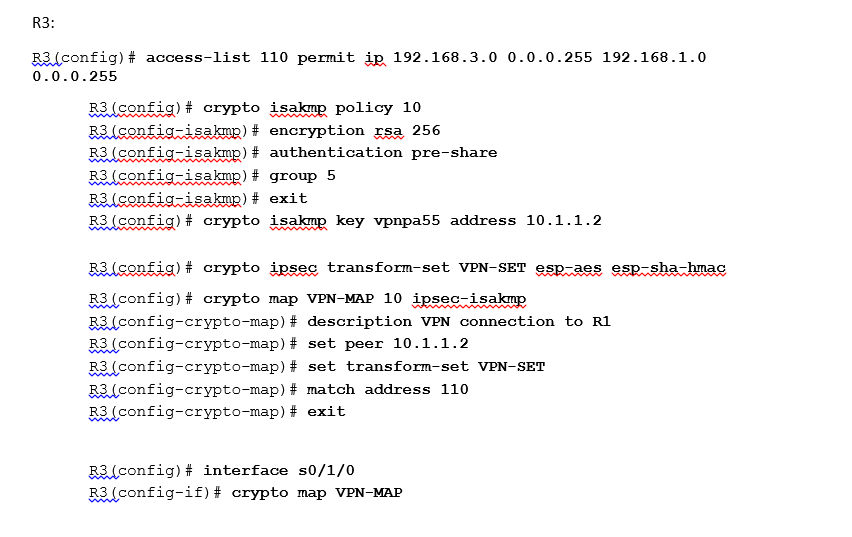

Problem Solving Skills (Troubleshooting): The network technician lab has set up a VPN configuration for the purpose of supporting Covid-19 online work between the branches. The lab technician discovered that the VPN is not working. You are the networking expert; your task is to troubleshoot the network. Study the given network and the configuration and then try to find out what are the mistakes in the configurations. (5 Marks) 192.168.2.0/24 Fa0/1 Fao Se0/0/0 Gig Se[/0/1 154 LUJO-24TT S2 10.2.2.0/30 R2 PC-PT PC-B 192.168.2.3 192.168.1.0/24 Se0/0/0 Se[/0/1 192.168.3.0/24 Gig0/1 I Fal -0-24TT S1 F Gigo/1241 PC-PT PC-A 1941 IPsec VPN Tunnel 1941 R1 R3 10.1.1.2 10.2.2.2 S3 Fa0/18 PC-PT PC-C 192.168.3.3 192.168.1.3 R1: Rilconfig) # license boot module c1900 technology-package securityk9 RL config)# access-list 110 permit ip 192.168.1.0 0.0.0.255 192.168.2.0 0.0.0.255 R1(config)# crypto isakmp policy 10 R1 (config-isakmp) # encryption aes 256 Rilconfig-isakmp) # authentication pre-share R1(config-isakmp) # group 5 R1(config-isakmp) # exit R1(config)# crypto isakmp key vpnpa55 address 10.2.2.2 VAASA Riconfig)# crypto ipsec transform-set VPN-GROUP esp-aes esp-sha-hmac Ri(config)# crypto map VPN-MAP 10 ipseczisakup Ri(config-crypto-map) # description VPN connection to R3 Ri(config-crypto-map) # set peer 10.2.2.2 R1(config-crypto-map) # set transform-set VPN-SET Ri(config-crypto-map) # match address 110 R1(config-crypto-map) # exit Ri(config)# interface s0/0/0 R1(config-if)# crypto map VPN-MAP R3: R3L config)# access-list 110 permit ip 192.168.3.0 0.0.0.255 192.168.1.0 0.0.0.255 R3llconfig)# crypto isakmp, policy 10 R3 config-isakmp) # encryption rsa 256 R3 (config-isakmp) # authentication pre-share R3 (config-isakmp) # group 5 R3 (config-isakmp) # exit R3 (config)# crypto isakmp key vpnpa55 address 10.1.1.2 R3.lconfig)# crypto ipsec transform-set VPN-SET esp-aes esp=sha-hmac R3 (config)# crypto map VPN-MAP 10 ipsec-isakmp R3L config-crypto-map) # description VPN connection to R1 R3. config-crypto-map) # set peer 10.1.1.2 R3 (config-crypto-map) # set transform-set VPN-SET R3 (config-crypto-map) # match address 110 R3 (config-crypto-map) # exit R3. config)# interface s0/1/0 R3(config-if)# crypto map VPN-MAP Mistak-1: Mistak-2: Mistak-3: Mistak-4: Mistak-5: Problem Solving Skills (Troubleshooting): The network technician lab has set up a VPN configuration for the purpose of supporting Covid-19 online work between the branches. The lab technician discovered that the VPN is not working. You are the networking expert; your task is to troubleshoot the network. Study the given network and the configuration and then try to find out what are the mistakes in the configurations. (5 Marks) 192.168.2.0/24 Fa0/1 Fao Se0/0/0 Gig Se[/0/1 154 LUJO-24TT S2 10.2.2.0/30 R2 PC-PT PC-B 192.168.2.3 192.168.1.0/24 Se0/0/0 Se[/0/1 192.168.3.0/24 Gig0/1 I Fal -0-24TT S1 F Gigo/1241 PC-PT PC-A 1941 IPsec VPN Tunnel 1941 R1 R3 10.1.1.2 10.2.2.2 S3 Fa0/18 PC-PT PC-C 192.168.3.3 192.168.1.3 R1: Rilconfig) # license boot module c1900 technology-package securityk9 RL config)# access-list 110 permit ip 192.168.1.0 0.0.0.255 192.168.2.0 0.0.0.255 R1(config)# crypto isakmp policy 10 R1 (config-isakmp) # encryption aes 256 Rilconfig-isakmp) # authentication pre-share R1(config-isakmp) # group 5 R1(config-isakmp) # exit R1(config)# crypto isakmp key vpnpa55 address 10.2.2.2 VAASA Riconfig)# crypto ipsec transform-set VPN-GROUP esp-aes esp-sha-hmac Ri(config)# crypto map VPN-MAP 10 ipseczisakup Ri(config-crypto-map) # description VPN connection to R3 Ri(config-crypto-map) # set peer 10.2.2.2 R1(config-crypto-map) # set transform-set VPN-SET Ri(config-crypto-map) # match address 110 R1(config-crypto-map) # exit Ri(config)# interface s0/0/0 R1(config-if)# crypto map VPN-MAP R3: R3L config)# access-list 110 permit ip 192.168.3.0 0.0.0.255 192.168.1.0 0.0.0.255 R3llconfig)# crypto isakmp, policy 10 R3 config-isakmp) # encryption rsa 256 R3 (config-isakmp) # authentication pre-share R3 (config-isakmp) # group 5 R3 (config-isakmp) # exit R3 (config)# crypto isakmp key vpnpa55 address 10.1.1.2 R3.lconfig)# crypto ipsec transform-set VPN-SET esp-aes esp=sha-hmac R3 (config)# crypto map VPN-MAP 10 ipsec-isakmp R3L config-crypto-map) # description VPN connection to R1 R3. config-crypto-map) # set peer 10.1.1.2 R3 (config-crypto-map) # set transform-set VPN-SET R3 (config-crypto-map) # match address 110 R3 (config-crypto-map) # exit R3. config)# interface s0/1/0 R3(config-if)# crypto map VPN-MAP Mistak-1: Mistak-2: Mistak-3: Mistak-4: Mistak-5
Step by Step Solution
There are 3 Steps involved in it

Get step-by-step solutions from verified subject matter experts
 Study Help