







Question: PROBLEM STATEMENT: Write a C program to implement a doubly linked list of dynamically allocated nodes, utilizing structures, unions and enums. You will build the
PROBLEM STATEMENT:
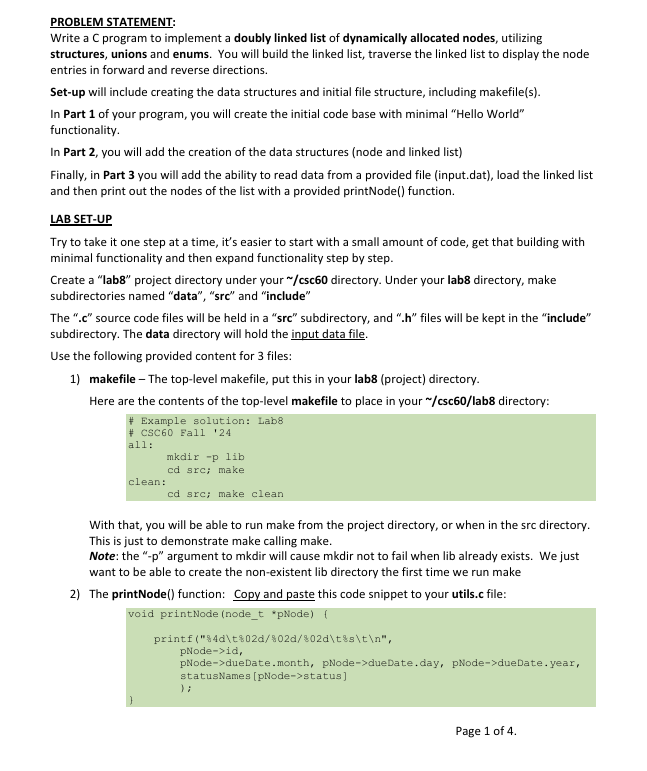
Write a C program to implement a doubly linked list of dynamically allocated nodes, utilizing structures, unions and enums. You will build the linked list, traverse the linked list to display the node entries in forward and reverse directions.
Setup will include creating the data structures and initial file structure, including makefiles
In Part of your program, you will create the initial code base with minimal "Hello World" functionality.
In Part you will add the creation of the data structures node and linked list
Finally, in Part mathbf you will add the ability to read data from a provided file inputdat load the linked list and then print out the nodes of the list with a provided printNode function.
LAB SETUP
Try to take it one step at a time, it's easier to start with a small amount of code, get that building with minimal functionality and then expand functionality step by step.
Create a "lab project directory under your csc directory. Under your lab directory, make subdirectories named "data", src and "include" subdirectory. The data directory will hold the input data file.
Use the following provided content for files:
makefile The toplevel makefile, put this in your labproject directory.
Here are the contents of the toplevel makefile to place in your sim csc lab directory:
# Example solution: Lab
# Csc Eall
all:
mkdir p lib
cd src; make
clean:
cd src; make clean
With that, you will be able to run make from the project directory, or when in the src directory. This is just to demonstrate make calling make.
Note: the p argument to mkdir will cause mkdir not to fail when lib already exists. We just want to be able to create the nonexistent lib directory the first time we run make
The printNode function: Copy and paste this code snippet to your utils.c file:
void printNode nodet pNode
printfdtddsdtst
pNodeid
pNodedueDate.month, pNodedueDate.day, pNodedueDate.year,
statusNames pNodestatus
;
Input.dat The input data for creating nodes, put this in your data directory.
lllll
Er each Part of this lab:
Build your project
Run make. Note, you will likely have to incrementally get it all working, ie run it observe errors, fix those then try again. That's normal, but easier with make Then, move on to the next part.
Also, In all c files, display error message to stderr standard error rather then stdout. Hint: use fprintfstderrmsg or perrormsg to print the message and the current value of errno.
Run lab
Run the labexecutable to observe the behavior and iterate through any bug fixeschanges
Part : Base code
Basic structure for the base program: makefile, srcmakefile labc includelabh
Labc should simply display the Title line: CSc Lab: Structs, Unions and Enums"
The text of the Title should be set as a #define in labh to be used in labc
Build out the structure below for an initial, simple "Hello world" program:
Note: lablib directory will be created by the toplevel make
Labdatainputdat leftarrow the input data file, see above for content
labincludelabh leftarrow includes #defines, typedefs, externs,
labmakefile leftarrow contents provided above
labsrcmakefile leftarrow everything to build the lab executable
labsrclabc leftarrow holds the main function
labsrcutilsc leftarrow holds utility functions
After running a build, you will also have:
lablabquad leftarrow to be built by make, the executable
labliblaba quad leftarrow to be built by make, holds all os except labo just utils.o
labsrclabo quad leftarrow the compiled object file for labc
labsrcutilso leftarrow the compiled object file for utils.c
Part Test:
Run the lab executable to observe its behavior Part : Create the data structures
In labh You will create the node and date structs and a typedef them to nodet and datet
The three nodet data fields: unsigned int id statust status, datet date
Also include prev and next pointers in the nodet to support a doubly linked listCreate statust as an enum with constants: open, inprog, complete, blocked. Create a typedef for this enum of prioritiesCreate datet as a struct same as in our Wk lecture deckCreate a global variable char statusNames separately to provide the appropriate Names to coincide with the priority enum OpenIn Progress", "Done", "Blocked"Create global variables "head" and "tail" pointers for the doubly linked list of nodes
Hint: put typedefs, structs and enums in labh Define the global variables in
labc at file scope. Remember to include externs for these variables in labh
Create a utils function "loadList which will for Part :
Create a single node using dynamic memory allocation
Fill the new node with some madeup data
Set the global head and tail pointers of the linked list
Add the function "printNode provided above to your utils.c
Adjust pri Example Output for final lab e
Step by Step Solution
There are 3 Steps involved in it
1 Expert Approved Answer
Step: 1 Unlock

Question Has Been Solved by an Expert!
Get step-by-step solutions from verified subject matter experts
Step: 2 Unlock
Step: 3 Unlock
 Study Help