







Question: PROBLEM: Write a C program to figure out how many integers fall between two given integers, and then write a makefile to pull the whole
PROBLEM:
Write a C program to figure out how many integers fall between two given integers, and then
write a makefile to pull the whole program all together.
The solution will be created in a typical source code directory structure, using subdirectories and
include files.
We will also create a Shell Script and practice using the Unix find command.
LAB SETUP
Create a "lab directory under your csc directory. Note: means "your home directory",
same as your $HOME shell variable
For this lab, we'll create a project structure under the lab directory which will be our project
source code directory structure:
First, create a directory named "myApp" under your csc directorylab
Then, create two additional directories named "utils" and "include" under your myApp
directory.
You should end up with the following directories:
csclabmyApputils
csclabmyAppinclude
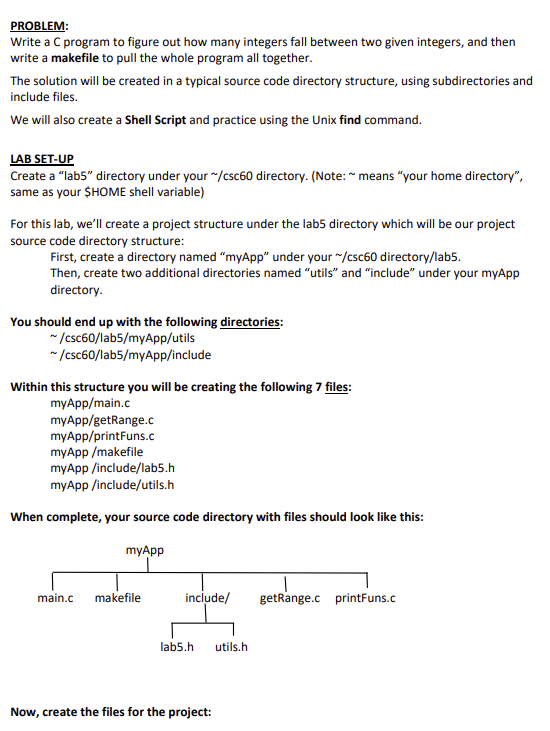
Within this structure you will be creating the following files:
myAppmainc
myAppgetRangec
myAppprintFunsC
myAppmakefile
myAppincludelabh
myAppincludeutilsh
When complete, your source code directory with files should look like this:
Now, create the files for the project: Try to take it one step at a time, it's easier to start with a small amount of code, get that
building and then expand step by step. A makefile helps with this since you don't need to
keep track of what to rebuild and how to do it just type "make" after making changes.
So create the makefile early in the process so you can use it while you finish creating your
c and h files.
Create the project makefile:
Model your makefile on the example in the Week Lecture slide deck, slide #feel free to
experiment with implicit rules, slide #
You'll need to adjust for the file names and directory structure of this source code project
Instead of "charProg", use the executable name "printRange"
Do this first because you'll want to run make to build the executable the cc commands as
you fill out the source code contents.
In your makefile:
include your name, class section # and current semester as lines in the comment block at
the top of the makefile.
Add a macro gcc at the top of your makefile, then use $ in the compilelink
commands see slide in the Week lecture slides for an example
Include the following rule in your makefile. Be very careful that the file names are correct!
clean:
$ printRange
Create includelabh
An "include file" which has one line in it:
#define TITLE
Range Counter Report
Create includeutilsh
This is include used to provide "extern" references to the utility functions for main.c
It should be included wherever it's needed, ie any c files that call functions in utils.
In utils.h you need the function prototypes for the two utility functions so main.c will be able
to compile. The prototypes should look like:
Create getRange.c
Contains one function "getRangeint int
Add the logic in getRange as stated in the comment below:
int getRange int firstNum, int lastNum calc and return the number of integers between firstNum and lastNum
eg there are integers between and namely:
Create printFuns.c Contains two functions:
"printHeader and "printDataLineint int, int
Function to print the header into the provided file
void printHeader
printfTITLE;
printfThe count of integers in a range:
;
printf lst Num nd Num # between
;
printf
;
Function to print the header into the provided file
void printDataLineint fNum, int lNum, int range
FILL IN THE LOGIC HERE, needs to "fit" with header line
You will need to #include the labh to have access the preprocessor macro TITLE
Create main.c file:
This is where you will have your main function.
Start with the basic structure of a file that defines variables, loops while gathering input data
from the user to processes and display the results of each entry.
Think about what #include lines are needed in main.c
The loop in main will be terminated by entering the values and
Build your project
Run make. Note, you will likely have to incrementally get it all working, ie run it observe
errors, fix those then try again. That's normal, and make makes it easier
Run getRange
Run the getRange executable with the following input: Note, each set of input should result in
a "report"
The output should look something like:
$ printRange
Enter first number:
Enter last number:
Range Counter Report
The count of integers in a range:
st Num nd Num # betweenREMINDERS:
Remember to put your name as a comment at the top of each code file you submit.
You should examine the data files and confirm the correctness of the answer produced by
your program.
Step by Step Solution
There are 3 Steps involved in it
1 Expert Approved Answer
Step: 1 Unlock

Question Has Been Solved by an Expert!
Get step-by-step solutions from verified subject matter experts
Step: 2 Unlock
Step: 3 Unlock
 Study Help