







Question: Problem Write a program that maintains a database containing person s name and birthday. You should be able to enter, remove, modify, or search for
Problem
Write a program that maintains a database containing persons name and birthday. You should be able to enter, remove, modify, or search for this database. You should assume that the names are unique. The program should be able to save the data in a file for use later.
Design a class to represent the database and another class to represent people. Use a binary search tree of people as a data member of the database class as suggested below
class PeopleDB
private:
BinarySearchTree db;
to store people in a BST
To make the implementation easier, use peoples name to perform comparison in the BinarySearchTree.
Requirements:
The database class PeopleDB should have the following member functions:
o a constructor that initializes the database from a file that contains peoples name and birthday. The file should not be sorted.
PeopleDBstring filename;
o add a person to the database
o remove a person from the database
o modify the database
o search for a person in the database
o display the database using preorder not sorted
o display the database in sorted order by names
The class people should have the following members:
o data members:
String name; use first name
Date birthday;
Date is a class and must be defined first.
o member functions:
get and set functions for all data members;
inputoutput operator
comparison operators
Comparison must be performed by names only.
To define the class people, you must provide a class date which should have the following members:
o data members:
int month;
int day;
int year;
o member functions:
get and set functions for all data members;
operator
No comparison operators are needed because we use peoples name to compare in the class People.
In the main program,
o the initial database should be built from an input file that contains first name and birthday Again the file should not be sorted.
o use a menu for all services
When use traversal operations, you need to pass a visit function as a parameter. To display data to the screen, you can define the visit function as below:
this operation is applied at each node
void toScreenPeople& p
cout p endl;
o save the modified database to another file before quitting the system.
This output file is opened as a global variable so that a visit function can access the output file at any tree node without opening and closing the file locally at each node.
global variable
ofstream fsOutSCSUDBtxt iosbase::app;
Use the member function display the database using preorder not sorted
The visit function to be passed to a traversal operation can be defined as below:
this operation is applied at each node
void toFilePeople& p
fsOut p endl;output to a file
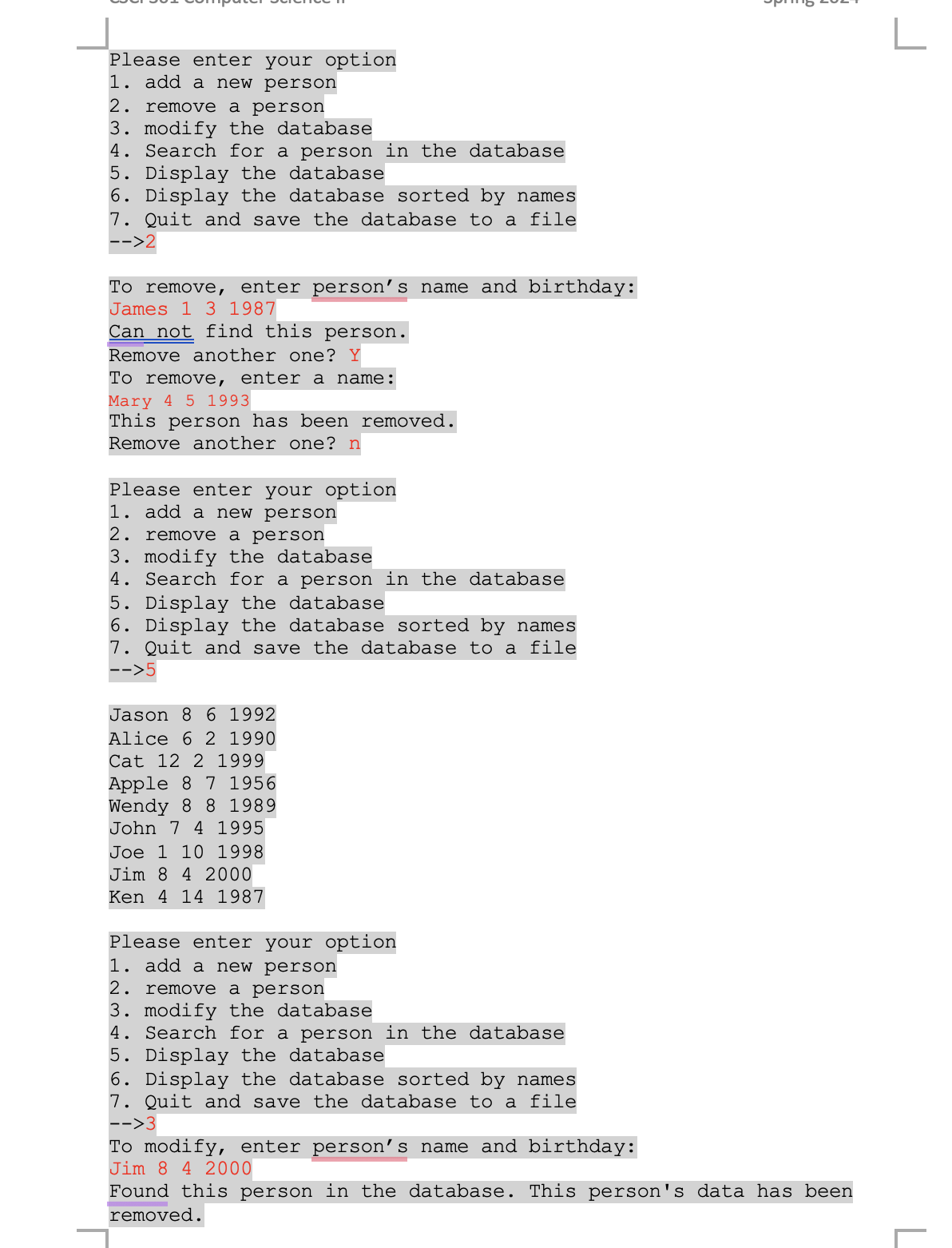
The output of your program should look like this:
Welcome to xxx database system. Please enter the file that contains initial people list:studentDBtxt
The initial database built from the input file is displayed by its original order:
Jason
Mary
Alice
John
Joe
Jim
Cat
Please enter your option
add a new person
remove a person
modify the database
Search for a person in the database
Display the database
Display the database sorted by names
Quit and save the database to a file
To add, enter name and birthday month day year:
Wendy
Add another one? Y
Ken
Add another one? y
Apple
Add another one? n
Please enter your option
add a new person
remove a person
modify the database
Search for a person in the database
Display the database
Quit and save the database to a file
Jason
Alice
Cat
Apple
Mary
John
Joe
Jim
Ken
Wendy
Please enter your option
add a new person
remove a person
modify the database
Search for a person in the database
Display the database
Display the database sorted by names
Quit and save the database to a file
To remove, enter persons name and birthday:
James
Can not find this person.
Remove another one? Y
To remove, enter a name:
Mary
This person has been removed.
Remove another one? n
Please enter your option
add a new person
remove a person
modify the database
Search for a person in the database
Display the database
Display the database sorted by names
Quit and save the database to a file
Jason
Alice
Cat
Apple
Wendy
John
Joe
Jim
Ken
Go through all of them and when you put in it should say, "The updated database has been saved to studentDBtxt
Bye!"
Please write in C
Step by Step Solution
There are 3 Steps involved in it
1 Expert Approved Answer
Step: 1 Unlock

Question Has Been Solved by an Expert!
Get step-by-step solutions from verified subject matter experts
Step: 2 Unlock
Step: 3 Unlock
 Study Help