







Question: Problem: Write a program that will display a temperature conversion table. The user will input the BEGINNING Celsius temperature, the ENDING Celsius temperature, and the
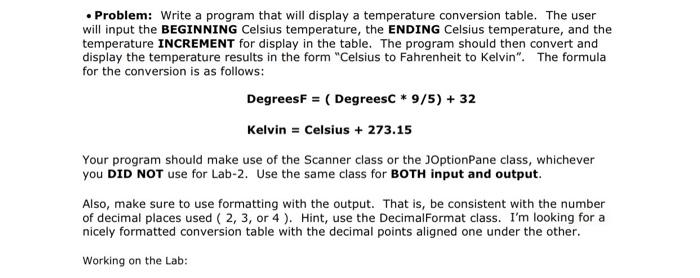
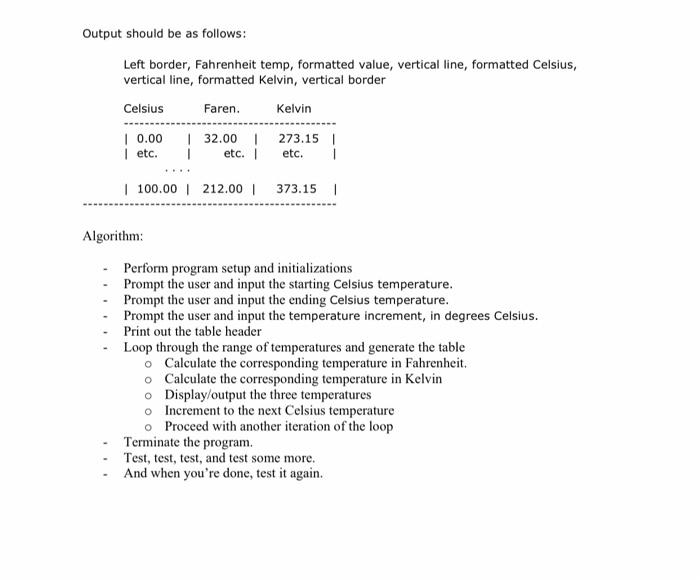
Problem: Write a program that will display a temperature conversion table. The user will input the BEGINNING Celsius temperature, the ENDING Celsius temperature, and the temperature INCREMENT for display in the table. The program should then convert and display the temperature results in the form "Celsius to Fahrenheit to Kelvin". The formula for the conversion is as follows: DegreesF = ( Degreesc * 9/5) + 32 Kelvin = Celsius + 273.15 Your program should make use of the Scanner class or the JOptionPane class, whichever you DID NOT use for Lab-2. Use the same class for BOTH input and output. Also, make sure to use formatting with the output. That is, be consistent with the number of decimal places used ( 2, 3, or 4). Hint, use the DecimalFormat class. I'm looking for a nicely formatted conversion table with the decimal points aligned one under the other. Working on the Lab: Output should be as follows: Left border, Fahrenheit temp, formatted value, vertical line, formatted Celsius, vertical line, formatted Kelvin, vertical border Celsius Faren. Kelvin | 0.00 etc. | 32.00 1 etc. 273.151 etc. 1 | 100.00 212.00 373.151 Algorithm: Perform program setup and initializations - Prompt the user and input the starting Celsius temperature. - Prompt the user and input the ending Celsius temperature. Prompt the user and input the temperature increment, in degrees Celsius. Print out the table header Loop through the range of temperatures and generate the table Calculate the corresponding temperature in Fahrenheit o Calculate the corresponding temperature in Kelvin o Display/output the three temperatures o Increment to the next Celsius temperature o Proceed with another iteration of the loop Terminate the program. Test, test, test, and test some more. And when you're done, test it again
Step by Step Solution
There are 3 Steps involved in it

Get step-by-step solutions from verified subject matter experts
 Study Help