







Question: Problem YOUR NAME LANDSCAPE AND POOL SERVICE Chapter 2 continues with the entry of both cash and credit sales, receipt of payment by credit
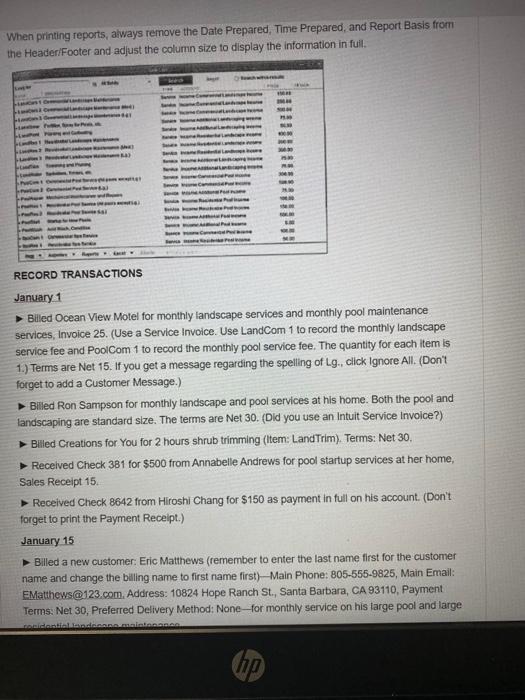
Problem YOUR NAME LANDSCAPE AND POOL SERVICE Chapter 2 continues with the entry of both cash and credit sales, receipt of payment by credit customers, credit memos, and bank deposits. In addition, reports focusing on sales and accounts receivable are prepared. INSTRUCTIONS Use the company file Landscape.qbw that you used for Chapter 1. The company name should be Your Name Landscape and Pool Service. (You changed the company name to include your real name in Chapter 1.) Since this company was used in Chapter 1, when you see the Open a Company screen, you may see other QuickBooks files and/or folders associated with that company. QuickBooks will create them as you use a company file. Some of these files may have extensions of QBW.ND or QBW.TLG. Folders that say QuickBooksAutoData Recovery, Searchindex, or Restored are common. For the most part, you do not use or change any of these files or folders, simply click the company file and click the Open button. Sometimes, when switching from one company to the next; l.e., Computer to Landscape, QuickBooks might mark your company file as read only. If this happens, refer to Chapter 1 for steps on how to change the file Properties from Read Only. The invoices and sales receipts are numbered consecutively. Invoice 25 is the first invoice number used in this problem. Sales Receipt 15 is the first sales receipt number used when recording cash sales in this problem. If you wish, you may hide the History for customers on the invoices and sales receipts. Each invoice recorded should be a Service Invoice and contain a message. When selecting a message, choose the one that you feel is most appropriate for the transaction. Print each invoice and sales receipt as it is completed and do not print lines around each field. Remember that payments received on account should be recorded as Receive Payments and not as a Sales Receipt. When recording transactions, use the following Sales Item chart to determine the item(s) billed. If the transaction does not indicate the size of the pool or property, use the first category for the item; for example, LandCom 1 or LandRes 1 would be used for standard-size landscape service. Remember that SpaCom 1 and SpaRes 1 are services for spas-not pools. The appropriate billing for a standard-size pool would be PoolCom 1 or PoolRes 1. If you get a message regarding the spelling of Lg., click Ignore All. When printing reports, always remove the Date Prepared, Time Prepared, and Report Basis from hp
Step by Step Solution
There are 3 Steps involved in it

Get step-by-step solutions from verified subject matter experts
 Study Help