







Question: processes.txt file: You are writing a (console) program in order to create an array of (simulated, fake, simplified) process control blocks. The program should read

processes.txt file:
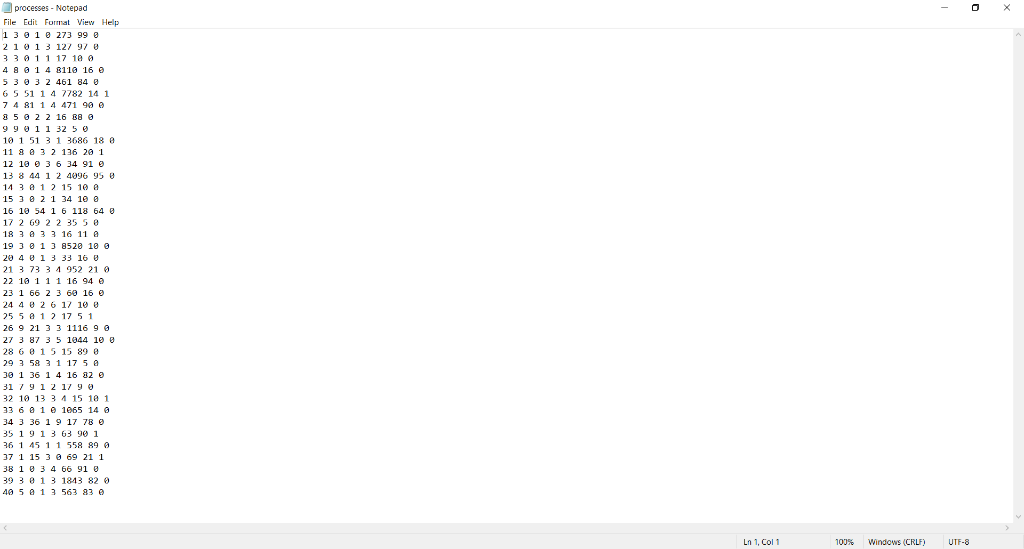
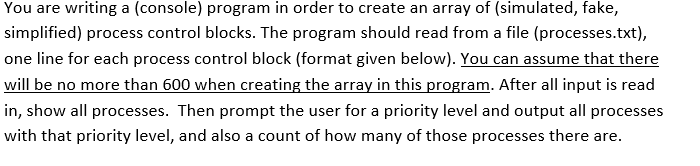
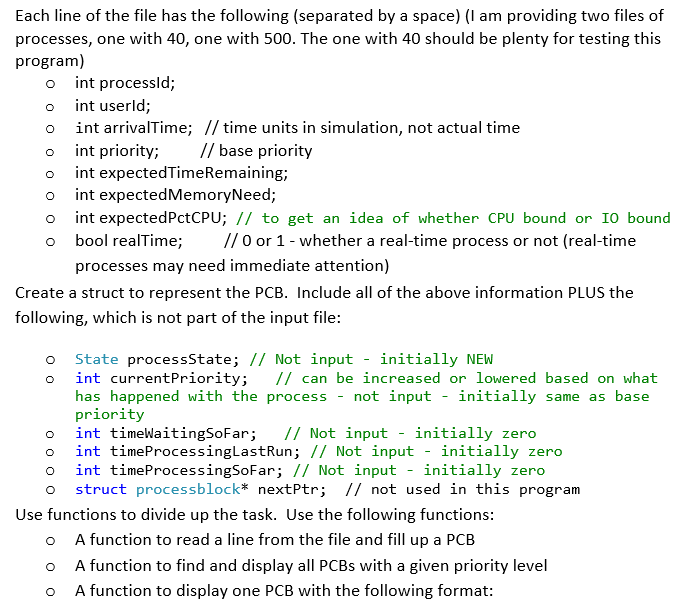
You are writing a (console) program in order to create an array of (simulated, fake, simplified) process control blocks. The program should read from a file (processes.txt), one line for each process control block (format given below). You can assume that there will be no more than 600 when creating the array in this program. After all input is read in, show all processes. Then prompt the user for a priority level and output all processes with that priority level, and also a count of how many of those processes there are. Each line of the file has the following (separated by a space) (I am providing two files of processes, one with 40, one with 500. The one with 40 should be plenty for testing this program) int processid; int userld; int arrivalTime; // time units in simulation, not actual time int priority; // base priority int expectedTimeRemaining; int expected MemoryNeed; int expectedPctCPU; // to get an idea of whether CPU bound or 10 bound o bool realTime; // 0 or 1 - whether a real-time process or not (real-time processes may need immediate attention) Create a struct to represent the PCB. Include all of the above information PLUS the following, which is not part of the input file: o o o State processState; // Not input - initially NEW int currentPriority; // can be increased or lowered based on what has happened with the process - not input - initially same as base priority int timeWaitingSoFar; // Not input - initially zero int timeProcessingLastRun; // Not input - initially zero int timeProcessingSoFar; // Not input - initially zero o struct processblock* nextPtr; // not used in this program Use functions to divide up the task. Use the following functions: O A function to read a line from the file and fill up a PCB A function to find and display all PCBs with a given priority level A function to display one PCB with the following format: o o ID: 3 Usr: 3 Arr: 0 pri: 1 Remain: 1 Mem: 17 CPU: 10 processes - Notepad File Edit Format View Help 1 3 1 273 99 21013 127 97 0 33911 17 18 4914 8110 16 5 3 3 2 461 84 0 6 5 51 1 4 7782 14 1 7.4 81 1 4 471 99 3 5 2 2 16 B8 @ 99 011 32 50 10 1 51 3 1 3686 18 6 11 8 6 3 2 136 20 1 12 10 3 6 34 91 13 8 44 1 2 4096 95 U 14 3 12 15 10 a 15 3 @ 21 34 10 @ 16 10 54 1 6 118 64 0 17 2 69 2 2 35 5 8 18 3 3 3 16 11 19 381 38520 10 20 4 0 1 3 33 16 U 21 3 73 3 1 952 21 0 22 10 1 1 1 16 94 1 23 1 66 2 3 60 16 24 4 8 26 17 10 8 25 5 12 17 51 26 9 21 3 3 1116 9 @ 27 3 87 3 5 1944 19 8 28 6 0 15 15 89 8 29 3 58 3 1 17 5 @ 30 1 36 1 4 16 32 31 7 9 12 17 90 32 10 13 3 1 15 18 1 33 6 @ 1 1065 14 % 34 3 36 19 17 78 35 1 9 1 3 63 90 1 36 1 45 11 558 890 37 1 15 3 69 21 1 38 1 0 3 4 66 91 U 39 3 0 1 3 1813 82 0 40 5 013 563 83 0 Ln 1. Col1 100% Windows (CRLF) UTF-8 You are writing a (console) program in order to create an array of (simulated, fake, simplified) process control blocks. The program should read from a file (processes.txt), one line for each process control block (format given below). You can assume that there will be no more than 600 when creating the array in this program. After all input is read in, show all processes. Then prompt the user for a priority level and output all processes with that priority level, and also a count of how many of those processes there are. Each line of the file has the following (separated by a space) (I am providing two files of processes, one with 40, one with 500. The one with 40 should be plenty for testing this program) int processid; int userld; int arrivalTime; // time units in simulation, not actual time int priority; // base priority int expectedTimeRemaining; int expected MemoryNeed; int expectedPctCPU; // to get an idea of whether CPU bound or 10 bound o bool realTime; // 0 or 1 - whether a real-time process or not (real-time processes may need immediate attention) Create a struct to represent the PCB. Include all of the above information PLUS the following, which is not part of the input file: o o o State processState; // Not input - initially NEW int currentPriority; // can be increased or lowered based on what has happened with the process - not input - initially same as base priority int timeWaitingSoFar; // Not input - initially zero int timeProcessingLastRun; // Not input - initially zero int timeProcessingSoFar; // Not input - initially zero o struct processblock* nextPtr; // not used in this program Use functions to divide up the task. Use the following functions: O A function to read a line from the file and fill up a PCB A function to find and display all PCBs with a given priority level A function to display one PCB with the following format: o o ID: 3 Usr: 3 Arr: 0 pri: 1 Remain: 1 Mem: 17 CPU: 10 processes - Notepad File Edit Format View Help 1 3 1 273 99 21013 127 97 0 33911 17 18 4914 8110 16 5 3 3 2 461 84 0 6 5 51 1 4 7782 14 1 7.4 81 1 4 471 99 3 5 2 2 16 B8 @ 99 011 32 50 10 1 51 3 1 3686 18 6 11 8 6 3 2 136 20 1 12 10 3 6 34 91 13 8 44 1 2 4096 95 U 14 3 12 15 10 a 15 3 @ 21 34 10 @ 16 10 54 1 6 118 64 0 17 2 69 2 2 35 5 8 18 3 3 3 16 11 19 381 38520 10 20 4 0 1 3 33 16 U 21 3 73 3 1 952 21 0 22 10 1 1 1 16 94 1 23 1 66 2 3 60 16 24 4 8 26 17 10 8 25 5 12 17 51 26 9 21 3 3 1116 9 @ 27 3 87 3 5 1944 19 8 28 6 0 15 15 89 8 29 3 58 3 1 17 5 @ 30 1 36 1 4 16 32 31 7 9 12 17 90 32 10 13 3 1 15 18 1 33 6 @ 1 1065 14 % 34 3 36 19 17 78 35 1 9 1 3 63 90 1 36 1 45 11 558 890 37 1 15 3 69 21 1 38 1 0 3 4 66 91 U 39 3 0 1 3 1813 82 0 40 5 013 563 83 0 Ln 1. Col1 100% Windows (CRLF) UTF-8
Step by Step Solution
There are 3 Steps involved in it

Get step-by-step solutions from verified subject matter experts
 Study Help