







Question: Processing 3 - Python mode Create an apple tree with 4 5 apples spread around the tree . Use conditional statements and the mousePressed function
Processing 3 - Python mode
Create an apple tree with 4 5 apples spread around the tree
. Use conditional statements and the mousePressed function to make the apples fall to the ground when the tree trunk is clicked.
Tree and apples appear in the foreground (in front of the horizon made by the ground). use a rect to make the ground.
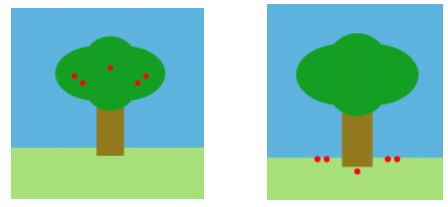
Clicking the mouse makes the apples fall.
ONLY clicking the trunk (no other section of the drawing) makes the apples fall.
Clicking the trunk again makes the apples reappear in the tree.
The apples stop falling once they reach the ground (they do not fall all the way off the sketch window
Here is how it should look:
).
Step by Step Solution
There are 3 Steps involved in it
1 Expert Approved Answer
Step: 1 Unlock

Question Has Been Solved by an Expert!
Get step-by-step solutions from verified subject matter experts
Step: 2 Unlock
Step: 3 Unlock
 Study Help