







Question: Processing Implementation: Project _ Samplesize ( 8 0 0 , 6 0 0 , P 3 D ) ; / / set up drawing canvas
Processing Implementation: ProjectSamplesize PD; set up drawing canvas
float angle ; define variables as neccessary
void drawstroke; stroke color apply Transformation matrix draw a shape from verticesvertex;vertex ;endShape;
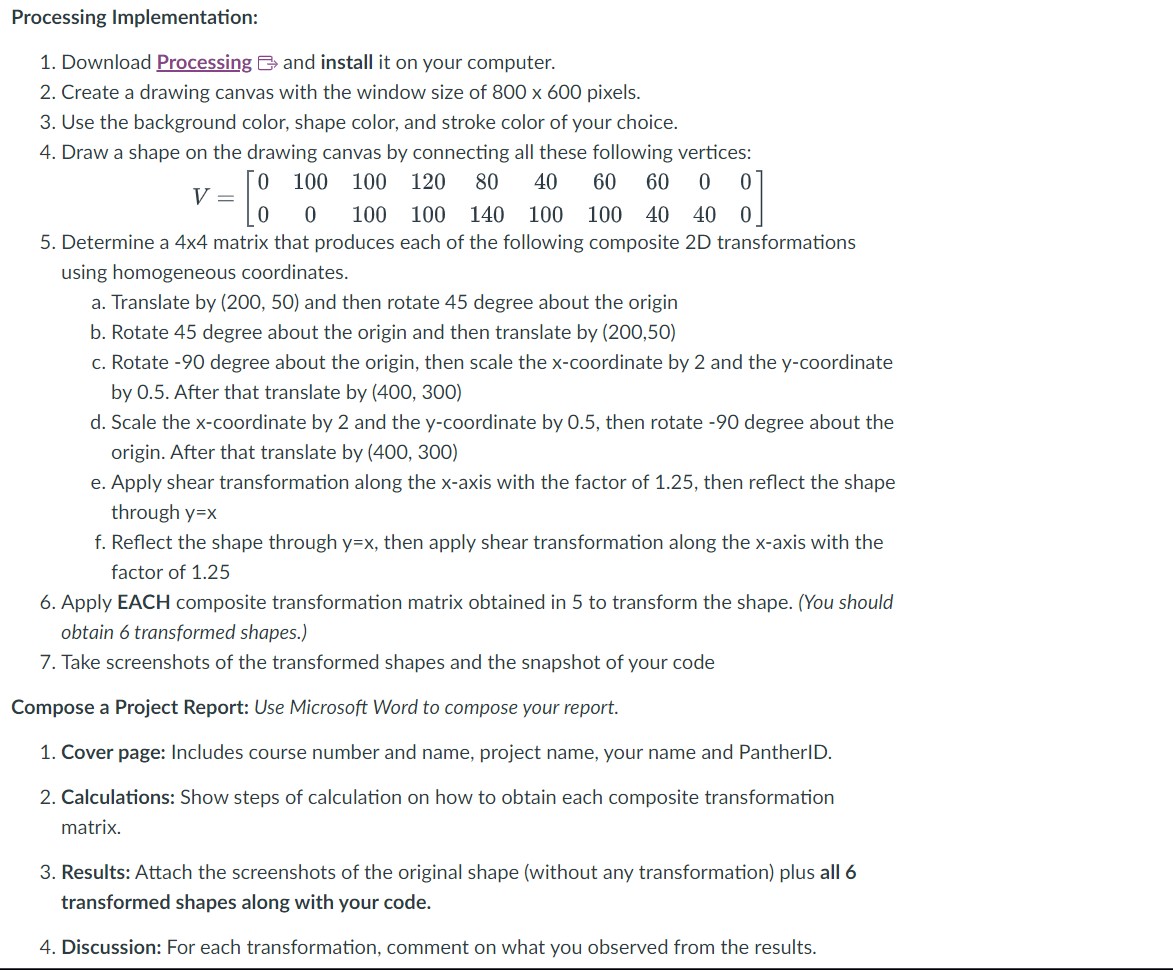
Download Processing and install it on your computer.
Create a drawing canvas with the window size of pixels.
Use the background color, shape color, and stroke color of your choice.
Draw a shape on the drawing canvas by connecting all these following vertices:
Determine a matrix that produces each of the following composite D transformations
using homogeneous coordinates.
a Translate by and then rotate degree about the origin
b Rotate degree about the origin and then translate by
c Rotate degree about the origin, then scale the coordinate by and the coordinate
by After that translate by
d Scale the coordinate by and the coordinate by then rotate degree about the
origin. After that translate by
e Apply shear transformation along the axis with the factor of then reflect the shape
through
f Reflect the shape through then apply shear transformation along the axis with the
factor of
Apply EACH composite transformation matrix obtained in to transform the shape. You should
obtain transformed shapes.
Take screenshots of the transformed shapes and the snapshot of your code
Compose a Project Report: Use Microsoft Word to compose your report.
Cover page: Includes course number and name, project name, your name and PantherID.
Calculations: Show steps of calculation on how to obtain each composite transformation
matrix.
Results: Attach the screenshots of the original shape without any transformation plus all
transformed shapes along with your code.
Discussion: For each transformation, comment on what you observed from the results.
Step by Step Solution
There are 3 Steps involved in it
1 Expert Approved Answer
Step: 1 Unlock

Question Has Been Solved by an Expert!
Get step-by-step solutions from verified subject matter experts
Step: 2 Unlock
Step: 3 Unlock
 Study Help