







Question: product table suppliers table current table I need the 10 queries and the steps for the form and reports PRODUCT X SUPPLIERS X ORDERS ProvudctID
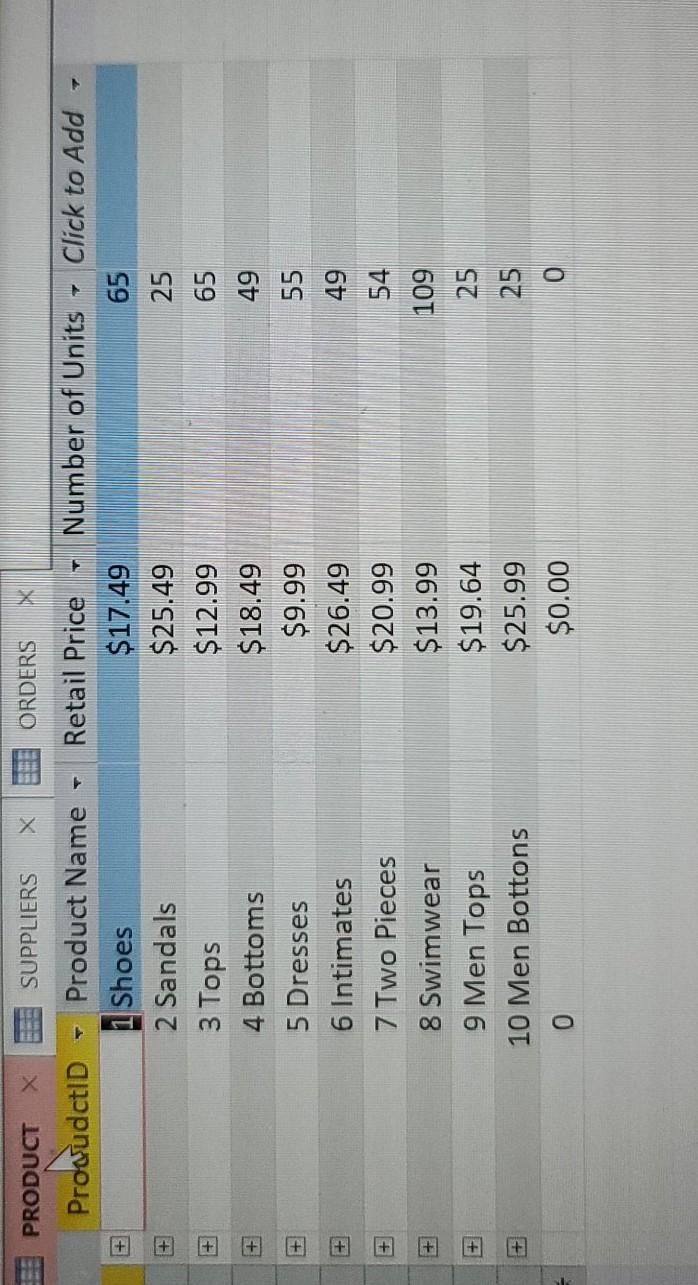
product table
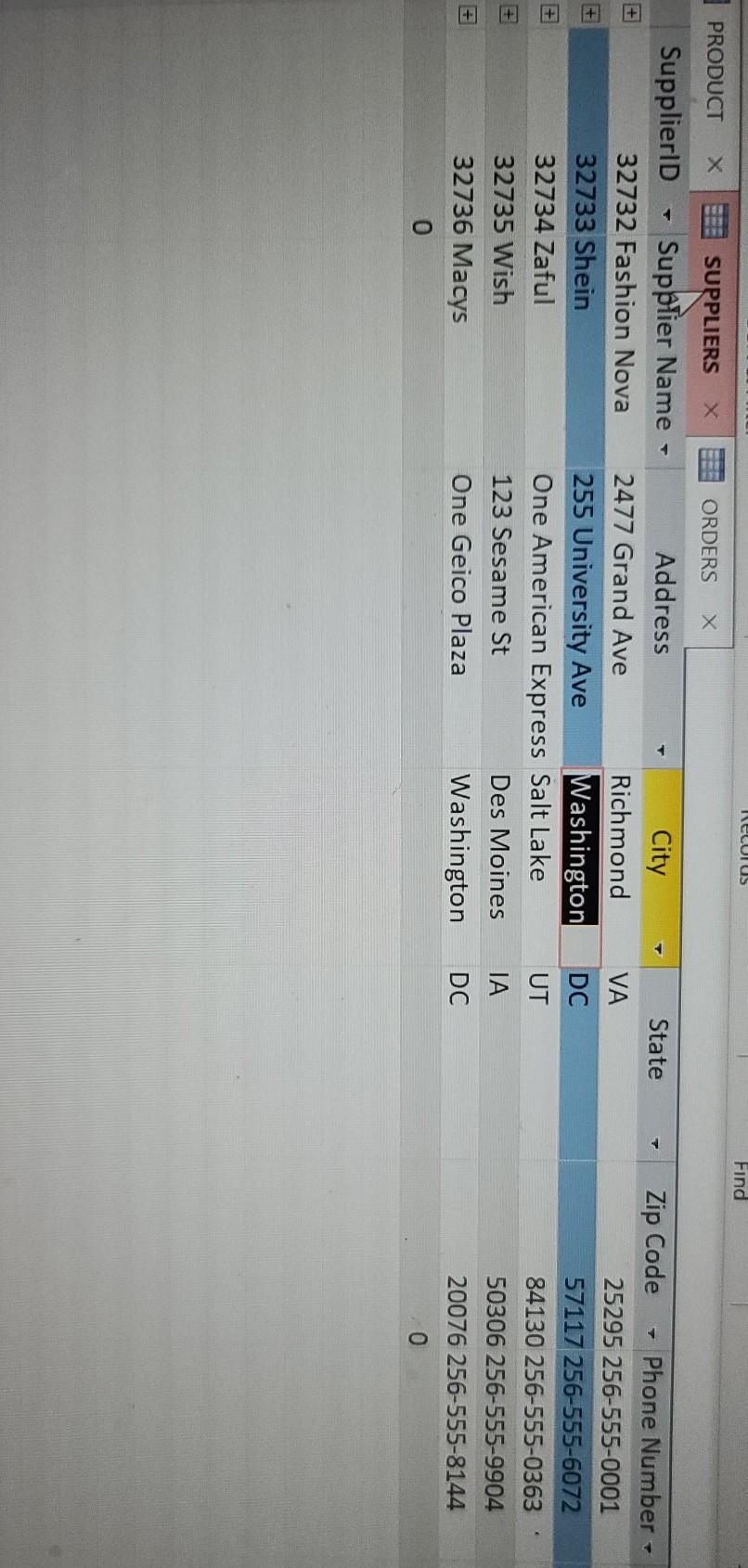
suppliers table
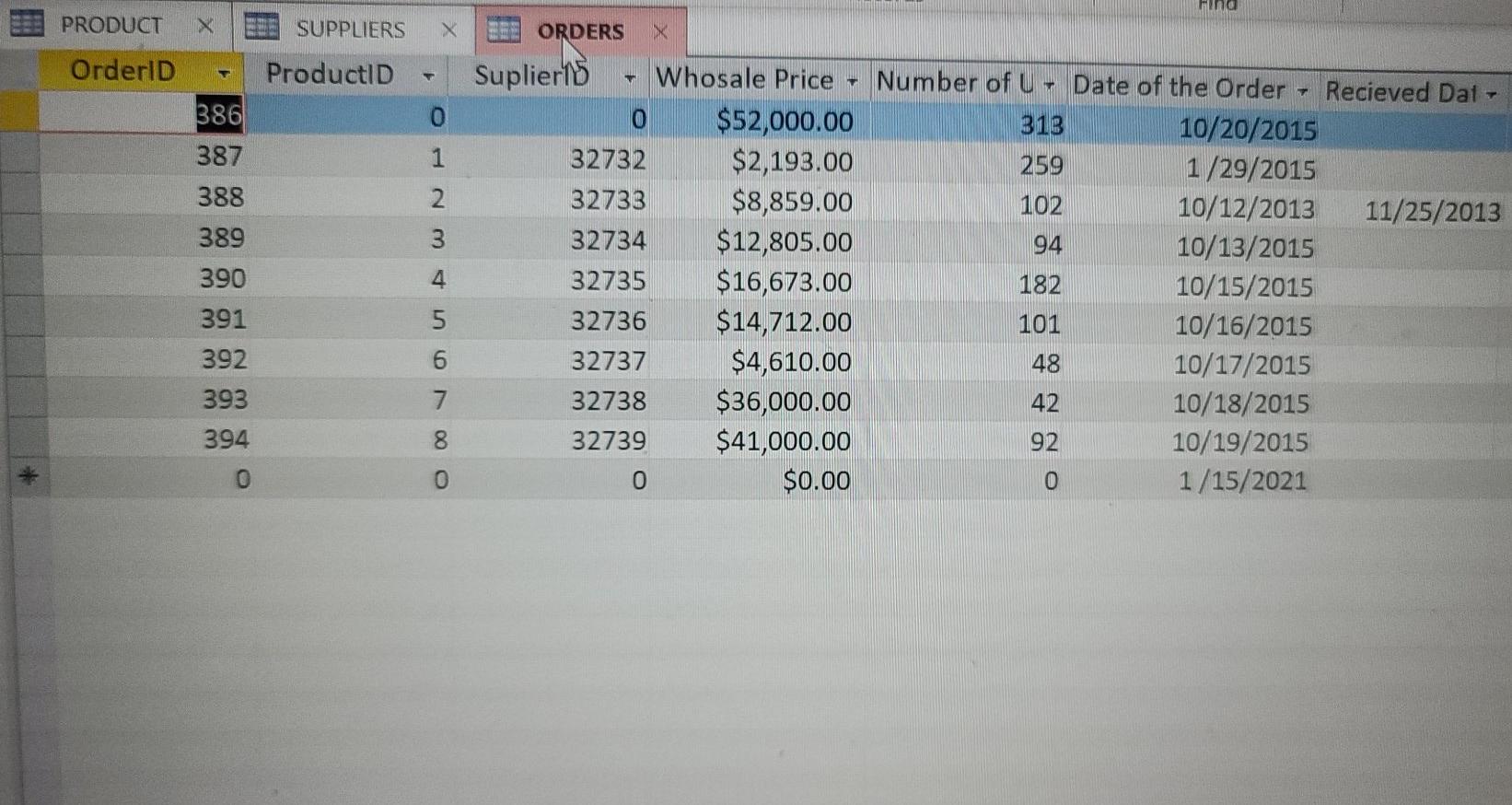
current table
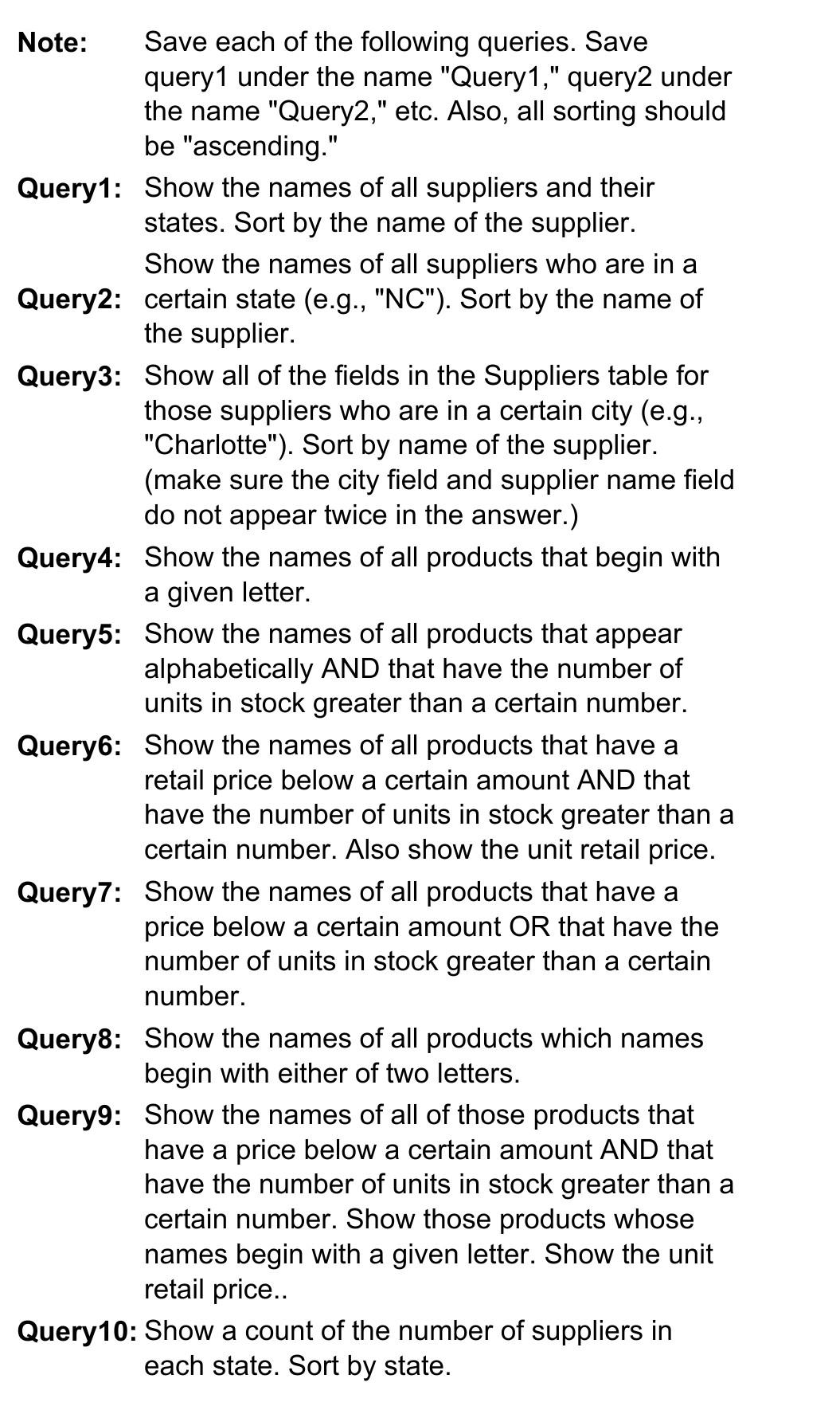
I need the 10 queries and the steps for the form and reports
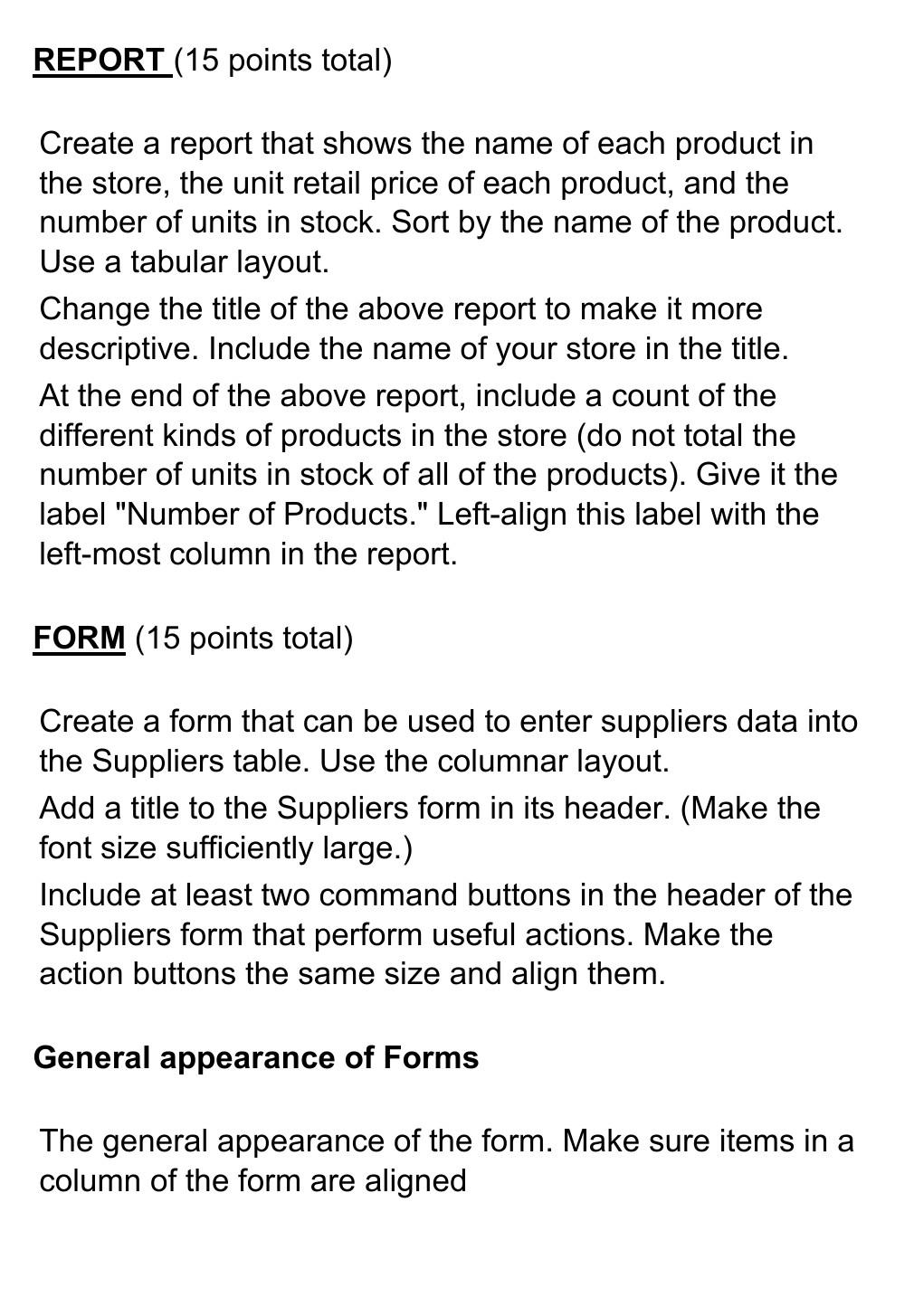
PRODUCT X SUPPLIERS X ORDERS ProvudctID LA 7 + Number of Units Click to Add 65 25 65 + + + 49 + Product Name 1 Shoes 2 Sandals 3 Tops 4 Bottoms 5 Dresses 6 Intimates 7 Two Pieces 8 Swimwear 9 Men Tops 10 Men Bottons 55 Retail Price $17.49 $25.49 $12.99 $18.49 $9.99 $26.49 $20.99 $13.99 $19.64 $25.99 $0.00 + 49 54 + + 109 25 + 25 0 0 leLUIUS Find PRODUCT SUPPLIERS ORDERS State VA DC SupplierlD Supplier Name - 32732 Fashion Nova 32733 Shein 32734 Zaful 32735 Wish 32736 Macys o Address City 2477 Grand Ave Richmond 255 University Ave Washington One American Express Salt Lake 123 Sesame St Des Moines One Geico Plaza Washington UT Zip Code Phone Number 25295 256-555-0001 57117 256-555-6072 84130 256-555-0363 50306 256-555-9904 20076 256-555-8144 0 DC And PRODUCT X SUPPLIERS OrderID ProductID O 386 387 388 1 2 389 390 ORDERS X Suplier15 Whosale Price $52,000.00 32732 $2,193.00 32733 $8,859.00 32734 $12,805.00 32735 $16,673.00 32736 $14,712.00 32737 $4,610.00 32738 $36,000.00 32739 $41,000.00 $0.00 4 Number of U- Date of the Order Recieved Dat - 313 10/20/2015 259 1/29/2015 102 10/12/2013 11/25/2013 94 10/13/2015 182 10/15/2015 101 10/16/2015 48 10/17/2015 42 10/18/2015 92 10/19/2015 0 1/15/2021 391 392 393 394 O 000 Note: Save each of the following queries. Save query1 under the name "Query1," query2 under the name "Query2," etc. Also, all sorting should be "ascending." Query1: Show the names of all suppliers and their states. Sort by the name of the supplier. Show the names of all suppliers who are in a Query2: certain state (e.g., "NC"). Sort by the name of the supplier. Query3: Show all of the fields in the Suppliers table for those suppliers who are in a certain city (e.g., "Charlotte"). Sort by name of the supplier. (make sure the city field and supplier name field do not appear twice in the answer.) Query4: Show the names of all products that begin with a given letter. Query5: Show the names of all products that appear alphabetically AND that have the number of units in stock greater than a certain number. Query6: Show the names of all products that have a retail price below a certain amount AND that have the number of units in stock greater than a certain number. Also show the unit retail price. Query7: Show the names of all products that have a price below a certain amount OR that have the number of units in stock greater than a certain number. Query8: Show the names of all products which names begin with either of two letters. Query9: Show the names of all of those products that have a price below a certain amount AND that have the number of units in stock greater than a certain number. Show those products whose names begin with a given letter. Show the unit retail price.. Query 10: Show a count of the number of suppliers in each state. Sort by state. REPORT (15 points total) Create a report that shows the name of each product in the store, the unit retail price of each product, and the number of units in stock. Sort by the name of the product. Use a tabular layout. Change the title of the above report to make it more descriptive. Include the name of your store in the title. At the end of the above report, include a count of the different kinds of products in the store (do not total the number of units in stock of all of the products). Give it the label "Number of Products." Left-align this label with the left-most column in the report. FORM (15 points total) Create a form that can be used to enter suppliers data into the Suppliers table. Use the columnar layout. Add a title to the Suppliers form in its header. (Make the font size sufficiently large.) Include at least two command buttons in the header of the Suppliers form that perform useful actions. Make the action buttons the same size and align them. General appearance of Forms The general appearance of the form. Make sure items in a column of the form are aligned
Step by Step Solution
There are 3 Steps involved in it

Get step-by-step solutions from verified subject matter experts
 Study Help