







Question: Products Entity ProdiD TEXT ( 10 ) ProdName TEXT ( 25 ) Prod Description LONGTEXT ProdLinitprice CURRENCY Pradaty Perunit NEGER Prod UnitsIn Stock NEGER Prod
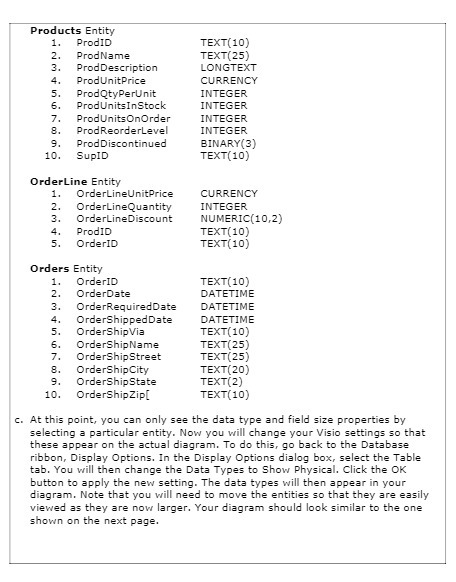
Products Entity ProdiD TEXT ( 10 ) ProdName TEXT ( 25 ) Prod Description LONGTEXT ProdLinitprice CURRENCY Pradaty Perunit NEGER Prod UnitsIn Stock NEGER Prod Units On Order TEGER Prod ReorderLevel RTEGER ProdDiscontinued BINARY (3 ) 10 SUPID TEXT ( 10 ) OrderLine Entity 1 . OrderLineun tprice CURRENCY OrderLine Quantity ITEGER OrderLine D scount NUMERIC ( 10 , 2 ) ProdID TEXT ( 10 ) 5 . OrderID TEXT ( 10 ) Orders Entity Orderto TEXT ( 10 ) OrderDate DATETIME OrderRequired Date DATETIME 4 . Ordershipped Date DATETIME Ordershipvia TEXT ( 10 ) 6 OrdershipName TEXT( 25 ) Ordership Street TEXT( 25 ) Ordership city TEXT ( 20 ) Ordership state TEXTI2 ) 10 Ordership zip TEXT ( 10 ) C . At this point , you can only see the data type and field size properties by selecting a particular entity , Now you will change your visio settings so the NEEDSTEEL . that these appear on the actual diagram . To do this , go back to the Database ribbon , Display Options . In the Display Options dialog box , select the Table tab , You will then change the Data Types to Show Physical . Click the OK button to apply the new setting . The data types will then appear in you diagram . Note that you will need to move the entities so that they are easily viewed as they are now larger , Your diagram should look similar to the one tot shown on the next page
Step by Step Solution
There are 3 Steps involved in it

Get step-by-step solutions from verified subject matter experts
 Study Help