



Question: Professar Speciose Computer Studies asignment8 CSC 162 Guess the Namber Program Iu VISuAL GASIC PAOGRAMnING This program plays Gess the Number with the user. The
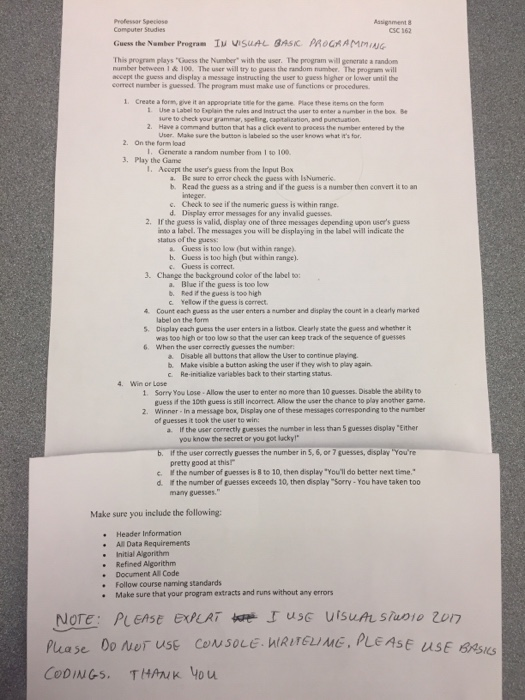
Professar Speciose Computer Studies asignment8 CSC 162 Guess the Namber Program Iu VISuAL GASIC PAOGRAMnING This program plays "Gess the Number" with the user. The program will generate a random number between 1 &100. The user will try to guess the random number. The program will accept the guess and display a message instructing the user to guess higher or lower until the correct narmber is guessed. The program must make use of functions oe procedures 1. Create a form, give it an appeopriate tle for the pame Place these nems on the form 1 Use a Label to Explain the rules and Instruct the user to enter a namber in the box Be ure to dheck your grammar, speling, capitalization, and punctuation 2. Have acommand buton that has a click event to pracess the number entered by the I. Generate a random number from 1 to 100 1. Ascept the user's guess from the Input Bo s labeled so 2. On the foren load 3. Play the Game a. Be sure to error chock the gaess with Is Numeric. b. Read the guess as a string and if the guess is a number then convert it to an imeger c. Check to see if the numeric guess is within range. d. Display error messages for any invalid guesses 2. If the guess is valid, display one of three messages depending upon user's guess into a label. The messages you will be displaying in the label will indicate the status of the guess: a Guess is too low (but within range). b. Guess is too high (but within range). c. Guess is correct. 3. Change the background color of the label to: Blue if the guess is too low a. b. Red if the guess is too high c Yellow if the guess is correct 4 Count each guess as the user enters a number and display the count in a clearly marked 5. 6. When the user correcty guesses the number: label on the form Display each guess the user enters in a listbos. Clearly state the guess and whether it was too high or too low so that the user can keep track of the sequence of guesses a. Disable all buttons that allow the User to continue playing b. Make visible a button asking the user if they wish to play again. c. Re-initialize variables back to their starting status. 4 Win or Lose 1. Sarry You Lose-Allow the user to enter no more than 10 guesses. Disable the ability to guess the 10th guess is still incorrect Allow the user the chance to play another game. Winner - In a messape box, Display one of these messages correspondng to the number of guesses it took the user to win 2. a. If the user correctly guesses the numberless than S guesses display "Either b. if the user correctly guesses the number in 5,6 or 7 guesses, display You' re c. I the number of guesses is 8 to 10, then display "You'll do better next time. you know the secret or you got lacky! pretty good at thish d if the number of guesses exceeds 10, then display "Sorry- You have taken too many guesses." Make sure you include the following: Header Information All Data Requirements Initial Algorithm Refined Algorithnm Document All Code Follow course naming standards Make sure that your program extracts and runs without any errors Please 0o ner USE CONsoLE WIRITE, PLEASE CODINGS. THANK you Professar Speciose Computer Studies asignment8 CSC 162 Guess the Namber Program Iu VISuAL GASIC PAOGRAMnING This program plays "Gess the Number" with the user. The program will generate a random number between 1 &100. The user will try to guess the random number. The program will accept the guess and display a message instructing the user to guess higher or lower until the correct narmber is guessed. The program must make use of functions oe procedures 1. Create a form, give it an appeopriate tle for the pame Place these nems on the form 1 Use a Label to Explain the rules and Instruct the user to enter a namber in the box Be ure to dheck your grammar, speling, capitalization, and punctuation 2. Have acommand buton that has a click event to pracess the number entered by the I. Generate a random number from 1 to 100 1. Ascept the user's guess from the Input Bo s labeled so 2. On the foren load 3. Play the Game a. Be sure to error chock the gaess with Is Numeric. b. Read the guess as a string and if the guess is a number then convert it to an imeger c. Check to see if the numeric guess is within range. d. Display error messages for any invalid guesses 2. If the guess is valid, display one of three messages depending upon user's guess into a label. The messages you will be displaying in the label will indicate the status of the guess: a Guess is too low (but within range). b. Guess is too high (but within range). c. Guess is correct. 3. Change the background color of the label to: Blue if the guess is too low a. b. Red if the guess is too high c Yellow if the guess is correct 4 Count each guess as the user enters a number and display the count in a clearly marked 5. 6. When the user correcty guesses the number: label on the form Display each guess the user enters in a listbos. Clearly state the guess and whether it was too high or too low so that the user can keep track of the sequence of guesses a. Disable all buttons that allow the User to continue playing b. Make visible a button asking the user if they wish to play again. c. Re-initialize variables back to their starting status. 4 Win or Lose 1. Sarry You Lose-Allow the user to enter no more than 10 guesses. Disable the ability to guess the 10th guess is still incorrect Allow the user the chance to play another game. Winner - In a messape box, Display one of these messages correspondng to the number of guesses it took the user to win 2. a. If the user correctly guesses the numberless than S guesses display "Either b. if the user correctly guesses the number in 5,6 or 7 guesses, display You' re c. I the number of guesses is 8 to 10, then display "You'll do better next time. you know the secret or you got lacky! pretty good at thish d if the number of guesses exceeds 10, then display "Sorry- You have taken too many guesses." Make sure you include the following: Header Information All Data Requirements Initial Algorithm Refined Algorithnm Document All Code Follow course naming standards Make sure that your program extracts and runs without any errors Please 0o ner USE CONsoLE WIRITE, PLEASE CODINGS. THANK you
Step by Step Solution
There are 3 Steps involved in it

Get step-by-step solutions from verified subject matter experts