







Question: PROG8290 Assignment 4 - Fall 2023 Finding vulnerabilities in Source Code. In class, we have used PVS-Studio (VS2017) and copcheck (Linux) to find vulnerabilities in
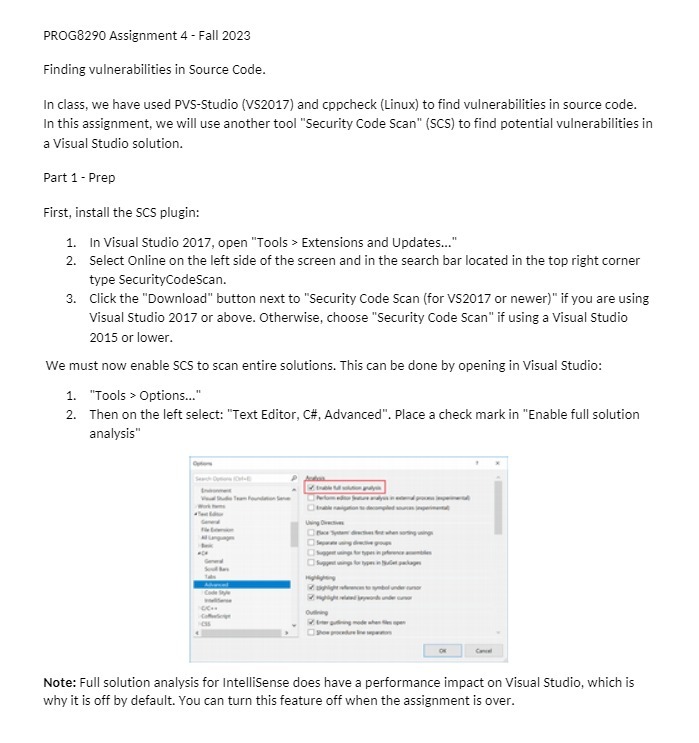
PROG8290 Assignment 4 - Fall 2023 Finding vulnerabilities in Source Code. In class, we have used PVS-Studio (VS2017) and copcheck (Linux) to find vulnerabilities in source code. In this assignment, we will use another tool "Security Code Scan" (SCS) to find potential vulnerabilities in a Visual Studio solution. Part 1 - Prep First, install the SCS plugin: 1. In Visual Studio 2017, open "Tools > Extensions and Updates..." 2. Select Online on the left side of the screen and in the search bar located in the top right corner type SecurityCodeScan. 3. Click the "Download" button next to "Security Code Scan (for VS2017 or newer)" if you are using Visual Studio 2017 or above. Otherwise, choose "Security Code Scan" if using a Visual Studio 2015 or lower. We must now enable SCS to scan entire solutions. This can be done by opening in Visual Studio: 1. "Tools > Options..." 2. Then on the left select: "Text Editor, C#, Advanced". Place a check mark in "Enable full solution analysis" Note: Full solution analysis for Intellisense does have a performance impact on Visual Studio, which is why it is off by default. You can turn this feature off when the assignment is over
Step by Step Solution
There are 3 Steps involved in it

Get step-by-step solutions from verified subject matter experts
 Study Help