







Question: Program Assignment 3 : Implement a Simple Virtual File System IN JAVA Purpose Computer users are familiar with the abstract concept of a file ,
Program Assignment : Implement a Simple Virtual File System IN JAVA
Purpose
Computer users are familiar with the abstract concept of a file but the operating system has to do a great deal of work to map logical files to a physical storage device. The low level details of how an operating system keeps track of a file's data, which may be scattered across the disk, are taken for granted for most computer users. In this assignment you will implement a simple file system on a virtual byte disk.
Instructions
The Disk
The virtual disk drive is implemented by the Drive class in the provided code. The bytes of the drive are divided into blocks. Each block is bytes in size. This mimics the structure of an actual disk drive, where blocks are typically K in size.
The File Format
The file system used on this virtual disk is Tiny File System TFS It allows for the creation of both files and subdirectories. The meaning of the data stored within a block depends on that block's type. The first block of the file system, block is always used to hold the root directory. Initially, all of the other blocks are part of the free space list. File names in the virtual disk must be in lowercase letters, and directories uppercase letters.
Root Directory
Root DirectorynextNnsnsnsnsnsnsns
The first byte of the root directory contains the block number of the first block of the free space list. The second byte is a count of how many files or directories are stored inside the root directory. The rest of the bytes are filedirectory names nX or the block in which the corresponding filedirectory is indexed sX Unneeded entries are set to
Free Space
Free Spacenext
The first byte of a block in the free space list contains the block number of the next block of the free space list. The last block on the free space list should contain in this position.
Directories
DirectoriesPNnsnsnsnsnsnsns
The first byte in a directory is the block number of its parent directory. The second byte is a count of how many files or directories are stored inside that directory. The rest of the bytes are filedirectory names nX or the block in which the corresponding filedirectory is indexed sX Unneeded entries are set to
File Index
File IndexPsizedatadatadatadatadatadatadatadatadatadatadatadatadatadata
File Data
The first byte in a file index is the block number of its parent directory.The second byte of a file index block contains the size of the file, in bytes. The remaining bytes are the block number of actual file data. Since there are at most of these, the maximum file size is x
Descriptions of Commands
CommandDescription
import
Copy a file stored in the regular file system to the memory resident virtual disk. The file is assumed to be a text file. If the file already exists in the virtual file system, it is overwritten.
export
Copy a file stored in the virtual disk to the regular file system. The file is assumed to be a text file. If the file already exists on the LinuxWindowsOSX file system, an error is reported, and no write occurs.
ls
List the contents file name and size of the given TFS directory.
mkdir
Create a new virtual files system directory at
raw
Display the raw contents of the disk, using the Drive.contentsAsByte method.
exit
End the program, causing all the data in the virtual disk to be lost.
Other Descriptions
ItemDescription
A legal path name in LinuxWindowsOSX; can be absolute or relative. Example: binstuffMinetxt
A legal absolute path in the virtual file system. Example: c or Xq
Sample Interaction
Here is some sample interaction with your shell. This is only a simple, possible example. Use any prompt you desire, display more info with ls etc.
: import myfiletxt a : import myfiletxt c : export c myfiletxt Error, file exists. : ls a c : exit
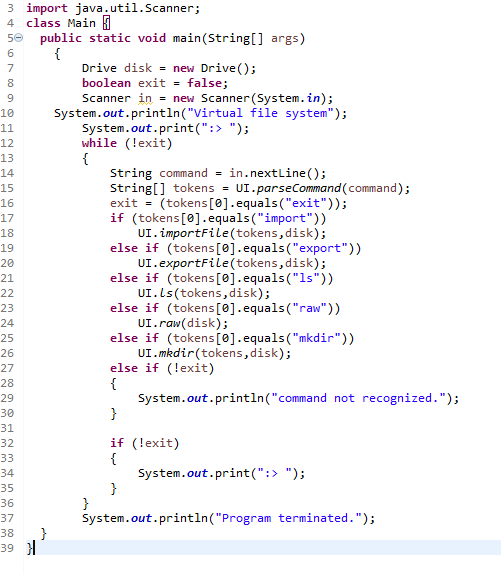
Provided code:
import java.util.Scanner;
class Main
public static void mainString args
Drive disk new Drive;
boolean exit false;
Scanner in new ScannerSystemin;
System.out.printlnVirtual file system";
System.out.print:;
while exit
String command innextLine;
String tokens UIparseCommandcommand;
exit tokensequalsexit;
if tokensequalsimport
UIimportFiletokens disk;
else if tokensequalsexport
UIexportFiletokens disk;
else if tokensequalsls
UIlstokensdisk;
else if tokensequalsraw
UIrawdisk;
else if tokensequalsmkdir
UImkdirtokens disk;
else if exit
System.out.printlncommand not recognized.";
if exit
System.out.print:;
System.out.printlnProgram terminated.";
public class UI
public static String parseCommandString command
String a ;
return a;
public static voi
Step by Step Solution
There are 3 Steps involved in it
1 Expert Approved Answer
Step: 1 Unlock

Question Has Been Solved by an Expert!
Get step-by-step solutions from verified subject matter experts
Step: 2 Unlock
Step: 3 Unlock
 Study Help