







Question: program can run multiple students. the program will ask the user to input student data and grades 2018 Fall CIS 150 Lab 6 Release date:
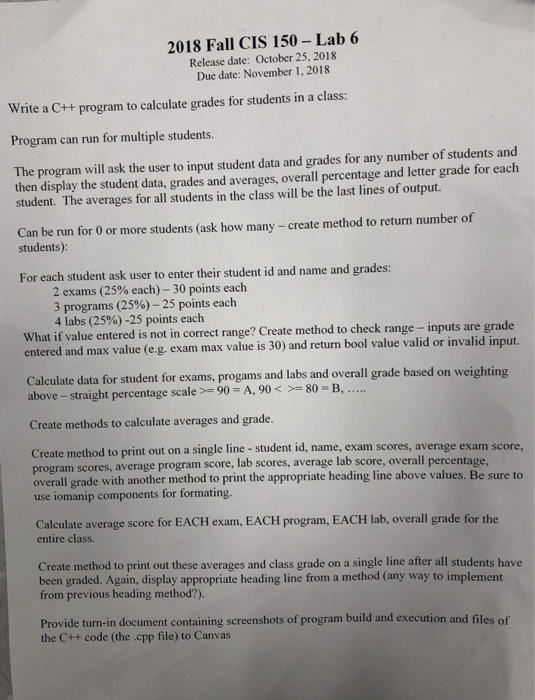
2018 Fall CIS 150 Lab 6 Release date: October 25, 2018 Due date: November 1, 2018 Writca Ct program to calculate grade or tudents in a a Program can run for multiple students. The program will ask the user to input student data and grades for any number of students and then display the student data, grades and averages, overall percentage and letter grade for each student. The averages for all students in the class will be the last lines of output. Can be run for 0 or more students (ask how many - create method to return number of students): For each student ask user to enter their student id and name and grades: 2 exams (25% each)-30 points each 3 programs (25%)-25 points each 4 labs (25%)-25 points each What if value entered is not in correct range? Create method to check range- inputs are gr ade entered and max value (e.g. exam max value is 30) and return bool value valid or invalid input. Calculate data for student for exams, progams and labs and overall grade based on weighting above-straight percentage scale >-90-A, 90 -80-B, Create methods to calculate averages and grade. Create method to print out on a single line - student id, name, exam scores, average exam score, program scores, average program score, lab scores, average lab score, overall grade with another method to print the appropriate heading line abo use iomanip components for formating. overall percentage ve values. Be sure to Calculate average score for EACH exam, EACH program, EACH lab, overall grade for the entire class. Create method to print out these averages and class grade on a single line after all students have been graded. Again, display appropriate heading line from a method (any way to implement from previous heading method?). Provide turn-in document containing screenshots of program build and execution and files of the C+t code (the .cpp file) to Canvas 2018 Fall CIS 150 Lab 6 Release date: October 25, 2018 Due date: November 1, 2018 Writca Ct program to calculate grade or tudents in a a Program can run for multiple students. The program will ask the user to input student data and grades for any number of students and then display the student data, grades and averages, overall percentage and letter grade for each student. The averages for all students in the class will be the last lines of output. Can be run for 0 or more students (ask how many - create method to return number of students): For each student ask user to enter their student id and name and grades: 2 exams (25% each)-30 points each 3 programs (25%)-25 points each 4 labs (25%)-25 points each What if value entered is not in correct range? Create method to check range- inputs are gr ade entered and max value (e.g. exam max value is 30) and return bool value valid or invalid input. Calculate data for student for exams, progams and labs and overall grade based on weighting above-straight percentage scale >-90-A, 90 -80-B, Create methods to calculate averages and grade. Create method to print out on a single line - student id, name, exam scores, average exam score, program scores, average program score, lab scores, average lab score, overall grade with another method to print the appropriate heading line abo use iomanip components for formating. overall percentage ve values. Be sure to Calculate average score for EACH exam, EACH program, EACH lab, overall grade for the entire class. Create method to print out these averages and class grade on a single line after all students have been graded. Again, display appropriate heading line from a method (any way to implement from previous heading method?). Provide turn-in document containing screenshots of program build and execution and files of the C+t code (the .cpp file) to Canvas
Step by Step Solution
There are 3 Steps involved in it

Get step-by-step solutions from verified subject matter experts
 Study Help