







Question: Program Specification value will simply be the arithmetic mean of the closest values around it. Consider a 4 by 4 square matrix of numbers as
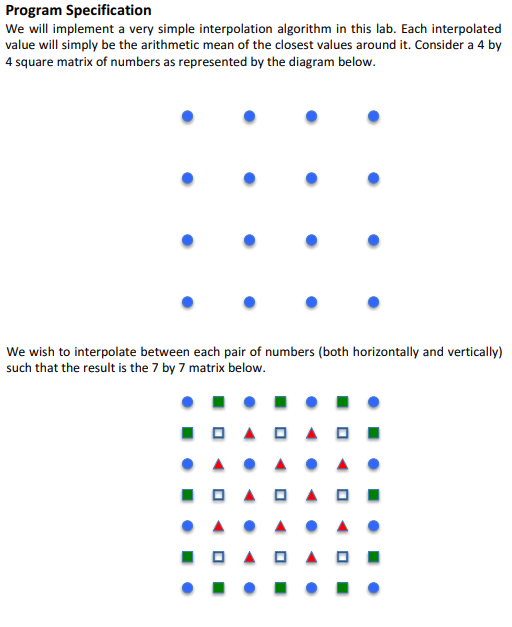
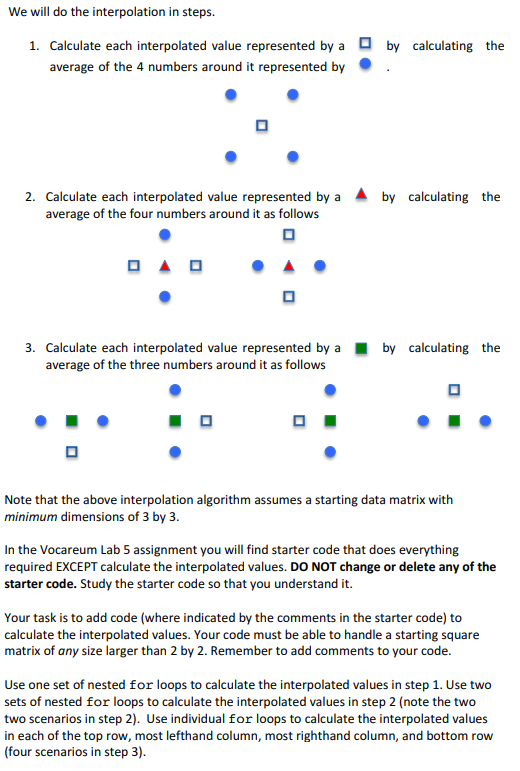
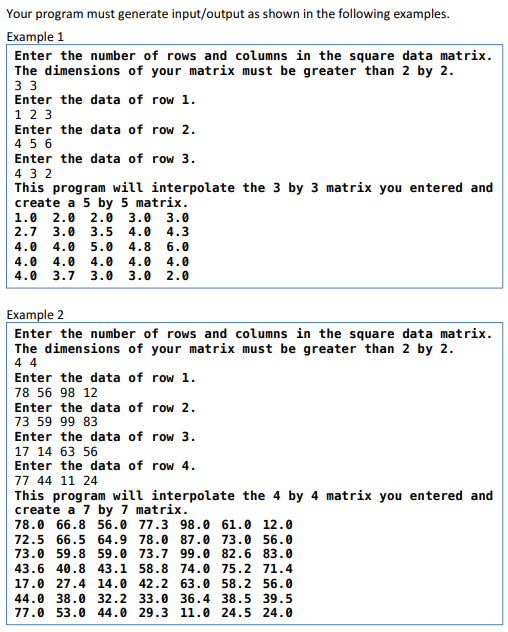
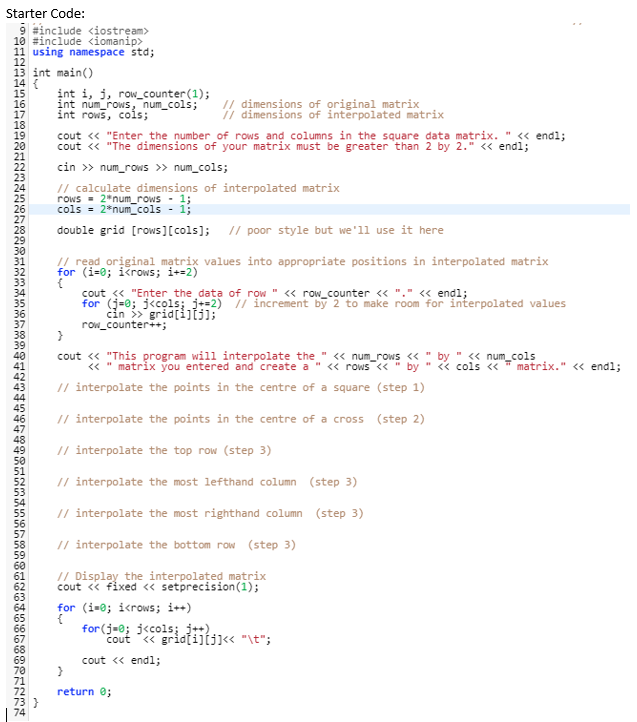
Program Specification value will simply be the arithmetic mean of the closest values around it. Consider a 4 by 4 square matrix of numbers as represented by the diagram below We will do the interpolation in steps. 1. Calculate each interpolated value represented by a by calculating the average of the 4 numbers around it represented by . 2. Calculate each interpolated value represented by a average of the four numbers around it as follows 3. Calculate each interpolated value represented by a average of the three numbers around it as follows by calculating the Note that the above interpolation algorithm assumes a starting data matrix with minimum dimensions of 3 by 3 In the Vocareum Lab 5 assignment you will find starter code that does everything required EXCEPT calculate the interpolated values. DO NOT change or delete any of the starter code. Study the starter code so that you understand it. Your task is to add code (where indicated by the comments in the starter code) to calculate the interpolated values. Your code must be able to handle a starting square matrix of any size larger than 2 by 2. Remember to add comments to your code. Use one set of nested for loops to calculate the interpolated values in step 1. Use two sets of nested for loops to calculate the interpolated values in step 2 (note the two two scenarios in step 2). Use individual for loops to calculate the interpolated values in each of the top row, most lefthand column, most righthand column, and bottom rovw (four scenarios in step 3) Your program must generate input/output as shown in the following examples. Example 1 Enter the number of rows and columns in the square data matrix The dimensions of your matrix must be greater than 2 by 2. Enter the data of row 1. 1 2 3 Enter the data of row 2 4 5 6 Enter the data of row 3. 4 3 2 This program will interpolate the 3 by 3 matrix you entered and create a 5 by 5 matrix 1.0 2.0 2.0 3.0 3.0 2.7 3.0 3.5 4.0 4.3 4.0 4.0 5.0 4.8 6.0 4.0 4.0 4.0 4.0 4.0 4.0 3.7 3.0 3.0 2.0 Example 2 Enter the number of rows and columns in the square data matrix The dimensions of your matrix must be greater than 2 by 2 Enter the data of row 1 78 56 98 12 Enter the data of row 2. 73 59 99 83 Enter the data of row 3. 17 14 63 56 Enter the data of row 4 77 44 11 24 This program will interpolate the 4 by 4 matrix you entered and create a 7 by 7 matrix 78.0 66.8 56.0 77.3 98.0 61.0 12.0 72.5 66.5 64.9 78.0 87.0 73.0 56.0 73.0 59.8 59.0 73.7 99.0 82.6 83.0 43.6 40.8 43.1 58.8 74.0 75.2 71.4 17.0 27.4 14.0 42.2 63.0 58.2 56.0 44.0 38.0 32.2 33.0 36.4 38.5 39.5 77.0 53.0 44.0 29.3 11.0 24.5 24.0 Starter Code: 9 #include
Step by Step Solution
There are 3 Steps involved in it

Get step-by-step solutions from verified subject matter experts
 Study Help