







Question: Program specifications (business requirements): Customer bank account Create a Windows application that shows a customer account information AutoSave Programming Assignment #3_Revision 2017 (6).docx - Word
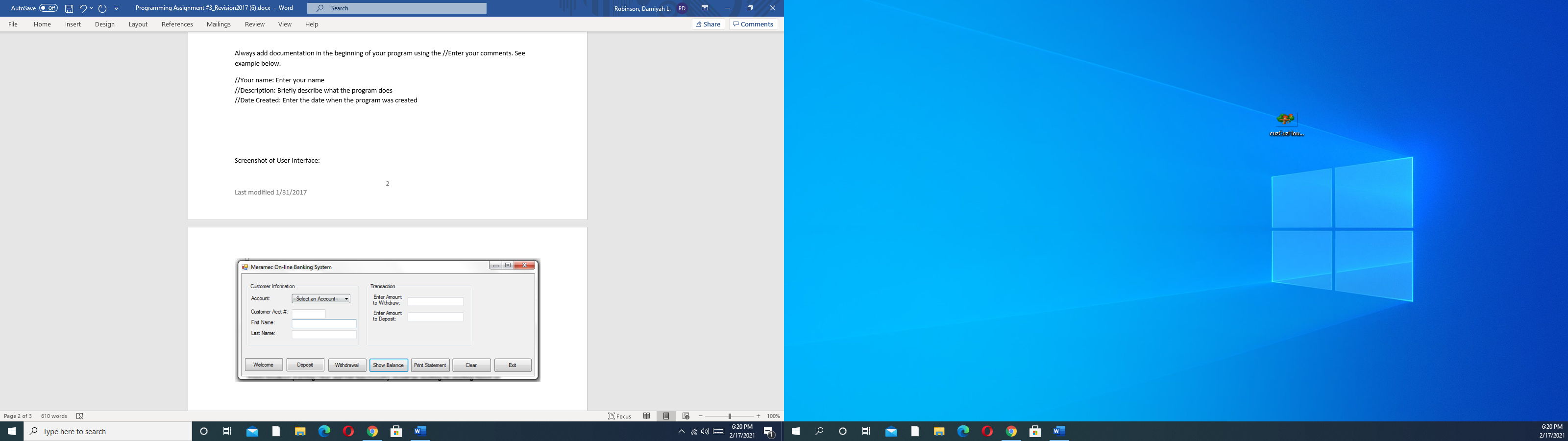 Program specifications (business requirements): Customer bank account
Create a Windows application that shows a customer account information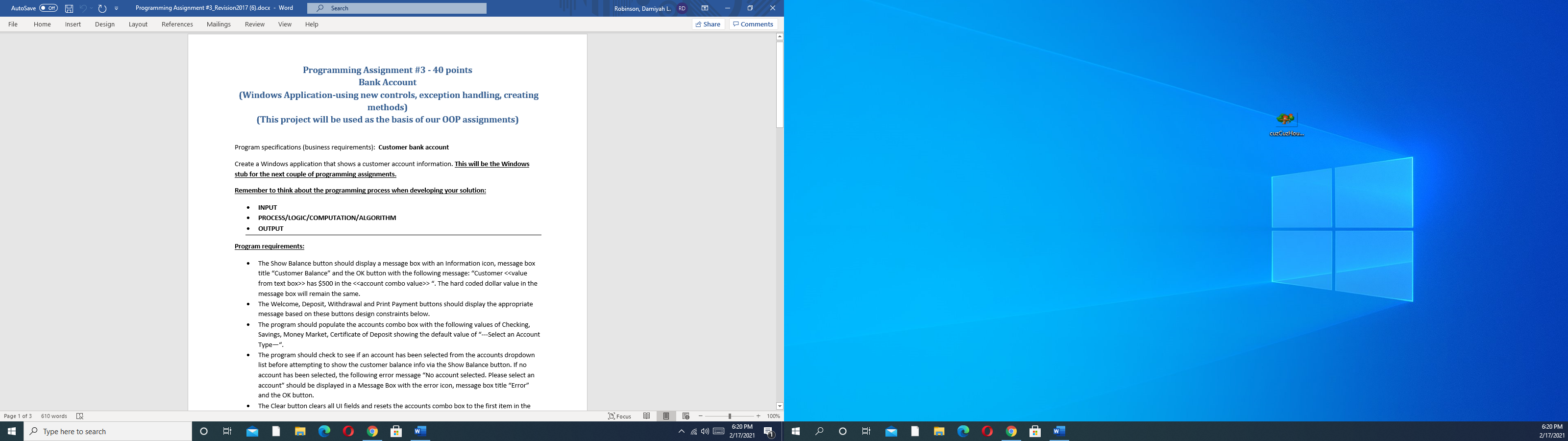
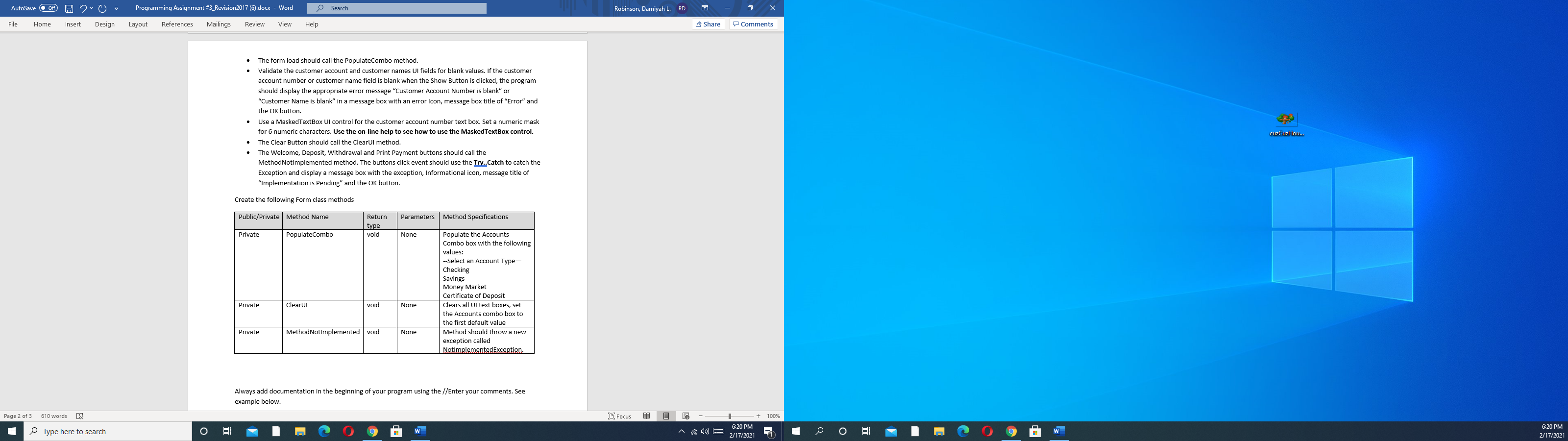
AutoSave Programming Assignment #3_Revision 2017 (6).docx - Word O Search Robinson, Damiyah L. RD File Home Insert Design Layout References Mailings Review View Help Share Comments Always add documentation in the beginning of your program using the //Enter your comments. See example below. //Your name: Enter your name //Description: Briefly describe what the program does //Date Created: Enter the date when the program was created cuzCuzhou... Screenshot of User Interface: 2 Last modified 1/31/2017 Meramec On-line Banking System X Customer Infomation Transaction Account: -- Select an Account- Enter Amount to Withdraw: Enter Amount to Deposit Customer Acct # First Name: Last Name Welcome Deposit Withdrawal Show Balance Print Statement Clear Exit Page 2 of 3 610 words LX C Focus 16 100% 6:20 PM H Type here to search W 6:20 PM 2/17/2021 o W 2/17/2021 AutoSave Off Programming Assignment #3_Revision 2017 (6).docx - Word Search Robinson, Damiyah L. RD File Home Insert Design Layout References Mailings Review View Help Share Comments Programming Assignment #3 -40 points Bank Account (Windows Application-using new controls, exception handling, creating methods) (This project will be used as the basis of our OOP assignments) cuzCuzhou... Program specifications (business requirements): Customer bank account Create a Windows application that shows a customer account information. This will be the Windows stub for the next couple of programming assignments. Remember to think about the programming process when developing your solution: INPUT PROCESS/LOGIC/COMPUTATION/ALGORITHM OUTPUT Program requirements: The Show Balance button should display a message box with an Information icon, message box title "Customer Balance" and the OK button with the following message: "Customer > has $500 in the >". The hard coded dollar value in the message box will remain the same. The Welcome, Deposit, Withdrawal and Print Payment buttons should display the appropriate message based on these buttons design constraints below. The program should populate the accounts combo box with the following values of Checking, Savings, Money Market, Certificate of Deposit showing the default value of "--Select an Account Type-". The program should check to see if an account has been selected from the accounts dropdown list before attempting to show the customer balance info via the Show Balance button. If no account has been selected, the following error message "No account selected. Please select an account" should be displayed in a Message Box with the error icon, message box title "Error" and the OK button. The Clear button clears all ul fields and resets the accounts combo box to the first item in the Page 1 of 3 610 words LX C Focus 16 100% 6:20 PM H Type here to search 6:20 PM 2/17/2021 o W 2/17/2021 AutoSave 0 = Programming Assignment #3_Revision 2017 (6).docx - Word Search Robinson, Damiyah L. RD File Home Insert Design Layout References Mailings Review View Help Share Comments The form load should call the populateCombo method. Validate the customer account and customer names UI fields for blank values. If the customer account number or customer name field is blank when the Show Button is clicked, the program should display the appropriate error message "Customer Account Number is blank" or "Customer Name is blank" in a message box with an error Icon, message box title of "Error" and the OK button. Use a MaskedTextBox UI control for the customer account number text box. Set a numeric mask for 6 numeric characters. Use the on-line help to see how to use the MaskedTextBox control. The Clear Button should call the ClearUl method. The Welcome, Deposit, Withdrawal and Print Payment buttons should call the MethodNotimplemented method. The buttons click event should use the Iry..Catch to catch the Exception and display a message box with the exception, Informational icon, message title of "Implementation is Pending" and the OK button. cuzCuzhou... Create the following Form class methods Public/Private Method Name Parameters Method Specifications Return type void Private PopulateCombo None Populate the Accounts Combo box with the following values: --Select an Account Type- Checking Savings Money Market Certificate of Deposit Clears all Ul text boxes, set the Accounts combo box to the first default value Method should throw a new exception called NotImplementedException. Private ClearUI void None Private MethodNotImplemented void None Always add documentation in the beginning of your program using the //Enter your comments. See example below. Page 2 of 3 610 words LX C Focus 16 100% 6:20 PM H Type here to search W 6:20 PM 2/17/2021 o W 2/17/2021
Step by Step Solution
There are 3 Steps involved in it

Get step-by-step solutions from verified subject matter experts
 Study Help