







Question: Program this in Matlab H2.1 Geometric transformations: Capture an image of yourself and resize it to N ~ N pixels for N = 256. 20
Program this in Matlab
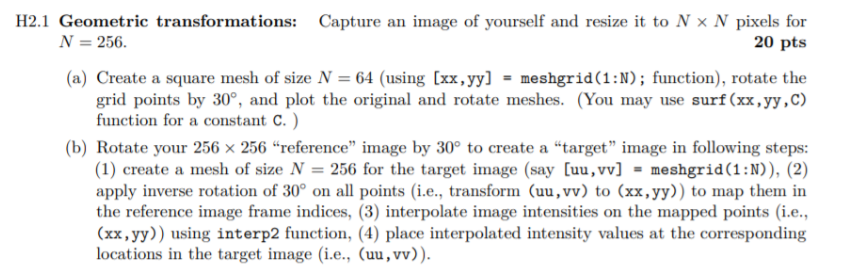
H2.1 Geometric transformations: Capture an image of yourself and resize it to N ~ N pixels for N = 256. 20 pts (a) Create a square mesh of size N = 64 (using (xx,yy) = meshgrid(1:N); function), rotate the grid points by 30, and plot the original and rotate meshes. (You may use surf(xx,yy,C) function for a constant C.) (b) Rotate your 256 X 256 reference image by 30 to create a "target image in following steps: (1) create a mesh of size N = 256 for the target image (say [uu, vv] - meshgrid(1:N)), (2) apply inverse rotation of 30 on all points (i.e., transform (uu,vv) to (xx,yy)) to map them in the reference image frame indices, (3) interpolate image intensities on the mapped points (i.e., (xx,yy)) using interp2 function, (4) place interpolated intensity values at the corresponding locations in the target image (i.e., (uu, vv)). H2.1 Geometric transformations: Capture an image of yourself and resize it to N ~ N pixels for N = 256. 20 pts (a) Create a square mesh of size N = 64 (using (xx,yy) = meshgrid(1:N); function), rotate the grid points by 30, and plot the original and rotate meshes. (You may use surf(xx,yy,C) function for a constant C.) (b) Rotate your 256 X 256 reference image by 30 to create a "target image in following steps: (1) create a mesh of size N = 256 for the target image (say [uu, vv] - meshgrid(1:N)), (2) apply inverse rotation of 30 on all points (i.e., transform (uu,vv) to (xx,yy)) to map them in the reference image frame indices, (3) interpolate image intensities on the mapped points (i.e., (xx,yy)) using interp2 function, (4) place interpolated intensity values at the corresponding locations in the target image (i.e., (uu, vv))
Step by Step Solution
There are 3 Steps involved in it

Get step-by-step solutions from verified subject matter experts
 Study Help