







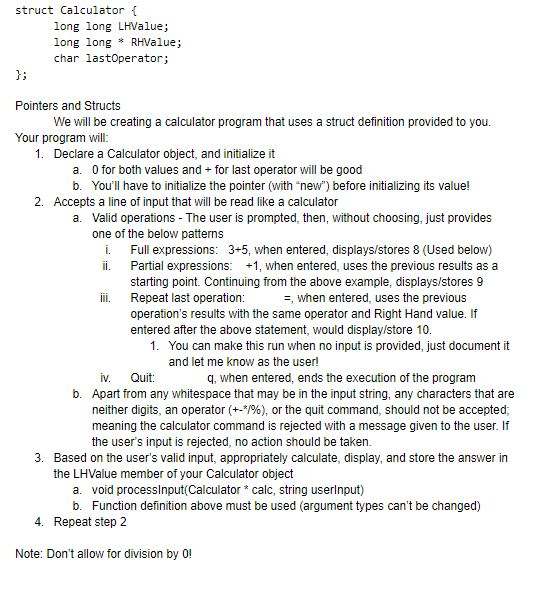
Question: Program using c++ struct Calculator { long long LHValue; //The first value is simply a large integer variable. This is also where the answer to
Program using c++
| struct Calculator { | |
| long long LHValue; //The first value is simply a large integer variable. This is also where the answer to an equation is stored. | |
| //The second value is a POINTER to a large integer. We will be able to use it similarly after syntax differences. | |
| //To use it, we will need to assign it memory space (using a variables address or, ideally, with the "new" keyword).
| |
| long long * RHValue; // If the user provides only the = operator, the previous RHValue and operator will be used | |
| char lastOperator; //Indicates which operator was last used, in case one isn't provided | |
| }; |
struct Calculator long long LHValue; long longRHValue; char lastoperator; 3: Pointers and Structs We will be creating a calculator program that uses a struct definition provided to you. Your program will 1. Declare a Calculator object, and initialize it a. 0 for both values and for last operator will be good b. You'll have to initialize the pointer (with new") before initializing its value! 2. Accepts a line of input that will be read like a calculator a. Valid operations The user is prompted, then, without choosing, just provides one of the below patterns i. ii. Full expressions: 3+5, when entered, displays/stores 8 (Used below) Partial expressions: +1, when entered, uses the previous results as a starting point. Continuing from the above example, displays/stores 9 i Repeat last operation: =, when entered, uses the previous operation's results with the same operator and Right Hand value. If entered after the above statement, would display/store 10 1. You can make this run when no input is provided, just document it and let me know as the user iv. Quit: Apart from any whitespace that may be in the input string, any characters that are neither digits, an operator (+-*/96), or the quit command, should not be accepted: meaning the calculator command is rejected with a message given to the user. If the user's input is rejected, no action should be taken. q, when entered, ends the execution of the program b. 3. Based on the user's valid input, appropriately calculate, display, and store the answer in the LHValue member of your Calator object void processlnput(Calculator *calc, string userlnput) Function definition above must be used (argument types can't be changed) a. b. Repeat step 2 4. Note: Don't allow for division by 0 struct Calculator long long LHValue; long longRHValue; char lastoperator; 3: Pointers and Structs We will be creating a calculator program that uses a struct definition provided to you. Your program will 1. Declare a Calculator object, and initialize it a. 0 for both values and for last operator will be good b. You'll have to initialize the pointer (with new") before initializing its value! 2. Accepts a line of input that will be read like a calculator a. Valid operations The user is prompted, then, without choosing, just provides one of the below patterns i. ii. Full expressions: 3+5, when entered, displays/stores 8 (Used below) Partial expressions: +1, when entered, uses the previous results as a starting point. Continuing from the above example, displays/stores 9 i Repeat last operation: =, when entered, uses the previous operation's results with the same operator and Right Hand value. If entered after the above statement, would display/store 10 1. You can make this run when no input is provided, just document it and let me know as the user iv. Quit: Apart from any whitespace that may be in the input string, any characters that are neither digits, an operator (+-*/96), or the quit command, should not be accepted: meaning the calculator command is rejected with a message given to the user. If the user's input is rejected, no action should be taken. q, when entered, ends the execution of the program b. 3. Based on the user's valid input, appropriately calculate, display, and store the answer in the LHValue member of your Calator object void processlnput(Calculator *calc, string userlnput) Function definition above must be used (argument types can't be changed) a. b. Repeat step 2 4. Note: Don't allow for division by 0
Step by Step Solution
There are 3 Steps involved in it

Get step-by-step solutions from verified subject matter experts
 Study Help