Question: Programming Activity 10-2 Guidance ================================== Part 1 ------ In RacePoly.java, the framework comments specifically tell you to use a switch statement and what to do
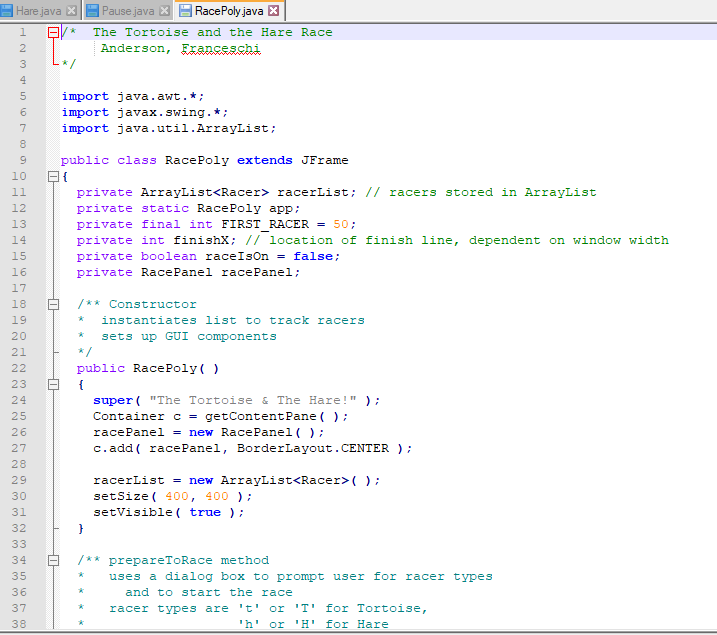
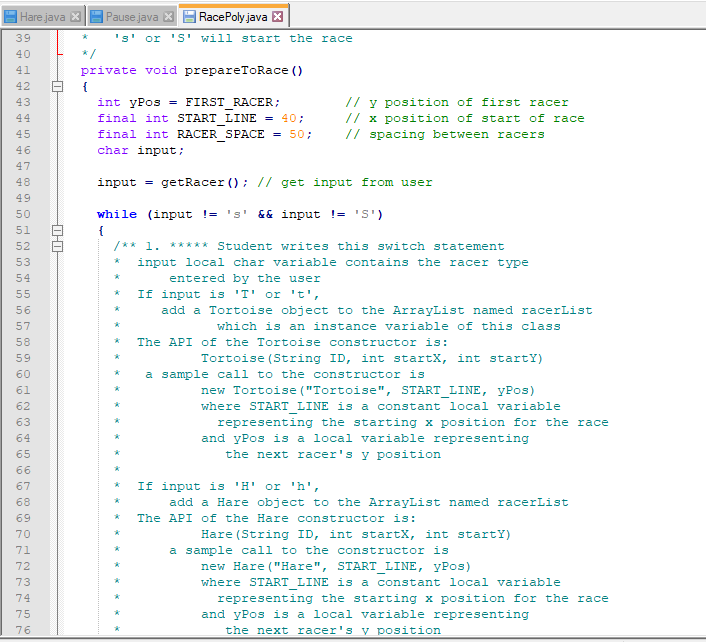
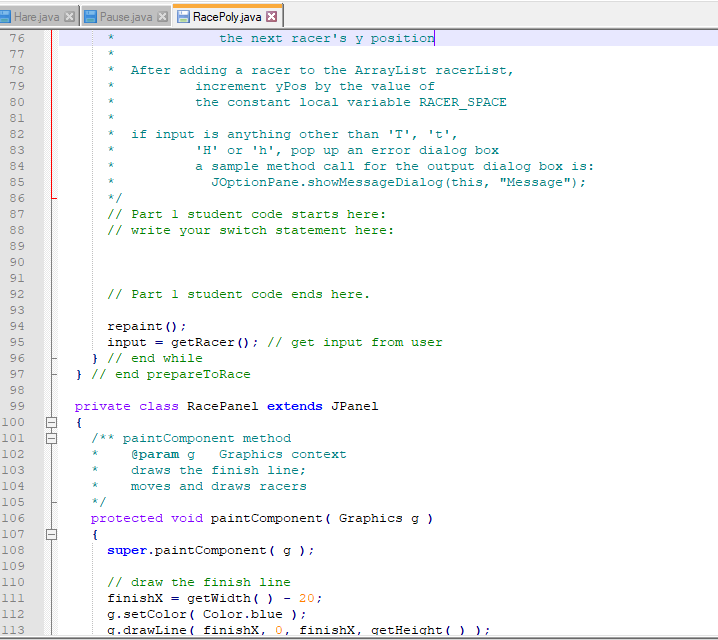
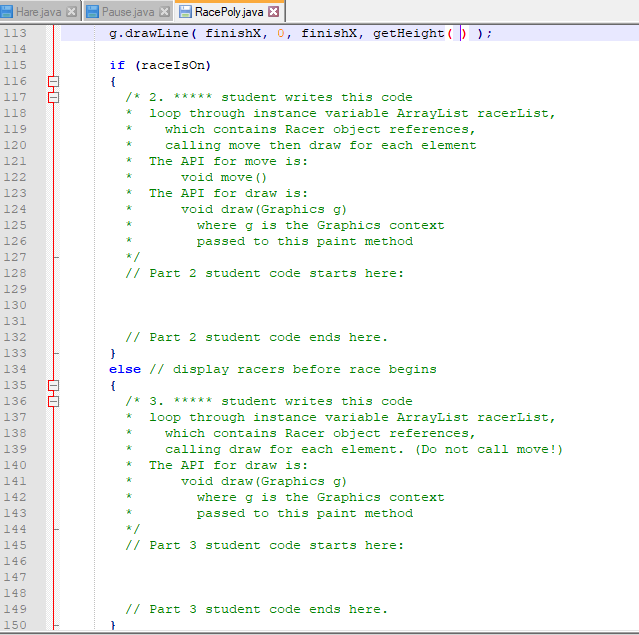
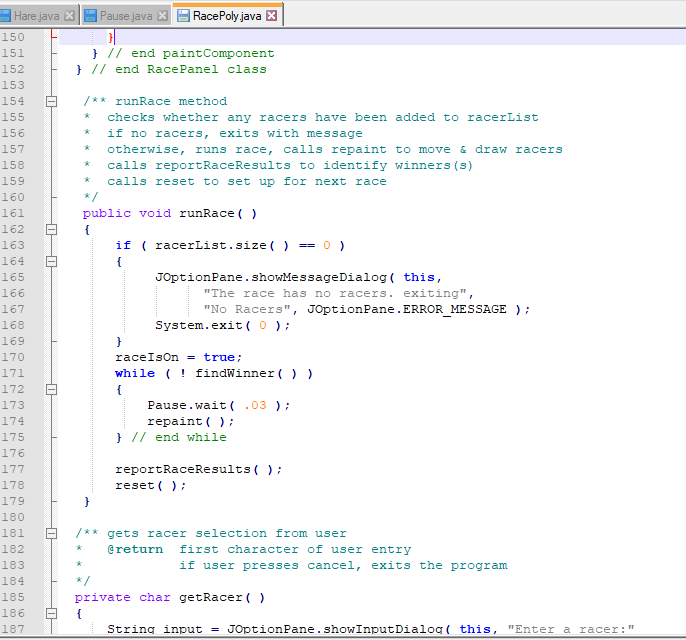
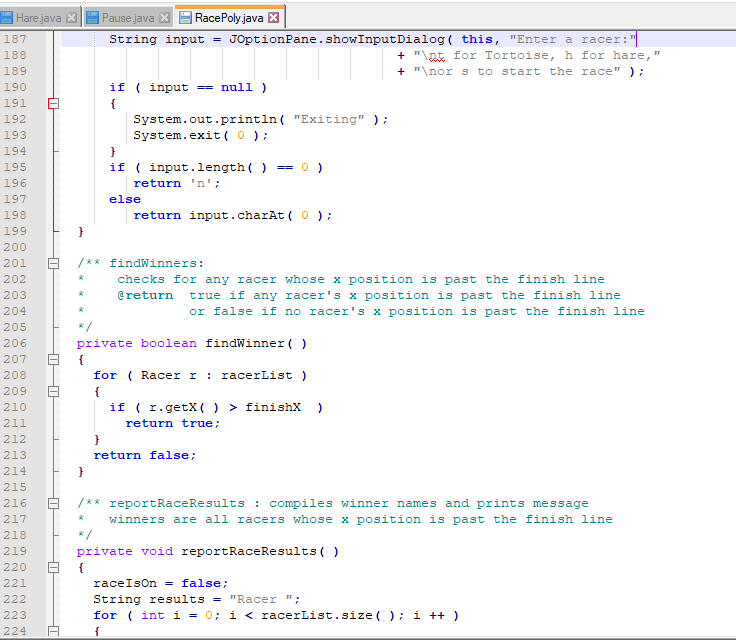
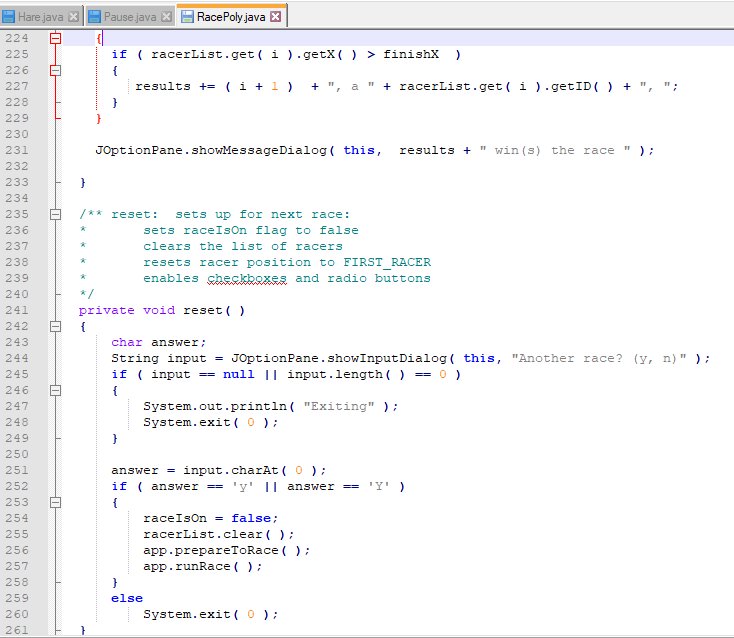
Programming Activity 10-2 Guidance ================================== Part 1 ------ In RacePoly.java, the framework comments specifically tell you to use a "switch" statement and what to do for each part. Here is the switch statement, but you have to replace the comments with your code: switch (input) { case 'T': case 't': // Your code break; case 'H': case 'h': // Your code break; default: // Your code break; } Compare this starting point to the comments and make sure you UNDERSTAND how this works. Now, add your code where indicated in the switch statement. Since the subject of this DF is code simplicity, I want you to know that each of these "// Your code" areas requires ONLY 2 or 3 lines of code, depending on how you code them. Incrementing review ------------------- Suppose you have the following starting code: int more = 5; int x = 0; Show the code to increase (increment) x by the value of the variable "more". Here are two alternative, but equivalent, ways to do it: x += more; // preferred by professional programmers or x = x + more; Parts 2 and 3 ------------- The framework comments say to: * loop through instance variable ArrayList racerList, * which contains Racer object references, You should know by now that the simplest way to loop through an ArrayList is by using an "enhanced for loop". Here is what the enhanced for loops will look like: for (Racer r : racerList) { // Your code goes here. // You will call functions using the Racer object named "r". // The code needed here is very short--only 1 or 2 lines. } Part 2 ------ For part 2, you should code only one enhanced for loop, not two. Both the move and the draw calls for each Racer take place inside that single loop.Please fill in the CODE for areas that says "student code starts and ends here" Your code GOES between each GREEN area. There are 3 parts please do all three. The screenshots have been posted...
Aswer the GREEN SENTENCES IN THE SCREENSHOT THAT SAYS "STUDENT CODE STARTS HERE- STUDENT CODE ENDS HERE.
I-Pause Java MRace Poly Java *The Tortoise and the Hare Race Hare Java 2 Anderson, ancesshi import java.awt.* import javax.swing. * import java.util.ArrayList 7 public class RacePoly extends JFrame 10 private ArrayListRacer> racerList; // racers stored in ArrayList private static RacePoly app private final int FIRST_RACER50 private int finishX: // location of finish line, dependent on window width private boolean raceIsOn -false private RacePanel racePanel 12 13 15 16 17 18 /* Constructor instantiates list to track racers 20 21 sets up GUI components public RacePoly) 23 2 4 25 26 27 28 29 30 31 32 super( "The Tortoise & The Hare!" Container c-getContentPane() racePanel new RacePanel() c.add racePanel, BorderLayout.CENTER ); racerList - new ArrayList setsize400, 400 setvisible true /** prepareToRace method 3 4 35 36 37 38 uses a dialog box to prompt user for racer types and to start the race racer types are't or 'T' for Tortoise, 'h'or 'H' for Hare Hare java X Pause jRacePoly java X 39 40 41 4 2 43 s' or 'S' will start the race x/ private void prepareToRace () // y position of first racer // x position of start of race int yPos = FIRST RACER: final int START LINE -40 final int RACER SPACE50:// spacing between racers char input 45 46 inputgetRacer/ get input from user 48 4 9 50 51 52 53 54 while (input!-s' && input !-'S) / 1 Student writes this switch statement input local char variable contains the racer type entered by the user If input is 'T' or 't', 56 57 58 59 add a Tortoise object to the ArrayList named racerList which is an instance variable of this class The API of the Tortoise constructor is: Tortoise (String ID, int startX, int startY) a sample call to the constructor is 61 62 new Tortoise ("Tortoise",START LINE, yPos) where START LINEis a constant local variable representing the starting x position for the race and yPos is a local variable representing 64 the next racer's y position 67 68 69 70 If input is 'H' or 'h', add a Hare object to the ArrayList named racerList The API of the Hare constructor is: Hare (String ID, int startX, int startY) a sample call to the constructor is 72 73 74 75 76 new Hare ("Hare", sSTART LINE, yPos) where START LINEis a constant local variable representing the starting x position for the race and yPos is a local variable representing the next racer's v position Hare javaPause java RacePoly java X 113 114 115 116 g.drawLine( finishX,0, finishX, getHeight( ) ) if (raceIsOn) /* 2. student writes this code 118 119 120 121 122 123 124 125 126 127 128 129 130 131 132 133 134 135 136 137 138 139 140 141 142 143 144 145 146 147 148 149 150 loop through instance variable ArrayList racerList, hich contains Racer object references, calling move then draw for each element The API for move is: void move () The API for draw is: void draw (Graphics g) where g is the Graphics context passed to this paint method Part 2 student code starts here: Part 2 student code ends here. else I/ display racers before race begins /* 3. student writes this code loop through instance variable ArrayList racerList, hich contains Racer object references, calling draw for each element. (Do not call move!) The API for draw is: void draw (Graphics g) where g is the Graphics context passed to this paint method Part 3 student code starts here: Part 3 student code ends here. Pause java M- RacePoly Java Hare java 150 151 152 153 154 155 156 157 158 159 160 161 162 163 164 165 166 167 168 169 170 // end paintComponent // end RacePanel class /* runRace method checks whether any racers have been added to racerList if no racers, exits with message otherwise, runs race, calls repaint to move &draw racers calls reportRaceResults to identify winners (s) calls reset to set up for next race public void runRace() if (racerList.size-0 ) JOptionPane.showMessageDialog ( this, "The race has no racers. exiting", "No Racers", JOptionPane. ERROR MESSAGE System.exit (0 raceIsontrue: while findwinner) 172 173 174 175 176 Pause.wait ( .03 repaint( // end while reportRaceResults ( reset 178 179 180 181 182 183 184 185 186 187 /** gets racer selection from user *return first character of user entry if user presses cancel, exits the program private char getRacer) String input = JOptionPane. showinputDialog ( this, "Enter a racer: " Hare java Pause java RacePoly java X 187 188 189 190 191 192 193 194 195 196 197 198 199 200 201 202 203 204 205 206 207 208 209 210 211 212 213 214 215 216 217 218 219 220 221 String input -JOptionPane.showInputDialog( this, "Enter a racer: + "t for Tortoise, h for hare," + " or s to start the race" ); if input null ) System.out.println( "Exiting") System.exit (0 if input.length()0) return 'n else return input.charAt( O) /findWinners: checks for any racer whose x position is past the finish 1ine return true if any racer's x position is past the finish line or false if no racer's x position is past the finish line x/ private boolean findwinner( ) for Racer r: racerList) if (r.getX( ) > finishX ) return true return false; /*reportRaceResults compiles winner names and prints message winners are all racers whose x position is past the finish line x/ private void reportRaceResults) raceIsOn -false String results "Racer" for (int i -0 i finishX ) results +- ( + ) + ", a " + racerList.get( 1 ).getID( ) + ", "; JOptionPane.showMessageDialog( this, results"in (s) the race" /** reset: sets up for next race: sets raceIsOn flag to false clears the list of racers resets racer position to FIRST RACER enables chestRQ2and radio buttons private void reset() char answer String input= JOptionPane.showInputDialog ( this, "Another race? (y, n)" ); if ( input =-null II input. Iength ( ) -0 ) System.out.println( "Exiting") System.exit (0 answerinput.charAt( 0 if answer- 'y' II answer'Y) race 1 son false ; racerList.clear() app.prepareToRace app.runRace) else System.exit (0 Hare java Pause jaRacePoly java 238 239 240 241 242 243 244 245 246 247 248 249 250 251 252 253 254 255 256 257 258 259 260 261 262 263 264 265 266 267 268 269 270 271 272 273 274 resets racer position to FIRST_RACER enables Sheskboxes and radio buttons private void reset char answer String input -JOptionPane.showInputDialog this, "Another race? if ( input =-null II input. length ( )-0 ) System.out.println( "Exiting") System.exit( o answer-input.charAt 0 nswer'y' 11 answer-'Y' answer== 'Y' ) raceIsOn -false racerList.clear() app.prepareToRace app.runRace( else System.exit (0 /** main instantiates the RacePoly object a calls runRace method public static void main( String args appnew RacePoly app.setDefaultcloseOperation ( JFrame.EXIT ON CLOSE app.prepareToRace app.runRace(









 Study Help