







Question: Programming Assignment 1.2 Assignment Description Youve decided that you really care about the different characteristics a number can have. For example, you might wonder if
Programming Assignment 1.2
Assignment Description Youve decided that you really care about the different characteristics a number can have. For example, you might wonder if the number is even or odd, or is the number is negative, zero, or positive.
In this assignment, you'll evaluate an integer to tell whether a number is even or odd and classify the number as negative, zero, or positive.
Getting Started
Download the appropriate zip file for your OS below and unzip the file somewhere on your computer.
Windows Programming Assignment 1.2 Materials ZIP File
Mac Programming Assignment 1.2 Materials ZIP File
Open the project in Visual Studio.
Important: You MUST only add code as indicated by the comments in that file. If you don't, you're virtually guaranteed to fail all the test cases in the automated grader.
Requirements
The code Ive provided in the Program.cs file reads in the number and stores it in an int variable named number. Your evaluation must use the value in that variable.
Your solution must do the following:
Print e if the number is even and o if the number is odd
Print a space
Print -1 if the number is negative, 0 if the number is 0, and 1 if the number is positive All of the above should be on a single line of output.
For example, if the number is -2, your output should be the following on a single line :
e -1
Wed typically label our output to tell the user what the output means, but that will just confuse the automated grader. You must print ONLY the values described above in your output, with the values appearing on a single line with a single space between them.
Running Your Code
Because of the code I included to work with the automated grader on Coursera, when you run your program the command prompt window will open and it will sit there doing nothing. To make your code run, type in an integer and press the key; your code should then run so you can check your output. For example, your input could be:
2
You can actually run your code again if you want to by typing in an integer and pressing the key again. When youre ready to stop running your code, type q (for quit).
Here's what running the code multiple times with different inputs should look like (remember, you're including a newline at the end of each of your output lines). The first line is the integer input, the second line is your output line, and so on:
-2
e -1
1
o 1
q
Important Note: The Coursera formatting makes it look like there's a blank line between each of the lines above, but there's not. The above output should be exactly 5 lines of output.
The image below shows my console window when I run the code multiple times as described above:
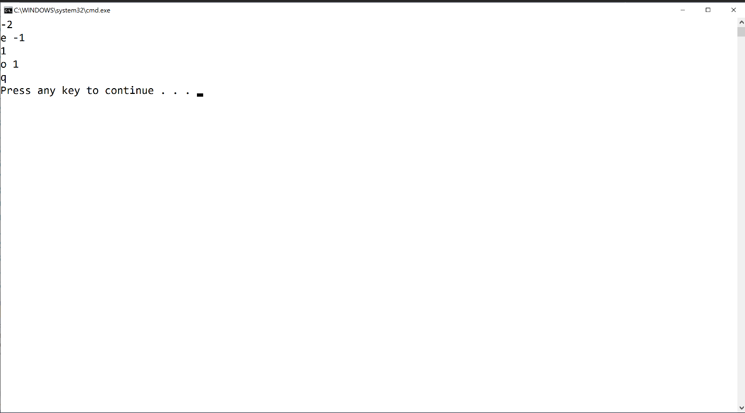
If your output doesn't match the image above EXACTLY (no extra words, characters, spaces, or blank lines) you'll fail all the test cases in the automated grader.
Mac users: You may have an extra blank line or no blank line at all after the q. That's fine.
Test Case Inputs The autograder uses the following set of test case inputs to test your code (1 test case per line):
1
2
0
-1
-2
Each test case runs twice (for a total of 10 test cases), so if you're failing 2 test cases you're failing for one of the test case inputs above.
You should figure out what the expected results are for each test case input and make sure your code is generating those expected results in the required format before submitting your code for grading.
Common Problems
Historically, lots of people post about grading errors on this assignment (because their code is wrong). Here are a couple things you should check:
1. You have to start with the Visual Studio project I gave you in the assignment materials and add your code in the section indicated. The code I gave you includes the appropriate structure for the automated grader to work. If you don't do this, you'll almost definitely fail all the test cases in the automated grader.
2. I give you an example in this assignment (and all assignments) for what output you should get when you run the code multiple times. Be sure to try that example; if your code doesn't generate output exactly as shown in the example, your code isn't working properly
using System;
namespace ProgrammingAssignment1 { // IMPORTANT: Only add code in the section // indicated below. The code I've provided // makes your solution work with the // automated grader on Coursera
///
///
// Add your code between this comment // and the comment below. You can of // course add more space between the // comments as needed
// Don't add or modify any code below // this comment input = Console.ReadLine(); } }
///
actwinoowssystemathond eve 2 e1 1 Press any key to continue
Step by Step Solution
There are 3 Steps involved in it

Get step-by-step solutions from verified subject matter experts
 Study Help