







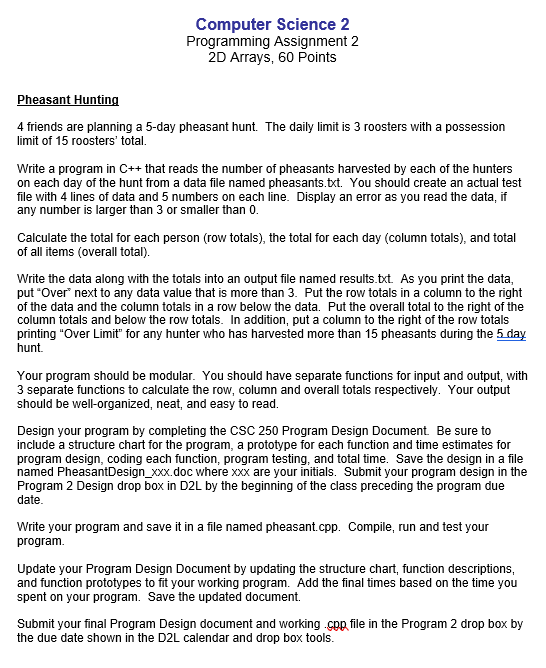
Question: Programming Assignment 2 2 D Arrays, 6 0 Points Pheasant Hunting 4 friends are planning a 5 - day pheasant hunt. The daily limit is
Programming Assignment
D Arrays, Points
Pheasant Hunting
friends are planning a day pheasant hunt. The daily limit is roosters with a possession
limit of roosters' total.
Write a program in that reads the number of pheasants harvested by each of the hunters
on each day of the hunt from a data file named pheasants.txt You should create an actual test
file with lines of data and numbers on each line. Display an error as you read the data, if
any number is larger than or smaller than
Calculate the total for each person row totals the total for each day column totals and total
of all items overall total
Write the data along with the totals into an output file named results.txt As you print the data,
put "Over" next to any data value that is more than Put the row totals in a column to the right
of the data and the column totals in a row below the data. Put the overall total to the right of the
column totals and below the row totals. In addition, put a column to the right of the row totals
printing "Over Limit" for any hunter who has harvested more than pheasants during the day
hunt.
Your program should be modular. You should have separate functions for input and output, with
separate functions to calculate the row, column and overall totals respectively. Your output
should be wellorganized, neat, and easy to read.
Design your program by completing the CSC Program Design Document. Be sure to
include a structure chart for the program, a prototype for each function and time estimates for
program design, coding each function, program testing, and total time. Save the design in a file
named PheasantDesignxxxdoc where xxx are your initials. Submit your program design in the
Program Design drop box in DL by the beginning of the class preceding the program due
date.
Write your program and save it in a file named pheasant.cpp Compile, run and test your
program.
Update your Program Design Document by updating the structure chart, function descriptions,
and function prototypes to fit your working program. Add the final times based on the time you
spent on your program. Save the updated document.
Submit your final Program Design document and working chp file in the Program drop box by
the due date shown in the DL calendar and drop box tools.
Step by Step Solution
There are 3 Steps involved in it
1 Expert Approved Answer
Step: 1 Unlock

Question Has Been Solved by an Expert!
Get step-by-step solutions from verified subject matter experts
Step: 2 Unlock
Step: 3 Unlock
 Study Help