







Question: Programming Challenge #5 in Starting Out with Visual Basic 7th Edition: I'm trying to work on this question, but I'm really stuck on it and
Programming Challenge #5 in Starting Out with Visual Basic 7th Edition:
I'm trying to work on this question, but I'm really stuck on it and trying to make the previous version as it states in the instructions got me stuck too. Any help is appreciated! I've made the GUI just like the picture in the bottom of the post.
Programming Challenge 4 in Chapter 5 asked you to create an application that measured room occupancy percentages in a hotel. Briefly, it was described this way: Create an application that calculates the occupancy rate for each floor, and the overall occupancy rate for the hotel. The occupancy rate is the percentage of rooms occupied, and may be calculated by dividing the number of rooms occupied by the number of rooms. The implementation of this application in Chapter 5 was constrained by the inability to use arrays and lists, so we suggested that you automatically increment the combo box index to select floors in strict ascending sequence (1, 2, 3, etc.).
For this assignment, modify your previous application so that it uses an array (or a list) to hold the occupancy counts for all of the floors (8 floors, 30 rooms on each floor). This change to the program code will allow the user to select floor numbers in the combo boc in any order. In Figure 8-50, for example, the user has selected the second and sixth floors, entering occupancy counts for each. In the figure, the user also clicked the Totals button. The ListBox was updated each time the user entered an occupancy count and clicked the Save button. The user may select floors in any order, even replacing a value for a floor that was entered before.
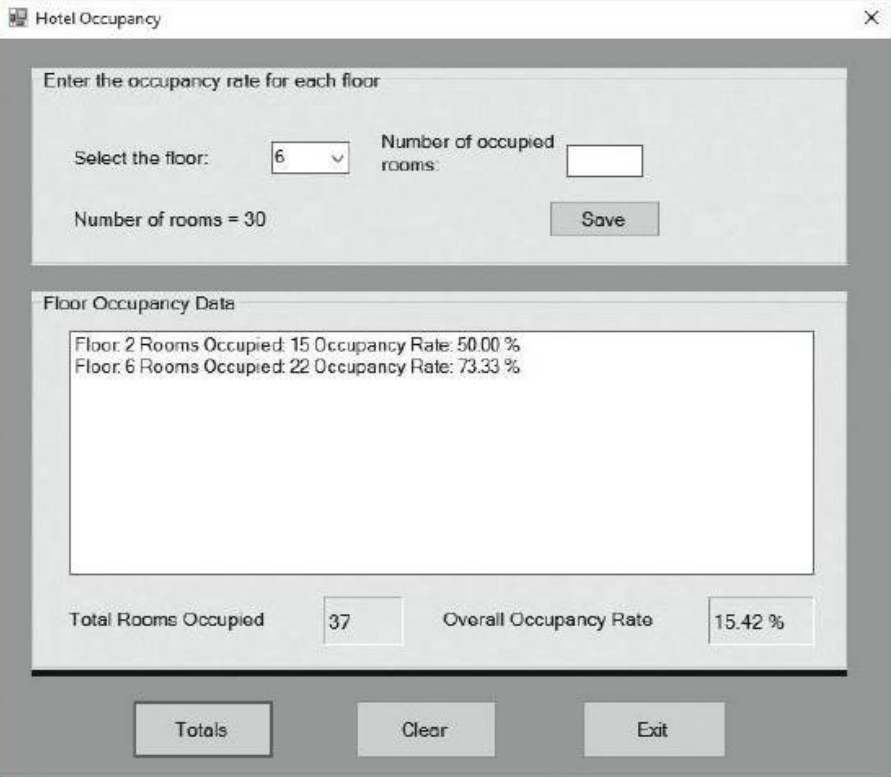
Figure 8-50
This is my code below, for some reason it doesnt seem to be working. please help!!
Public Class Form1
'To divide the number of rooms by the occupied rooms
'18/30 = .6 Or 60% And the hotel has 240 rooms.
'Below program performs the calculation of occupancy.
Private Sub btnReport_Click(ByVal sender As System.Object, ByVal e As System.EventArgs) Handles btnReport.Click
Const rooms As Integer = 30
Dim floor As Integer
Const maxFloor As Integer = 8
Dim occupancy As Integer
Dim occupancyRate As Double
Dim occupancySum As Integer
Dim overallRate As Double
lblOccupancyRate.Text = ""
lblRoomsOccupied.Text = ""
lstOutput.Items.Clear()
For floor = 1 To maxFloor
occupancy = InputBox("Enter the number of rooms occupied")
occupancyRate = (occupancy / rooms)
occupancySum += occupancy
overallRate = occupancySum / (rooms * floor)
lstOutput.Items.Add("Floor: " & floor & " Rooms Occupied: " & occupancy _
& " Occupancy Rate: " & occupancyRate.ToString("P2"))
lblRoomsOccupied.Text = occupancySum.ToString
lblOccupancyRate.Text = overallRate.ToString("P2")
Next
lstOutput.Items.Add("Total occupancy is " _
& occupancySum & " rooms - " & overallRate.ToString("P2") & " full.")
End Sub
Private Sub Button2_Click(sender As Object, e As EventArgs) Handles btnTotals.Click
Dim room As Double
'To hold rooms occupancy
Dim rate As Double 'To hold rooms occupancy rate
Dim overallRate As Double 'To hold overall rate
Dim i As Integer
'Calculate total rooms and occupied rate
'Display the result
lstOutput.Items.Add("Floor:" + i.ToString() + "" + "Rooms Occupied:" + room.ToString() + "" +
"Occupancy Rate:" + Format(rate, "0.00") + "%"
rate = (lblRoomsOccupied / 30) * 100
overallRate = (lblRoomsOccupied / 240) * 100
End Sub
End Class
Hotel occupancy Enter the occupancy rate for each floor Number of occupied Select the floor 6 rooms Number of rooms E 30 Save Floor occupancy Data Floor Rooms occupied 150ccupancy Rate: 50.00 Floor 6 Rooms occupied. 22 Occupancy Rate: 73.33% Overall Occupancy Rate 15.42 Total Rooms Occupied 37 Totals Exit Clear
Step by Step Solution
There are 3 Steps involved in it

Get step-by-step solutions from verified subject matter experts
 Study Help