







Question: Programming Concepts II Assignment 2 String Manipulation This assignment is an exercise in using string manipulation to edit and reformat input fields. Some fields have
Programming Concepts II Assignment 2 String Manipulation
This assignment is an exercise in using string manipulation to edit and reformat input fields. Some fields have patterns, some expect numeric values possibly with limits. Some fields are required (and cannot be just spaces), some are optional or conditionally optional, some will cause abends if null is not expected. Strings need to be trimmed of leading and trailing blanks, shifted to upper- or lower-case or capitalized.
This is also an exercise in creating and using reusable code code usable by multiple projects.
Wherever you see XX, replace it with your initials
- Create a XXValidation class with the following static methods:
- XXCapitalize this takes a string parameter and returns a string. Return an empty string if the input is null or empty. It should trim leading and trailing spaces, and change the first letter of each word (if it is a letter) to upper case and the remaining letters in each word to lower case. Watch 1-letter words.
- XXMemberCodeValidation - This takes a string and returns a Boolean. If the incoming string is null or an empty string, pass it (so method can be used where this is optional). Otherwise, return true if the string is 9 characters long and contains exactly 5 numbers and 4 upper-case letters in any order: AAAA66666 & 5A5A5AA55 are both valid.
- XXPhoneNumberValidation this takes a string and returns a Boolean. If the incoming string is null or empty, pass it. Otherwise, return true only if the entire string fits the phone pattern 123 123 1234 or 123.123.1234. Note for the space separator or period separator, either one can be used but not both (e.g. 123 123.1234 would be incorrect).
XXUKPostalValidation this takes a string by reference and returns a Boolean. If the incoming string is null or empty, pass it. Otherwise, return true only if the strings entire content fits the UK postal pattern A[A]3[A/3] 3AA (where 3 represents any digit, A represents any letter, [A] represents an optional letter, and [A/3] represents an optional letter or digit). Accept upper or lower case, with or without the space. If valid, shift the input string to uppercase characters and insert the space, if missing.
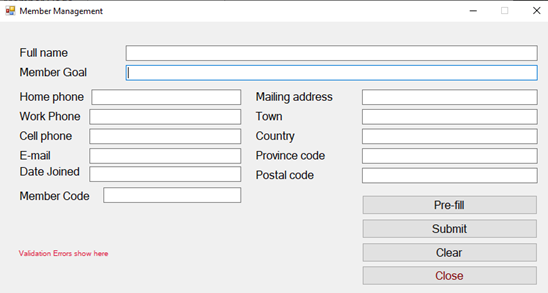
- Buttons:
- Pre-Fill loads the form with valid data making it easier to test individual field errors.
- Use this string as the Pre-Fill value for the Member Goal field: To Run 126 mileS; in 2 hours. Perform 300 situps, and Squat 100 pOUNDS, by January of 2021.
- Submit edits the current data on the form and reformats the fields back onto the form.
- All validation errors are displayed together on the form in a red label, rich text box or in a message box one line per error, with focus to the first field in error.
- Close closes the form.
- Pre-Fill loads the form with valid data making it easier to test individual field errors.
- Tab sequence should be down the top rows and the left column, then down the right column and the buttons.
- Perform the following validations (all fields are optional unless specified otherwise). All error messages are to be shown at once, one line per error, focus moved to the first field in error.
- Full name is required and must contain more than one name (eg First Name and Last Name).
- At least one phone number is required. Use your XXPhoneNumberValidation method to verify the phone number(s) provided.
- A non-blank Member Goal is required.
- Email must be a valid email pattern, if provide Theres a MailAddress class in the System.Net.Mail namespace that throws an exception when instantiated with an invalid email address. Theres also a plethora of indecipherable regular expressions out there.
- A non-blank Member Code is required. Use XXMemberCodeValidation to validate the code provided.
- The Date Joined cannot be in the future and should display in the format 2021 Jan 15.
- Mailing address and Town, if provided, must contain at least 3 letters.
- Province Code, if provided, must be exactly two letters, not just two characters.
- Postal code is required. Use XXUKPostalValidation to validate and format it.
- If Email is not provided, then Mailing Address, Town and Province Code are required.
- Perform the following data formatting
- Use your XXCapitalize method to format Full name, Member Goal, Mailing Address and Town.
- Remove all punctuation characters from Member Goals except the period(.).
- Shift the province code to upper case.
- Shift the email to lower case (its still valid, but easier to use for comparisons).
- The Postal code should be reformatted by XXUKPostalValidation.
Member Management - Full name Member Goal Home phone Work Phone Cell phone E-mail Date Joined Member Code Mailing address Town Country Province code Postal code Pre-fill Submit Validation Emo show here Clear Close
Step by Step Solution
There are 3 Steps involved in it

Get step-by-step solutions from verified subject matter experts
 Study Help