







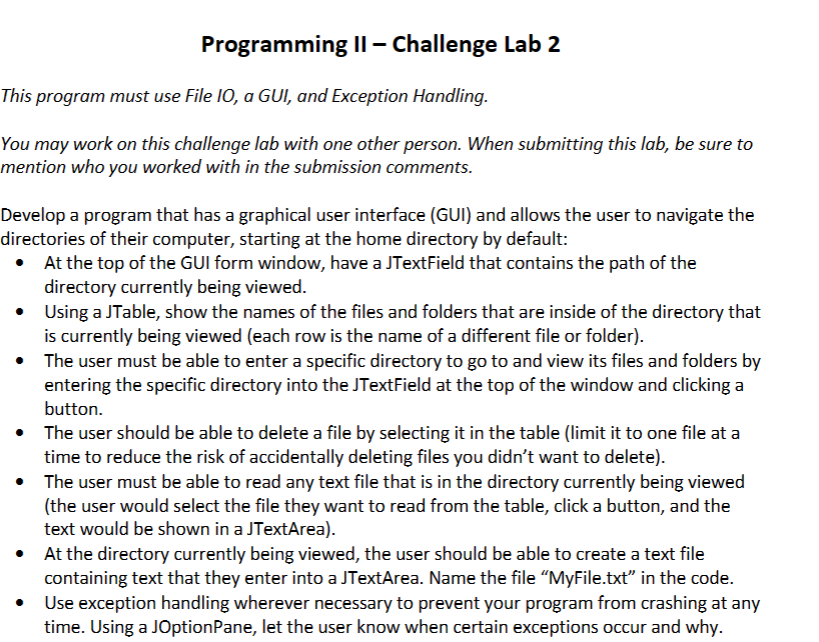
Question: Programming II - Challenge Lab 2 This program must use File IO , a GUI, and Exception Handling. You may work on this challenge lab
Programming II Challenge Lab
This program must use File IO a GUI, and Exception Handling.
You may work on this challenge lab with one other person. When submitting this lab, be sure to
mention who you worked with in the submission comments.
Develop a program that has a graphical user interface GUI and allows the user to navigate the
directories of their computer, starting at the home directory by default:
At the top of the GUI form window, have a JTextField that contains the path of the
directory currently being viewed.
Using a JTable, show the names of the files and folders that are inside of the directory that
is currently being viewed each row is the name of a different file or folder
The user must be able to enter a specific directory to go to and view its files and folders by
entering the specific directory into the JTextField at the top of the window and clicking a
button.
The user should be able to delete a file by selecting it in the table limit it to one file at a
time to reduce the risk of accidentally deleting files you didn't want to delete
The user must be able to read any text file that is in the directory currently being viewed
the user would select the file they want to read from the table, click a button, and the
text would be shown in a JTextArea
At the directory currently being viewed, the user should be able to create a text file
containing text that they enter into a JTextArea. Name the file "MyFile.txt in the code.
Use exception handling wherever necessary to prevent your program from crashing at any
time. Using a JOptionPane, let the user know when certain exceptions occur and why.
Step by Step Solution
There are 3 Steps involved in it
1 Expert Approved Answer
Step: 1 Unlock

Question Has Been Solved by an Expert!
Get step-by-step solutions from verified subject matter experts
Step: 2 Unlock
Step: 3 Unlock
 Study Help