







Question: Programming in C: I have measured data divided into 100 steps. I want to read this data in C and save the temperature as a
Programming in C:
I have measured data divided into 100 steps. I want to read this data in C and save the temperature as a latex file. It should be output with a nice temperature curve. On the Y axis the temperature should appear and on the X axis the 100 steps. But this does not work for me. Can someone fix me the code? The data file looks like this: x y temperature 0.292886,-0.015196,21.379749 . . . X and y are not important. Only temperature is important
Here is a picture from the data in the .csv file.
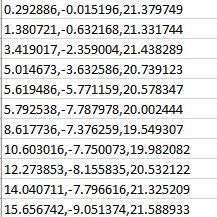
Please fix my code in C:
Here is my code:
#include
int main() { FILE *input_file, *tex_file;
input_file = fopen("result.csv", "r"); if (!input_file) { printf("fail to open result.csv "); exit(1); }
tex_file = fopen("path.tex", "w"); if (!tex_file) { printf("fail to open path.tex "); exit(1); }
// write tex head const char *tex_head = "\\documentclass{report} \\usepackage{tikz} \\begin{document} " "\\begin{tikzpicture}[x=0.1cm,y=0.1cm] \\draw "; fputs(tex_head, tex_file);
char line[1024]; double x, y; while (fgets(line, sizeof(line), input_file)) { char *save = line; char *_x = strtok_r(line, ",", &save); x = atof(_x); char *_y = strtok_r(NULL, ",", &save); y = atof(_y); fprintf(tex_file, "(%f,%f)--", x, y); } fprintf(tex_file, "(%f,%f); ", x, y);
// write tex tail const char *tex_tail = "\\end{tikzpicture} \\end{document}"; fputs(tex_tail, tex_file);
fclose(input_file); fclose(tex_file); }
0.292886,-0.015136,21.373749 1.380721,-0.632168,21.331744 3.419017,-2.353004,21.438289 5.014673,-3.632586,20.739123 5.619486,-5,771159,20.578347 5.732538,-7.787978,20.002444 8.617736,-7.376259,19.549307 10.603016, -7.750073,19.982082 12.273853-8.155835,20.532122 14.040711-7,796616,21.325209 15.656742,-9.051374,21.588933 0.292886,-0.015136,21.373749 1.380721,-0.632168,21.331744 3.419017,-2.353004,21.438289 5.014673,-3.632586,20.739123 5.619486,-5,771159,20.578347 5.732538,-7.787978,20.002444 8.617736,-7.376259,19.549307 10.603016, -7.750073,19.982082 12.273853-8.155835,20.532122 14.040711-7,796616,21.325209 15.656742,-9.051374,21.588933
Step by Step Solution
There are 3 Steps involved in it

Get step-by-step solutions from verified subject matter experts
 Study Help