







Question: programming language: Java for processing A3 (30 marks) Focus: Using Variables to Control Animation Q1. (115) Create a program that animates the creation of shapes
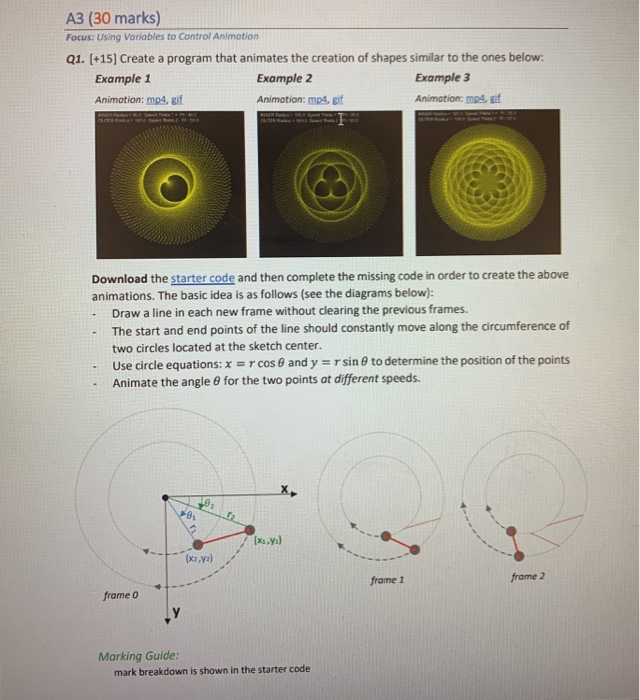
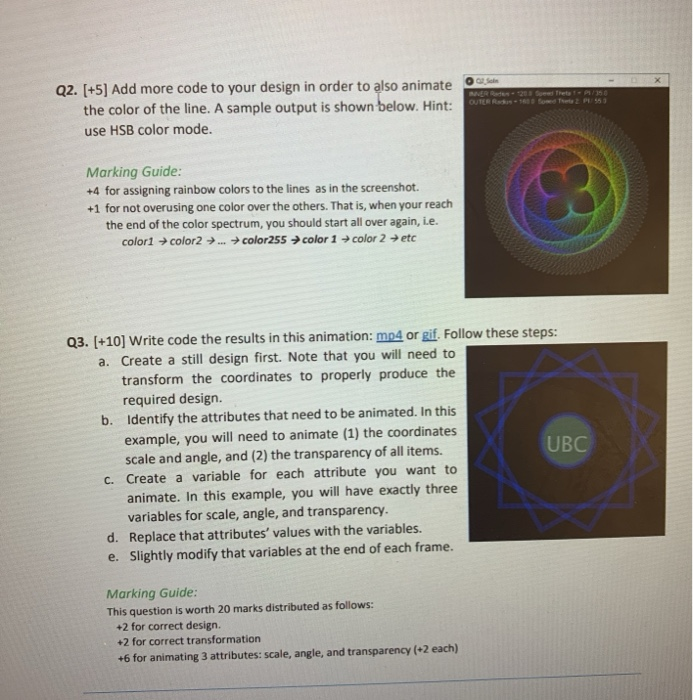
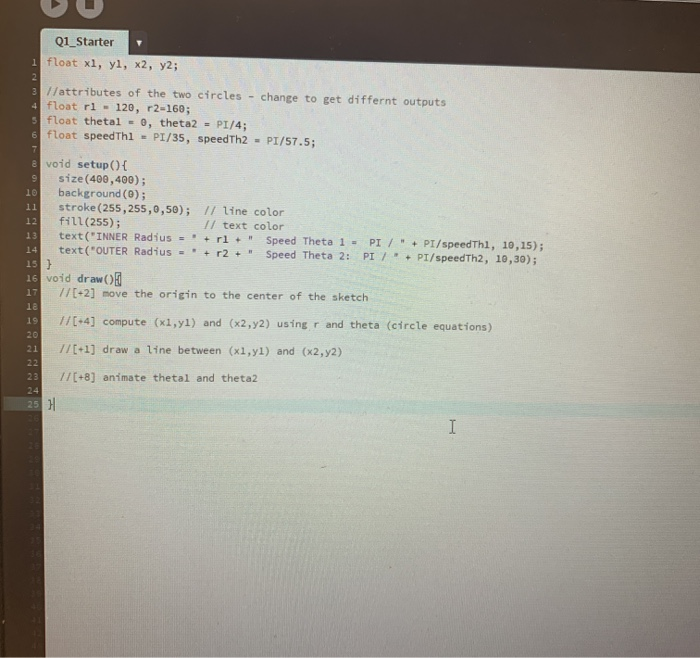
A3 (30 marks) Focus: Using Variables to Control Animation Q1. (115) Create a program that animates the creation of shapes similar to the ones below: Example 1 Example 2 Example 3 Animation: mp4, gif Animation: mp4, gif Animation.mp, git Download the starter code and then complete the missing code in order to create the above animations. The basic idea is as follows (see the diagrams below): Draw a line in each new frame without clearing the previous frames. - The start and end points of the line should constantly move along the circumference of two circles located at the sketch center. Use circle equations: x=rcos 8 and y = r sine to determine the position of the points Animate the angle for the two points at different speeds. . ya) frome 1 frame 2 frame o Marking Guide: mark breakdown is shown in the starter code OS L L .. . OUTER - 10 Bored The URER Q2. [+5) Add more code to your design in order to also animate the color of the line. A sample output is shown below. Hint: use HSB color mode. PE 553 Marking Guide: +4 for assigning rainbow colors to the lines as in the screenshot. +1 for not overusing one color over the others. That is, when your reach the end of the color spectrum, you should start all over again, i.e. color1 color2 ... color255 color 1 color 2 etc Q3. (+10) Write code the results in this animation: mp4 or gif. Follow these steps: a. Create a still design first. Note that you will need to transform the coordinates to properly produce the required design. b. Identify the attributes that need to be animated. In this example, you will need to animate (1) the coordinates UBC scale and angle, and (2) the transparency of all items. C. Create a variable for each attribute you want to animate. In this example, you will have exactly three variables for scale, angle, and transparency. d. Replace that attributes' values with the variables. e. Slightly modify that variables at the end of each frame. Marking Guide: This question is worth 20 marks distributed as follows: +2 for correct design. +2 for correct transformation +6 for animating 3 attributes: scale, angle, and transparency (+2 each) Q1_Starter 1 float x1, yi, x2, y2; 3 Hattributes of the two circles - change to get differnt outputs 4 float ri - 120, r2-160; s float thetal - e, theta2 - PI/4; 6 float speedThi - PI/35, speedTh2 - PI/57.5; 20 void setup() { size(400,400); background(0); stroke (255,255,0,50); // line color fill(255); Il text color text("INNER Radius=rl + " Speed Theta 1 - PI/" + PI/speedThi, 10, 15); 14 text("OUTER Radius="+r2 + " Speed Theta 2: PI7 + PI/speedTh2, 10,30); 15 } 16 void draw 17 //[+2) move the origin to the center of the sketch 13 19 20 1/[4) compute (x1,yl) and (x2,72) using r and theta (circle equations) 1/[+1) draw a line between (x1,yl) and (x2,y2) 17(+8) animate thetal and theta2 25 H A3 (30 marks) Focus: Using Variables to Control Animation Q1. (115) Create a program that animates the creation of shapes similar to the ones below: Example 1 Example 2 Example 3 Animation: mp4, gif Animation: mp4, gif Animation.mp, git Download the starter code and then complete the missing code in order to create the above animations. The basic idea is as follows (see the diagrams below): Draw a line in each new frame without clearing the previous frames. - The start and end points of the line should constantly move along the circumference of two circles located at the sketch center. Use circle equations: x=rcos 8 and y = r sine to determine the position of the points Animate the angle for the two points at different speeds. . ya) frome 1 frame 2 frame o Marking Guide: mark breakdown is shown in the starter code OS L L .. . OUTER - 10 Bored The URER Q2. [+5) Add more code to your design in order to also animate the color of the line. A sample output is shown below. Hint: use HSB color mode. PE 553 Marking Guide: +4 for assigning rainbow colors to the lines as in the screenshot. +1 for not overusing one color over the others. That is, when your reach the end of the color spectrum, you should start all over again, i.e. color1 color2 ... color255 color 1 color 2 etc Q3. (+10) Write code the results in this animation: mp4 or gif. Follow these steps: a. Create a still design first. Note that you will need to transform the coordinates to properly produce the required design. b. Identify the attributes that need to be animated. In this example, you will need to animate (1) the coordinates UBC scale and angle, and (2) the transparency of all items. C. Create a variable for each attribute you want to animate. In this example, you will have exactly three variables for scale, angle, and transparency. d. Replace that attributes' values with the variables. e. Slightly modify that variables at the end of each frame. Marking Guide: This question is worth 20 marks distributed as follows: +2 for correct design. +2 for correct transformation +6 for animating 3 attributes: scale, angle, and transparency (+2 each) Q1_Starter 1 float x1, yi, x2, y2; 3 Hattributes of the two circles - change to get differnt outputs 4 float ri - 120, r2-160; s float thetal - e, theta2 - PI/4; 6 float speedThi - PI/35, speedTh2 - PI/57.5; 20 void setup() { size(400,400); background(0); stroke (255,255,0,50); // line color fill(255); Il text color text("INNER Radius=rl + " Speed Theta 1 - PI/" + PI/speedThi, 10, 15); 14 text("OUTER Radius="+r2 + " Speed Theta 2: PI7 + PI/speedTh2, 10,30); 15 } 16 void draw 17 //[+2) move the origin to the center of the sketch 13 19 20 1/[4) compute (x1,yl) and (x2,72) using r and theta (circle equations) 1/[+1) draw a line between (x1,yl) and (x2,y2) 17(+8) animate thetal and theta2 25 H
Step by Step Solution
There are 3 Steps involved in it

Get step-by-step solutions from verified subject matter experts
 Study Help