







Question: Project 1 2 - 2 : Student Registration Create a GUI application that accepts student registration data. The GUI with valid data Student Registration First
Project : Student Registration
Create a GUI application that accepts student registration data.
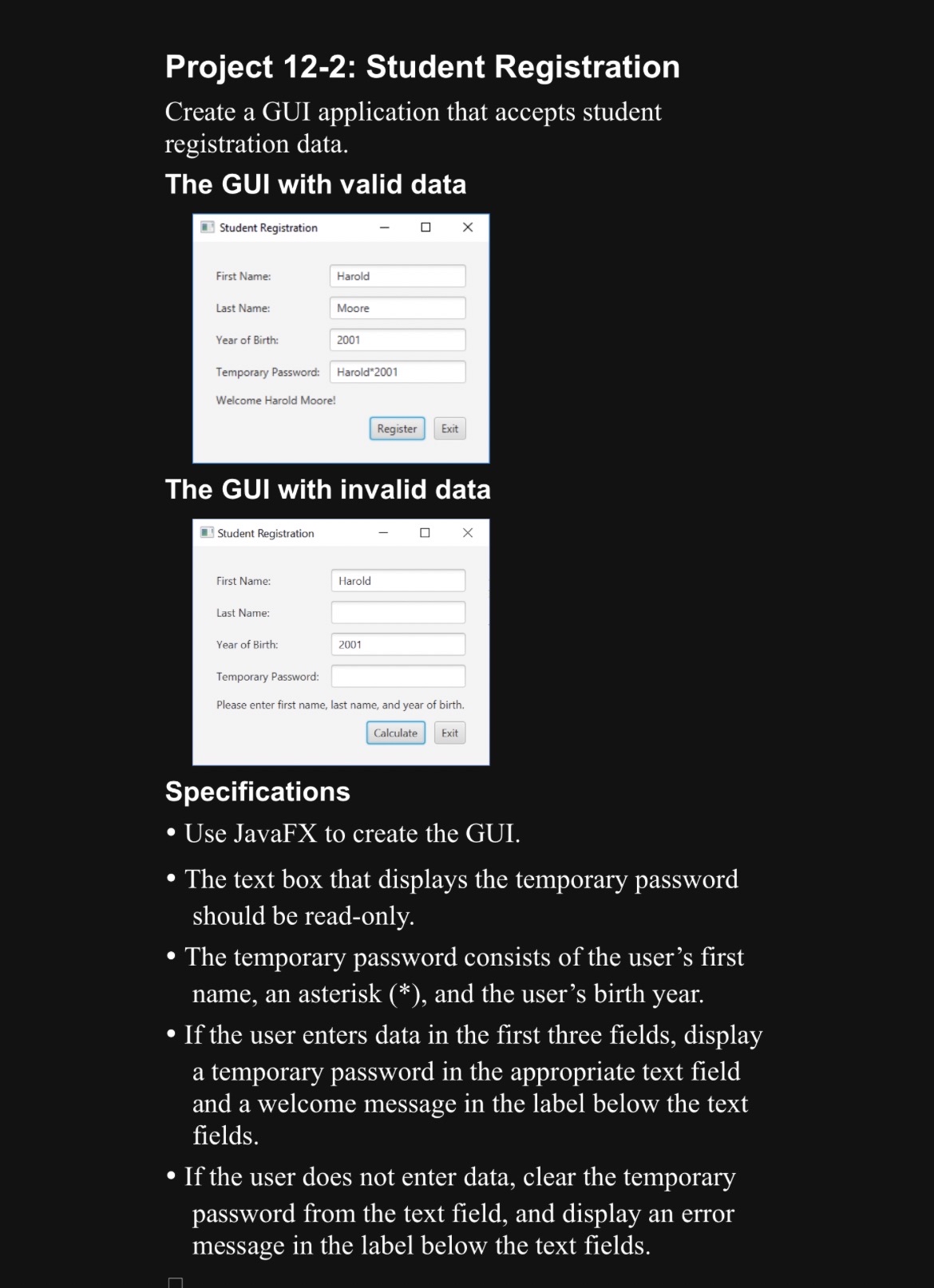
The GUI with valid data
Student Registration
First Name:
Last Name:
Year of Birth:
Harold
Temporary Password:
Moore
Welcome Harold Moore!
Harold
The GUI with invalid data
Student Registration
First Name:
Last Name:
Year of Birth:
Temporary Password:
Please enter first name, last name, and year of birth.
Specifications
Use JavaFX to create the GUI.
The text box that displays the temporary password should be readonly.
The temporary password consists of the user's first name, an asterisk and the user's birth year.
If the user enters data in the first three fields, display a temporary password in the appropriate text field and a welcome message in the label below the text fields.
If the user does not enter data, clear the temporary password from the text field, and display an error message in the label below the text fields.
Step by Step Solution
There are 3 Steps involved in it
1 Expert Approved Answer
Step: 1 Unlock

Question Has Been Solved by an Expert!
Get step-by-step solutions from verified subject matter experts
Step: 2 Unlock
Step: 3 Unlock
 Study Help