







Question: Project 1 - Create a basic calculator Overall Project Instruction: Create a form that lets the user perform the operations provided by a basic calculator.
Project 1 - Create a basic calculator Overall Project Instruction: Create a form that lets the user perform the operations provided by a basic calculator. Plus create a class that performs the required operations. Use the attached file for complete instructions plus some hints.
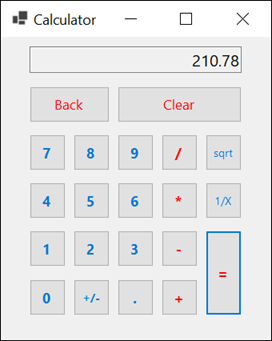
Operation
To perform an addition, subtraction, multiplication, or division operation, the user clicks the first number, followed by the appropriate operator key (+, -,*, /), followed by the second number and the equals key (=).
To perform an addition, subtraction, multiplication, or division operation on the result of a previous operation, the user clicks another operator key, followed by another number and the equals key.
The user can also repeat the previous operation on the result by clicking the equals keys without first clicking another operator and number.
To perform a square root or reciprocal operation, or to change the sign of a number, the user clicks the number followed by the appropriate operator key(sqrt, 1/X, +/-).
To perform a square root or reciprocal operation on the result of a previous operation, the user clicks the appropriate operator key.
Each time the user clicks a number key, the number is displayed in the text box at the top of the form. This text box also displays the result of an operation when the user clicks the sqrt, 1/X, +/-, or = key.
To erase the last digit entered, the user clicks the Back key.
To clear all the values entered, the user clicks the Clear key.
Specification
Create a class named Calculator that implements the functions of the calculator. For suggested design methods and properties for this class go to the last page.
If the user tries to divide a number by zero, the calculator should display an error message in the text box. The form class should use a try-catch statement to catch a divide-by-zero exception.
use visual studios
210.78 Back Clear 7 8 9/ sqrt 4 5 6 1/x 1 2 3 = 0
Step by Step Solution
There are 3 Steps involved in it

Get step-by-step solutions from verified subject matter experts
 Study Help