







Question: Project 14: Data Types For this assignment. Use the PowerPoint frame Quantitative vs. Qualitative table format as illustrated in DataInfo.pptx Download DataInfo.pptxframe #12 as your
Project 14: Data Types
For this assignment.
- Use the PowerPoint frame "Quantitative vs. Qualitative" table format as illustrated inDataInfo.pptx Download DataInfo.pptxframe #12 as your guide,
- Create a new table of 25 examples of data items consisting of all data types (some items could have multiple data types).
- Include quantitative sub-types (counts, measures, and variables) also visual characteristics.
- Include qualitative data elements such as numeric Constantsand descriptions.
The picture below is cut off from DataInfo.pptx
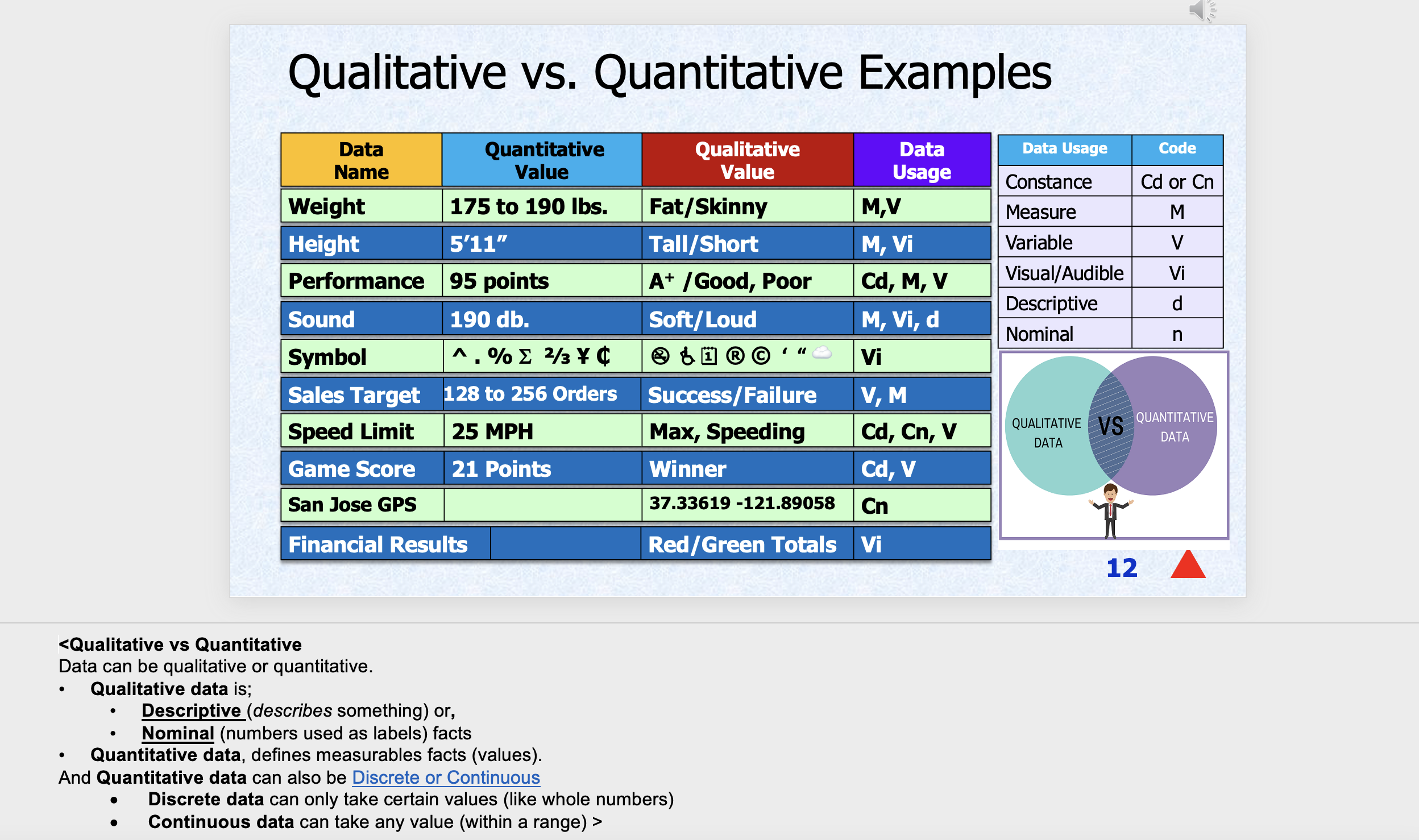
Qualitative vs. Quantitative Examples Sales Target 77 128 to 256 Orders Financial Results
Step by Step Solution
There are 3 Steps involved in it

Get step-by-step solutions from verified subject matter experts
 Study Help