







Question: Project 2 : Air Traffic Control Simulation Introduction One day in 2 0 5 0 , you are the air traffic controller sitting at the
Project : Air Traffic Control Simulation
Introduction
One day in you are the air traffic controller sitting at the control tower at ATL, enjoying your
morning coffee. Suddenly, you receive a radio call saying that an airplane, A declares an emergency
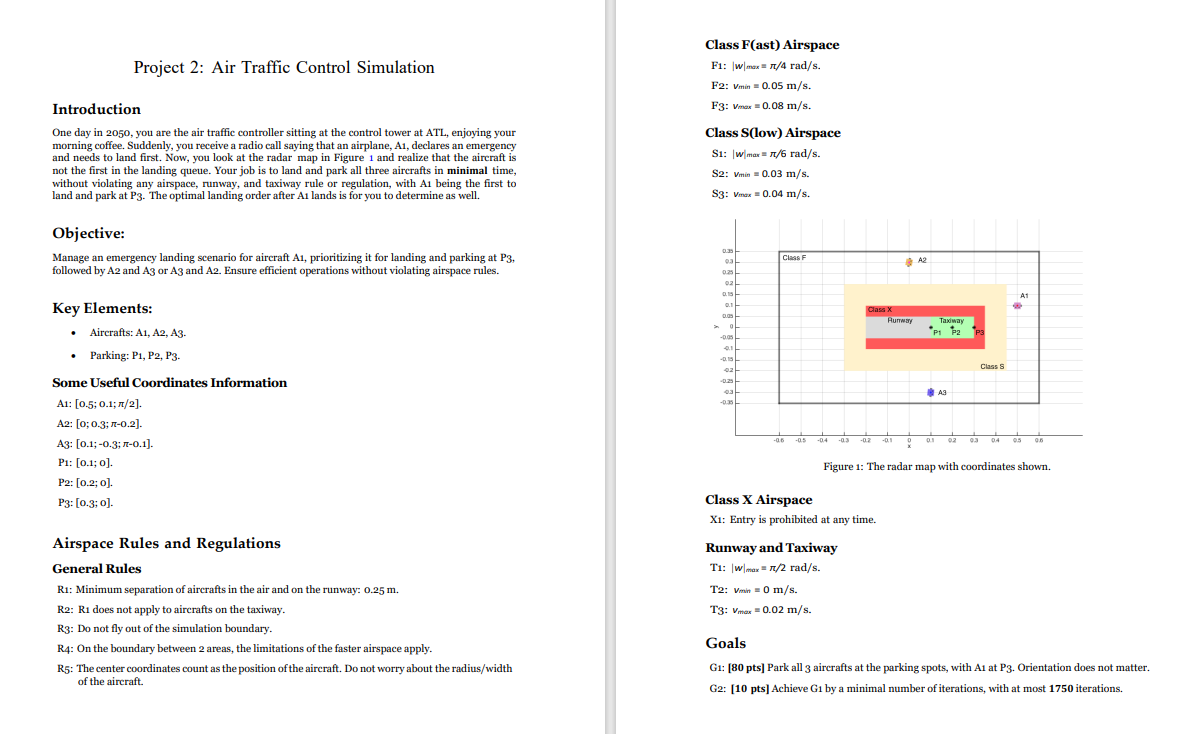
and needs to land first. Now, you look at the radar map in Figure and realize that the aircraft is
not the first in the landing queue. Your job is to land and park all three aircrafts in minimal time,
without violating any airspace, runway, and taxiway rule or regulation, with being the first to
land and park at The optimal landing order after A lands is for you to determine as well.
Objective:
Manage an emergency landing scenario for aircraft A prioritizing it for landing and parking at
followed by and or and Ensure efficient operations without violating airspace rules.
Key Elements:
Aircrafts: A A A
Parking: P P P
Some Useful Coordinates Information
A: ;;
A: ;;
A: ;;
P: ; o
P: ;
:;
Airspace Rules and Regulations
General Rules
R: Minimum separation of aircrafts in the air and on the runway:
R: R does not apply to aircrafts on the taxiway.
R: Do not fly out of the simulation boundary.
R: On the boundary between areas, the limitations of the faster airspace apply.
R: The center coordinates count as the position of the aircraft. Do not worry about the radiuswidth
of the aircraft.
Class Fast Airspace
:
F:
F:
Class Slow Airspace
S:
S:
Ss:
Class X Airspace
: Entry is prohibited at any time.
Runway and Taxiway
T:
T:
:
GOALS:
G: DESIGN ALGORITHM AND WRITE MATLAB CODE TO Park all aircrafts at the parking spots, with A at P Orientation does not matter.
G: DEVELOP MATLAB CODE TO Achieve G by a minimal number of iterations, with at most iterations.
BASE STRUCTURE MATLAB CODE ON WHICH THE GOALS HAVE TO BE DEVELOPED:
Simulator Skeleton File Project
This file provides the barebones requirements for interacting with the
Robotarium. Note that this code won't actually run. You'll have to
insert your own algorithm! If you want to see some working code, check
out the 'examples' folder.
close all
Get Robotarium object used to communicate with the robotssimulator
N ;
r RobotariumNumberOfRobots N 'ShowFigure', true, 'InitialConditions', ;;pi pi pi;
data ;
Select the number of iterations for the experiment.
iterations ; Do not change
Other important variables
initpos; ; pi;
initpos; ; pi;
initpos; ; pi;
target ; ;
targetalt ; ;
Place Static Variables Here
Do not modify anything outside this area
var ;
Do not modify anything outside this area
Iterate for the previously specified number of iterations
for t :iterations
Retrieve the most recent poses from the Robotarium. The time delay is
approximately seconds
p rgetposes;
Plot the traces every iterations
if modt
plotppkppmppb;
end
Success check with position tolerance embedded
if isequalroundp:: target isequalroundp:: targetalt
fprintfSuccess The final iteration number is d
t;
break
end
Place Algorithm Here
Do not modify anything outside this area
u ;
You can try with u ; first. Observe what happens to
get a sense of how it works.
Step by Step Solution
There are 3 Steps involved in it
1 Expert Approved Answer
Step: 1 Unlock

Question Has Been Solved by an Expert!
Get step-by-step solutions from verified subject matter experts
Step: 2 Unlock
Step: 3 Unlock
 Study Help