







Question: Project 22-3: Manage customer data (GUI) Operation This application begins by displaying a table of customer data. If the user clicks the Add button, the
Project 22-3: Manage customer data (GUI)
Operation
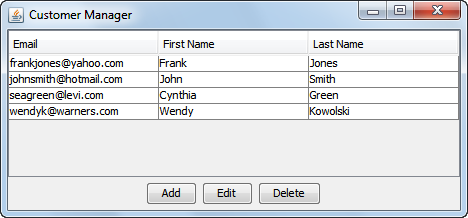
This application begins by displaying a table of customer data.
If the user clicks the Add button, the application allows the user to add customer data to the table (and the underlying database).
If the user selects a customer row and clicks the Edit button, the application allows the user to update the data for the selected customer row in the table (and the database).
If the user selects a customer row and clicks the Delete button, the application deletes the selected customer row from the table (and the database).
Specifications
Create a table in the mma database described in chapter 19 to store the necessary data. To do that, you can use the SQL script stored in the create_customer_table.sql file thats supplied. If this script isnt supplied, you can create your own SQL script.
Create a class named Customer that stores data for the users id, email address, first name, and last name.
Create a class named CustomerDB that contains the methods necessary to get an array list of Customer objects, to get a Customer object for the customer with the specified id, and to add, update, or delete the specified customer.
Create a CustomerManagerFrame class like the one shown above. This frame should display a table of customer data as well as the Add, Edit, and Delete buttons. This class should use the Customer and CustomerDB classes to work with the customer data.
Create a CustomerForm class that allows the user to add or edit customer data.
141 Customer Manager Email frankjo johnsmith@hotmail.com seagreen@levi.com wendyk@warners.com First Name Frank John Cynthia Wendy Last Name ones Smith Green Kowolski nes@yahoo.com Add Edit Delete
Step by Step Solution
There are 3 Steps involved in it

Get step-by-step solutions from verified subject matter experts
 Study Help