







Question: Project # 3 - Multiprocessing in Python Problem You are tasked with creating a Python program capable of executing the first 1 0 0 iterations
Project # Multiprocessing in Python
Problem
You are tasked with creating a Python program capable of executing the first iterations of a modified cellular life simulator. This simulator will receive the path to the input file as an argument containing the starting cellular matrix. The program must then simulate the next iterations based on the algorithm discussed on the next few pages. The simulation is guided by a handful of simplistic rules that will result in a seemingly complex simulation of cellular organisms.
Guidance and Rules
The following two sections outline the guiding principles for your simulation application and suggest a sequential framework for tackling the problem. Your approach should be divided into two distinct phases: the serial computation phase and the concurrent computation phase. Each phase is broken into one or more stages and after completing each stage, it is highly recommended to rigorously test your program before proceeding to the subsequent one.
Phase Serial Computation
Stage Data Retrieval
Your solution should begin by parsing and verifying the command line arguments as they are described in the Command Line Argunents section on page
Stage Reading and Writing Matrix Files
Stage Reading the Matrix Fike
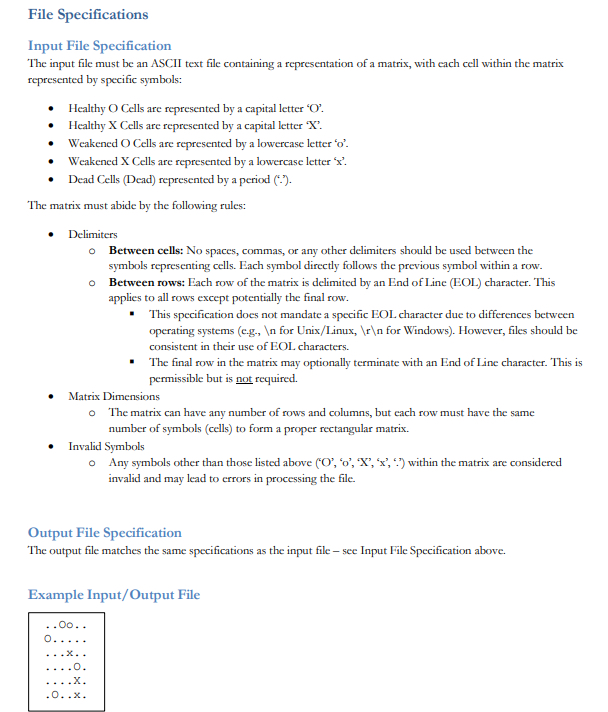
Once your solution has verified the command line arguments, it should read in the matrix written into the input file given by the command line argument This file will follow the specification as described in the Input File Speafication section on page This matrix will represent the starting matrix Time Step from which matrix processing will occur as discussed in Stage Matrix Processing.
Stage Writing the Matrix File
Upon completion of all generations from Slage Matrix Processing, your solution must write the generated matrix Time Step to an output file. The name and location of this output file is determined by the command line argument o This output file will follow the specification as described in the Output File Specififation section on page
Stage Matrix Processing
Your solution will accept the starting matrix Time Step from a file given in the command line argument and then simulate steps through The final matrix Time Step will then be written to an output file whose name and path is dictated by a separate command line argument. These files must contain a copy of your matrix with each row of the matrix printed on separate lines and no characters in between the columns.
Using the matrix retrieved from the input file given, your solution must then process the next steps of a simulation that uses the following symbols and rules to dictate what occurs during each time step.
Stage Symbols
Your solution should be able to read and handle the following symbols, with each symbol representing a specific integer value.
Cells that contain a capital letter O are considered "Healthy O Cells" during this iteration.
Cells that contain a capital letter X are considered "Healthy X Cells" during this iteration.
Cells that contain a lowercase letter o are considered "Weakened O Cells" during this iteration.
Cells that contain a lowercase letter are considered "Weakened X Cells" during this iteration.
Cells that contain a period are considered "dead" during this iteration.
Stage Iterative Rules
Your solution will need to read the data from the current iteration matrix and write output to the next iteration. This is necessary to ensure that each cell is calculated irrespective of what the other cells are doing in the same iteration. For each of the iterations, the following rules must be applied to each cell in the matrix in the order they are written below:
For each cell of the matrix, sum up the neighboring cells using the following rules:
a Neighboring cells that are "Healthy O Cells" are equal to two
b Neighboring cells that are "Weakened O Cells" are equal to one
c Neighboring cells that are "dead" are equal to zero
d Neighboring cells that are "Weakened X Cells" are equal to negative one
e Neighboring cells that are "Healthy X Cells" are equal to negative two
If the current cell is a healthy O cell
a If the sum of neighbor values is a power of the cell immediately dies.
b Otherwise, if the sum of neighbor values is less than then it becomes a weakened cell.
c Otherwise, the cell remains unchanged.
If the current cell is a weakened cell
a If the sum of neighbor values is less than or equal to the cell immediately dies.
b Otherwise, if the sum of neighbor values is greater than or equal to then it becomes a healthy O cell.
c Otherwise, the cell remains unchanged.
If the current cell is a dead cell
a If the sum of neighbor values is a prime number, the cell
Step by Step Solution
There are 3 Steps involved in it
1 Expert Approved Answer
Step: 1 Unlock

Question Has Been Solved by an Expert!
Get step-by-step solutions from verified subject matter experts
Step: 2 Unlock
Step: 3 Unlock
 Study Help