







Question: Project 3, Using Microsoft Visual C# Main form for the application fmStudents Constructor of class- fnmStudent create instance on class Course Grade btnl.oadData call method-
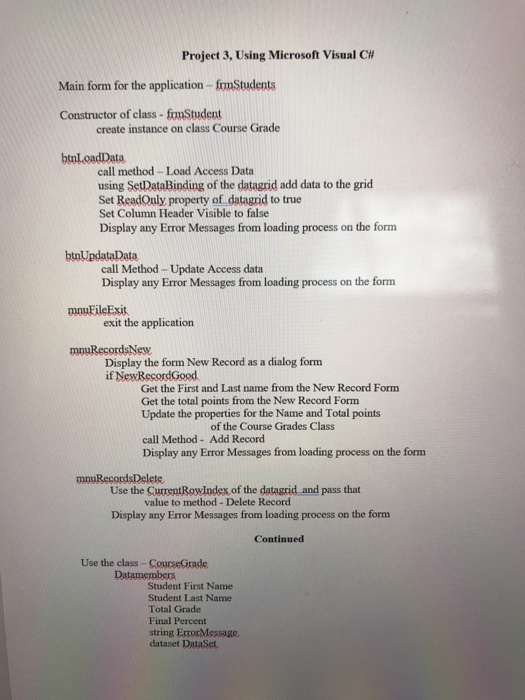
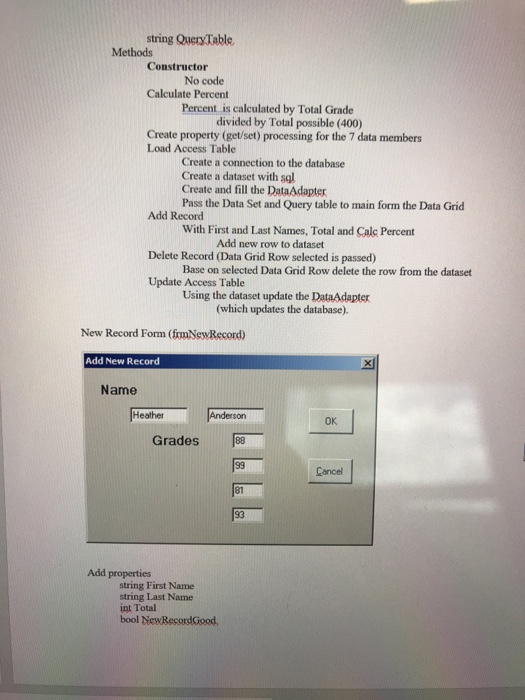

Project 3, Using Microsoft Visual C# Main form for the application fmStudents Constructor of class- fnmStudent create instance on class Course Grade btnl.oadData call method- Load Access Data using SetDataBinding of the datagrid add data to the grid Set ReadQuly property of datagrid to true Set Column Header Visible to false Display any Error Messages from loading process on the form btnUpdataData call Method- Update Access data Display any Error Messages from loading process on the form mnuFileExit exit the application mnuRecordsNew Display the form New Record as a dialog form if NewBesordGood Get the First and Last name from the New Record Form Get the total points from the New Record Form Update the properties for the Name and Total points of the Course Grades Class call Method- Add Record Display any Error Messages from loading process on the form Use the CurrentRowIndex, of the datagrid and pass that value to method Delete Record Display any Error Messages from loading process on the form Continued Use the class-CourseGrade Student First Name Student Last Name Total Grade Final Percent dataset DataSet Project 3, Using Microsoft Visual C# Main form for the application fmStudents Constructor of class- fnmStudent create instance on class Course Grade btnl.oadData call method- Load Access Data using SetDataBinding of the datagrid add data to the grid Set ReadQuly property of datagrid to true Set Column Header Visible to false Display any Error Messages from loading process on the form btnUpdataData call Method- Update Access data Display any Error Messages from loading process on the form mnuFileExit exit the application mnuRecordsNew Display the form New Record as a dialog form if NewBesordGood Get the First and Last name from the New Record Form Get the total points from the New Record Form Update the properties for the Name and Total points of the Course Grades Class call Method- Add Record Display any Error Messages from loading process on the form Use the CurrentRowIndex, of the datagrid and pass that value to method Delete Record Display any Error Messages from loading process on the form Continued Use the class-CourseGrade Student First Name Student Last Name Total Grade Final Percent dataset DataSet
Step by Step Solution
There are 3 Steps involved in it

Get step-by-step solutions from verified subject matter experts
 Study Help