







Question: Project 8-4: Country List Manager Console Country List Manager COMMAND MENU 1- List countries 2 Add a country 3 - Exit Enter menu number:
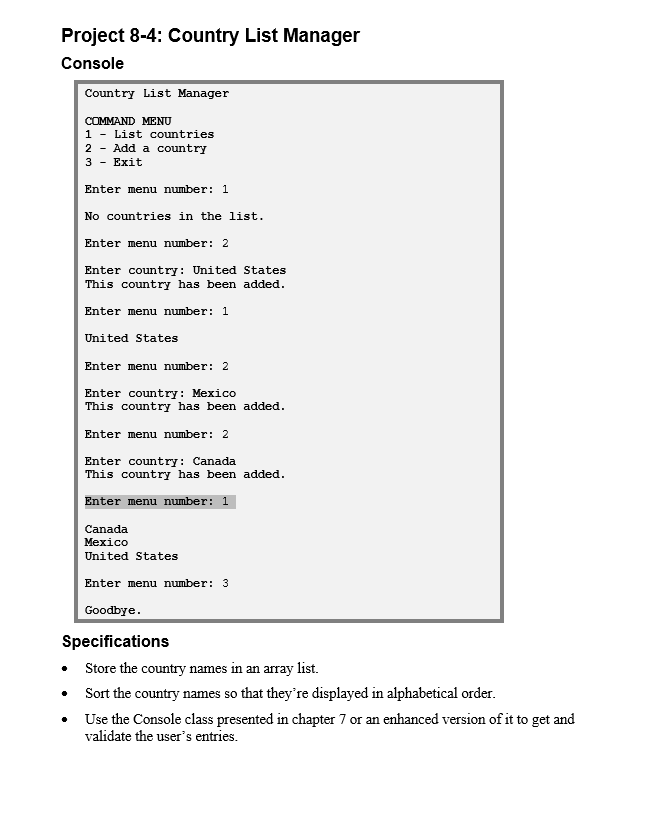
Project 8-4: Country List Manager Console Country List Manager COMMAND MENU 1- List countries 2 Add a country 3 - Exit Enter menu number: 1 No countries in the list. Enter menu number: 2 Enter country: United States This country has been added. Enter menu number: 1 United States Enter menu number: 2 Enter country: Mexico This country has been added. Enter menu number: 2 Enter country: Canada This country has been added. Enter menu number: 1 Canada Mexico United States Enter menu number: 3 Goodbye. Specifications Store the country names in an array list. Sort the country names so that they're displayed in alphabetical order. Use the Console class presented in chapter 7 or an enhanced version of it to get and validate the user's entries.
Step by Step Solution
There are 3 Steps involved in it

Get step-by-step solutions from verified subject matter experts
 Study Help