







Question: Project Assignment Make your own four-bar linkage simulator in Matlab. To do this, create a function (fourBarSim.m) for your program that has the following inputs
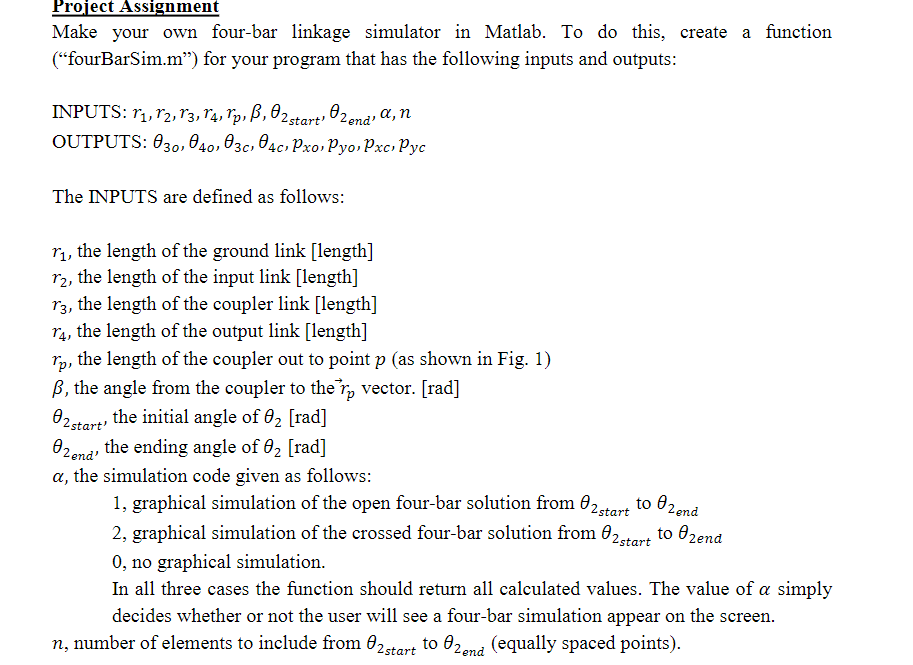
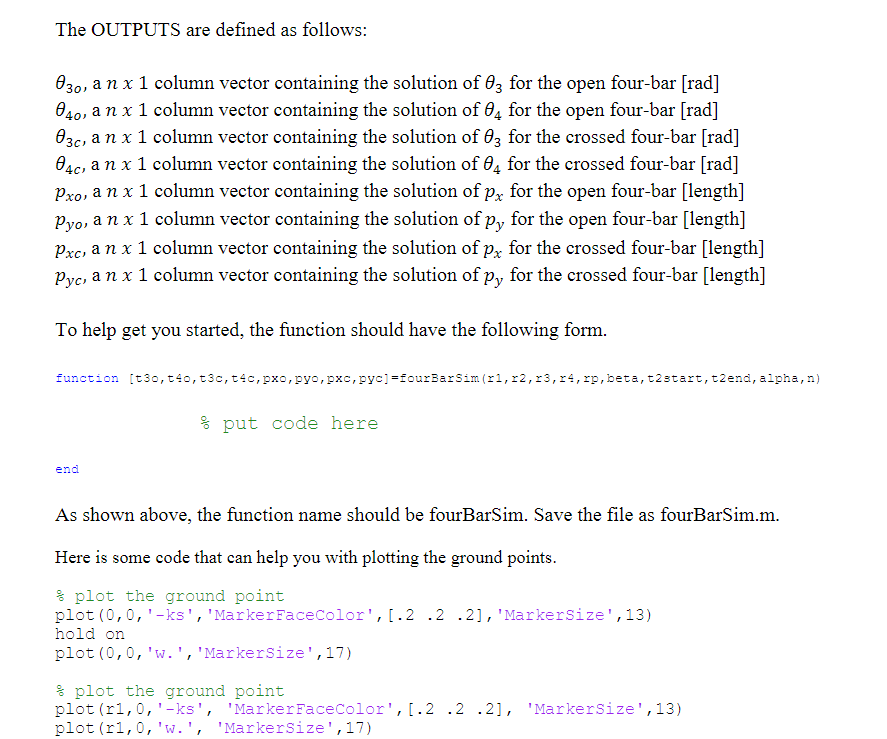
Project Assignment Make your own four-bar linkage simulator in Matlab. To do this, create a function ("fourBarSim.m) for your program that has the following inputs and outputs: INPUTS: 11, 82, 83, 84, rp, B, C2start, Czend, a, n OUTPUTS: 030, 040, 03, 04c, Pxo, Pyo, Pxc, Pyc The INPUTS are defined as follows: ry, the length of the ground link [length] r2, the length of the input link [length] r3, the length of the coupler link [length] r4, the length of the output link [length] ry, the length of the coupler out to point p (as shown in Fig. 1) B, the angle from the coupler to the ro vector. [rad] O2 start, the initial angle of 62 [rad] Czend, the ending angle of 62 [rad] a, the simulation code given as follows: 1, graphical simulation of the open four-bar solution from @2start to end 2, graphical simulation of the crossed four-bar solution from start to Ozend 0, no graphical simulation. In all three cases the function should return all calculated values. The value of a simply decides whether or not the user will see a four-bar simulation appear on the screen. n, number of elements to include from @2start to 62end (equally spaced points). The OUTPUTS are defined as follows: 030, a n x 1 column vector containing the solution of 0; for the open four-bar (rad] 040, a n x 1 column vector containing the solution of 04 for the open four-bar (rad] 03c, a n x 1 column vector containing the solution of 63 for the crossed four-bar (rad] 04c, a n x 1 column vector containing the solution of 4 for the crossed four-bar (rad] Pxo, a n x 1 column vector containing the solution of px for the open four-bar [length] Pyo, a nx 1 column vector containing the solution of py for the open four-bar [length] Pxc, a n x 1 column vector containing the solution of px for the crossed four-bar [length] Pyc, a n x 1 column vector containing the solution of py for the crossed four-bar [length] To help get you started, the function should have the following form. function (t30, 140, t3c, t4c,pxo, pyo, pxc,pye) =fourBarsim(r1,22,23,24,, beta, t2start, t2end, alpha, n) % put code here end As shown above, the function name should be fourBarSim. Save the file as fourBarSim.m. Here is some code that can help you with plotting the ground points. & plot the ground point plot(0,0,'-ks', 'Marker FaceColor', [.2.2.2], 'MarkerSize', 13) hold on plot(0,0,'w.', 'Markersize',17) & plot the ground point plot (r1,0,'-ks', 'Marker FaceColor', [.2.2.2], 'MarkerSize', 13) plot(r1,0, 'W.', 'MarkerSize', 17) Project Assignment Make your own four-bar linkage simulator in Matlab. To do this, create a function ("fourBarSim.m) for your program that has the following inputs and outputs: INPUTS: 11, 82, 83, 84, rp, B, C2start, Czend, a, n OUTPUTS: 030, 040, 03, 04c, Pxo, Pyo, Pxc, Pyc The INPUTS are defined as follows: ry, the length of the ground link [length] r2, the length of the input link [length] r3, the length of the coupler link [length] r4, the length of the output link [length] ry, the length of the coupler out to point p (as shown in Fig. 1) B, the angle from the coupler to the ro vector. [rad] O2 start, the initial angle of 62 [rad] Czend, the ending angle of 62 [rad] a, the simulation code given as follows: 1, graphical simulation of the open four-bar solution from @2start to end 2, graphical simulation of the crossed four-bar solution from start to Ozend 0, no graphical simulation. In all three cases the function should return all calculated values. The value of a simply decides whether or not the user will see a four-bar simulation appear on the screen. n, number of elements to include from @2start to 62end (equally spaced points). The OUTPUTS are defined as follows: 030, a n x 1 column vector containing the solution of 0; for the open four-bar (rad] 040, a n x 1 column vector containing the solution of 04 for the open four-bar (rad] 03c, a n x 1 column vector containing the solution of 63 for the crossed four-bar (rad] 04c, a n x 1 column vector containing the solution of 4 for the crossed four-bar (rad] Pxo, a n x 1 column vector containing the solution of px for the open four-bar [length] Pyo, a nx 1 column vector containing the solution of py for the open four-bar [length] Pxc, a n x 1 column vector containing the solution of px for the crossed four-bar [length] Pyc, a n x 1 column vector containing the solution of py for the crossed four-bar [length] To help get you started, the function should have the following form. function (t30, 140, t3c, t4c,pxo, pyo, pxc,pye) =fourBarsim(r1,22,23,24,, beta, t2start, t2end, alpha, n) % put code here end As shown above, the function name should be fourBarSim. Save the file as fourBarSim.m. Here is some code that can help you with plotting the ground points. & plot the ground point plot(0,0,'-ks', 'Marker FaceColor', [.2.2.2], 'MarkerSize', 13) hold on plot(0,0,'w.', 'Markersize',17) & plot the ground point plot (r1,0,'-ks', 'Marker FaceColor', [.2.2.2], 'MarkerSize', 13) plot(r1,0, 'W.', 'MarkerSize', 17)
Step by Step Solution
There are 3 Steps involved in it

Get step-by-step solutions from verified subject matter experts
 Study Help