







Question: ' project ch11_ex1_MonthSales includes the two classes below MonthSelectorApp.java (MonthSalesApp) import java.text.NumberFormat; public class MonthSelectorApp { public static void main(String[] args) { System.out.println(Monthly Sales );
'
![public class MonthSelectorApp { public static void main(String[] args) { System.out.println("Monthly Sales](https://dsd5zvtm8ll6.cloudfront.net/si.experts.images/questions/2024/09/66f57f46ac04c_93366f57f45d9f0e.jpg)
project ch11_ex1_MonthSales includes the two classes below
MonthSelectorApp.java (MonthSalesApp)
import java.text.NumberFormat;
public class MonthSelectorApp {
public static void main(String[] args) { System.out.println("Monthly Sales "); // declare monthNames and monthSales arrays
// get currency formatting NumberFormat currency = NumberFormat.getCurrencyInstance(); // get one or more months String choice = "y"; while (choice.equalsIgnoreCase("y")) { // get the input from the user int monthNumber = Console.getInt("Enter month number: "); // validate input if (monthNumber monthName.length) { Console.displayLine("Invalid month number. Try again."); continue; } // get the index number for the month // and display the month name and sales
// check if the user wants to continue choice = Console.getString("Continue? (y): "); Console.displayLine(); } // display the total sales for the year Console.displayLine(); }
}
Console.java
import java.util.Scanner;
public class Console {
private static Scanner sc = new Scanner(System.in); public static void displayLine() { System.out.println(); }
public static void displayLine(String s) { System.out.println(s); }
public static String getString(String prompt) { System.out.print(prompt); String s = sc.nextLine(); return s; }
public static int getInt(String prompt) { int i = 0; while (true) { System.out.print(prompt); try { i = Integer.parseInt(sc.nextLine()); break; } catch (NumberFormatException e) { System.out.println("Error! Invalid integer. Try again."); } } return i; }
public static double getDouble(String prompt) { double d = 0; while (true) { System.out.print(prompt); try { d = Double.parseDouble(sc.nextLine()); break; } catch (NumberFormatException e) { System.out.println("Error! Invalid decimal. Try again."); } } return d; } }
1. Use proper statement indentation and meaningful variable names in the code.
2. Add a multi-line description of this application that also includes your name and the date written at the beginning of the code.
3. Add appropriate descriptive comments to each line of code you add to the project explaining why the code is in the application.
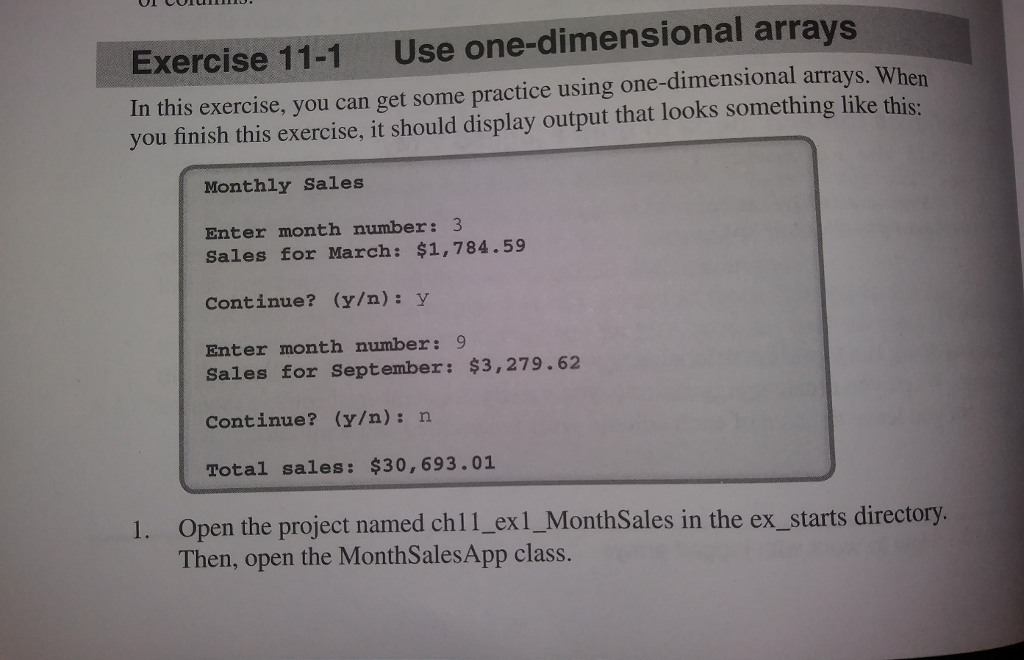
Exercise 11-1 Use one-dimensional arrays In this exercise, you can get some practice using one-dimensional arrays. When you finish this exercise, it should display output that looks something like this: Monthly Sales Enter month number: 3 Sales for March: $1,784.59 Continue? (y): y Enter month number: Sales for September: $3,279.62 Continue? (y): n Total sales: $30,693.01 1. Open the project named chl1_exl_MonthSales in the ex starts directory. Then, open the MonthSalesApp class
Step by Step Solution
There are 3 Steps involved in it

Get step-by-step solutions from verified subject matter experts
 Study Help