







Question: project ch12_ex2_FutureValue includes the following classes Console.java import java.util.Scanner; public class Console { private static Scanner sc = new Scanner(System.in); public static String getString(String prompt)
project ch12_ex2_FutureValue includes the following classes
Console.java
import java.util.Scanner;
public class Console { private static Scanner sc = new Scanner(System.in);
public static String getString(String prompt) { System.out.print(prompt); String s = sc.next(); // read user entry sc.nextLine(); // discard any other data entered on the line return s; }
public static int getInt(String prompt) { int i = 0; boolean isValid = false; while (!isValid) { System.out.print(prompt); if (sc.hasNextInt()) { i = sc.nextInt(); isValid = true; } else { System.out.println("Error! Invalid integer. Try again."); } sc.nextLine(); // discard any other data entered on the line } return i; }
public static int getInt(String prompt, int min, int max) { int i = 0; boolean isValid = false; while (!isValid) { i = getInt(prompt); if (i = max) { System.out.println( "Error! Number must be less than " + max + "."); } else { isValid = true; } } return i; }
public static double getDouble(String prompt) { double d = 0; boolean isValid = false; while (!isValid) { System.out.print(prompt); if (sc.hasNextDouble()) { d = sc.nextDouble(); isValid = true; } else { System.out.println("Error! Invalid number. Try again."); } sc.nextLine(); // discard any other data entered on the line } return d; }
public static double getDouble(String prompt, double min, double max) { double d = 0; boolean isValid = false; while (!isValid) { d = getDouble(prompt); if (d = max) { System.out.println( "Error! Number must be less than " + max + "."); } else { isValid = true; } } return d; } }
FutureValueApp.java
import java.util.*; import java.text.*;
public class FutureValueApp {
public static void main(String[] args) { // display a welcome message System.out.println("Welcome to the Future Value Calculator"); System.out.println();
// perform 1 or more calculations String choice = "y"; while (choice.equalsIgnoreCase("y")) {
// get the input from the user System.out.println("DATA ENTRY"); double monthlyInvestment = Console.getDouble( "Enter monthly investment: ", 0, 1000); double interestRate = Console.getDouble( "Enter yearly interest rate: ", 0, 30); int years = Console.getInt( "Enter number of years: ", 0, 100);
// calculate the future value double monthlyInterestRate = interestRate/12/100; int months = years * 12; double futureValue = calculateFutureValue( monthlyInvestment, monthlyInterestRate, months);
// get the currency and percent formatters NumberFormat currency = NumberFormat.getCurrencyInstance(); NumberFormat percent = NumberFormat.getPercentInstance(); percent.setMinimumFractionDigits(1);
// format the result as a single string String results = "Monthly investment:\t" + currency.format(monthlyInvestment) + " " + "Yearly interest rate:\t" + percent.format(interestRate/100) + " " + "Number of years:\t" + years + " " + "Future value:\t\t" + currency.format(futureValue) + " ";
// print the results System.out.println(); System.out.println("FORMATTED RESULTS"); System.out.println(results); // see if the user wants to continue choice = Console.getString("Continue? (y): "); System.out.println(); } }
public static double calculateFutureValue(double monthlyInvestment, double monthlyInterestRate, int months) { double futureValue = 0; for (int i = 1; i
1. Use proper statement indentation and meaningful variable names in the code.
2. Add a multi-line description of this application that also includes your name and the date written at the beginning of the code.
3. Add appropriate descriptive comments to each line of code you add to the project explaining why the code is in the application.
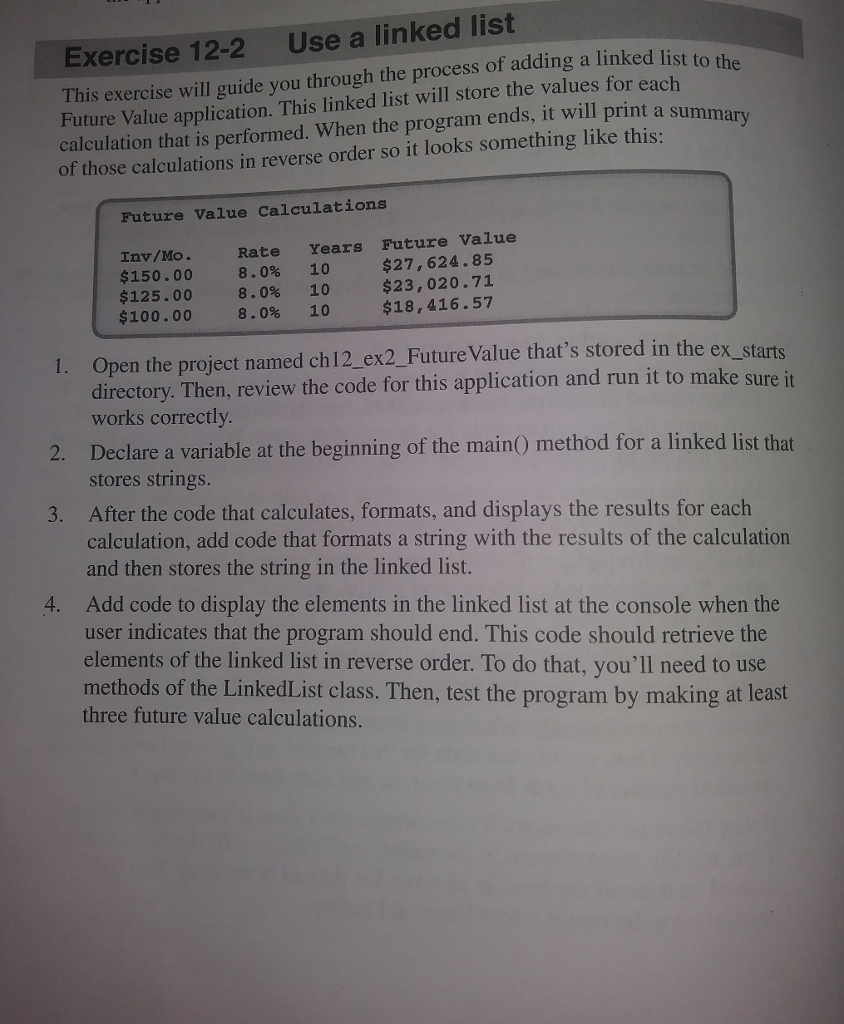
Exercise 12-2 Use a linked list Future Value application. This linked list will store the values for each calculation that is performed. When the program ends, it will print a of those calculations in reverse order so it looks something like this: exereise will guide you through the process of adding a linked list to Future Value Calculations Inv/Mo. Rate Years Future Value $27,624.85 $23,020.71 $18,416.57 $150.00 8.0% 10 $125.00 8.0% 10 $100.00 8.0% 10 Open the project named ch12_ex2_Future Value that's stored in the ex directory. Then, review the code for this application and run it to make sure it I. _starts works correctly Declare a variable at the beginning of the main stores strings. method for a linke 3. After the code that calculates, formats, and displays the results for each calculation, add code that formats a string with the results of the calculation and then stores the string in the linked list. Add code to display the elements in the linked list at the console when the user indicates that the program should end. This code should retrieve the elements of the linked list in reverse order. To do that, you'll need to use 4. methods of the LinkedList class. Then, test the program by making at least three future value calculations
Step by Step Solution
There are 3 Steps involved in it

Get step-by-step solutions from verified subject matter experts
 Study Help