







Question: Project : Connect Four Overview: For this project, you are going to create a program to play Connect 4. Goal: The goal of the project
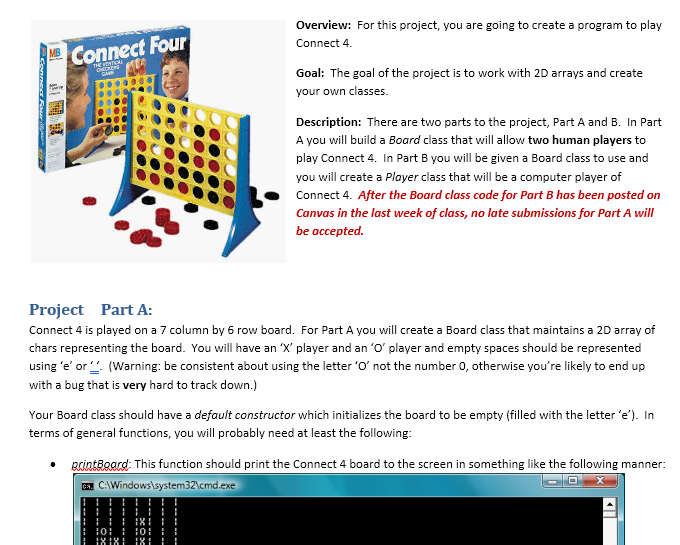
Project : Connect Four Overview: For this project, you are going to create a program to play Connect 4. Goal: The goal of the project is to work with 2D arrays and create your own classes. Description: There are two parts to the project, Part A and B. In Part A you will build a Board class that will allow two human players to play Connect 4. In Part B you will be given a Board class to use and you will create a Player class that will be a computer player of Connect 4.
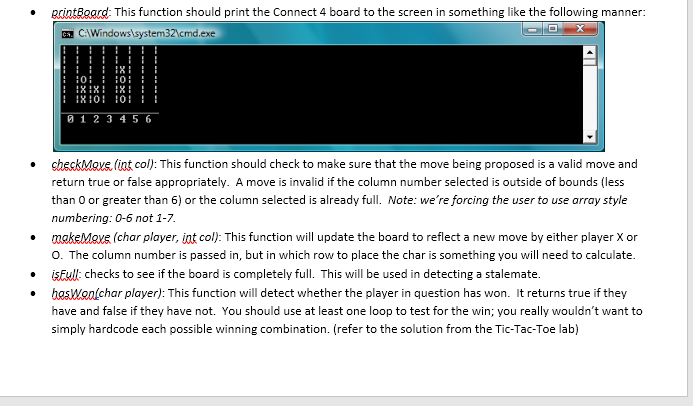
Project Part A: Connect 4 is played on a 7 column by 6 row board. For Part A you will create a Board class that maintains a 2D array of chars representing the board. You will have an X player and an O player and empty spaces should be represented using e or . (Warning: be consistent about using the letter O not the number 0, otherwise youre likely to end up with a bug that is very hard to track down.) Your Board class should have a default constructor which initializes the board to be empty (filled with the letter e). In terms of general functions, you will probably need at least the following: printBoard: This function should print the Connect 4 board to the screen in something like the following manner: checkMove (int col): This function should check to make sure that the move being proposed is a valid move and return true or false appropriately. A move is invalid if the column number selected is outside of bounds (less than 0 or greater than 6) or the column selected is already full. Note: were forcing the user to use array style numbering: 0-6 not 1-7. makeMove (char player, int col): This function will update the board to reflect a new move by either player X or O. The column number is passed in, but in which row to place the char is something you will need to calculate. isFull: checks to see if the board is completely full. This will be used in detecting a stalemate. hasWon(char player): This function will detect whether the player in question has won. It returns true if they have and false if they have not. You should use at least one loop to test for the win; you really wouldnt want to simply hardcode each possible winning combination. (refer to the solution from the Tic-Tac-Toe lab) hostGame: This function will actually run a game of Connect 4. It should take turns getting moves from the two users, test whether the moves are valid and detect when the game has terminated, either due to a win or a stalemate. You should print an appropriate message at the end of the game indicating the outcome. If the user enters an invalid move, they should be re-prompted until they enter a correct one. You can assign player X to always go first and player O to always go second. You should reprint the board after each move so that the user can decide where to make their move. Others: you may need to implement other functions either as part of your class or outside of it, to complete your project. Your main ( ) method should be very simple, involving little more than creating a Board object and calling the hostGame function.
Project Part B: Participation in the tournament is OPTIONAL. In this part of the assignment, you will create a Player class that will be a semi-intelligent computer Connect 4 player. You will be provided with a Board class that you must use, without modifying, as part of your project. We will host an in class tournament between the Connect 4 players that you create and the winner will be awarded extra credit and maybe a prize! The Player class will have a single member variable (property), data type = character. It will indicate whether it is playing X or O. The Player class should have standard constructors, accessors and mutators. In addition, you will create the following general functions for the game: bestMove(int scores [ ]): This function will take an array of 7 scores (one for each possible move the Player is considering) and return the integer index number for the move that the player should make, NOT the score stored there. It should first check to see whether there is a single highest score. If there is, then it should return the index of the highest score (which is equivalent to the move that the player should make). If there is a tie, then it will select one of the top scoring moves and return the index of that move. You can use any heuristic you choose in breaking a tie as long as you document it in your comments. Some simple heuristics are: o Always use the leftmost. o Always use the rightmost. o Randomly select. evalMove (int col, Board b): This function evaluates a single proposed move: placing the token in column col, and returns an integer representing the score of that move. If a column is full, then you can immediately assign it to have a score of -1. Otherwise, the score will range between 0 and 100, depending on how good a move it would be for the computer to place its token in the corresponding column. As a minimal implementation, you should assign a score of: o 0 if the move will cause the player to lose in the next move. o 50 if the player will neither win nor lose in the next move. o 75 if the move will block the other person from winning o 100 if the move will cause the player to win. You can also try evaluating things from a strategic point of view, such as: Rank center columns higher than outer ones Do I or my opponent have any 2- or 3-in-a-row runs? Block a 2 in a row/col Build on a 2 in a row/col
evalAllMoves (Board b): This function returns an integer between 0 and 6 representing which column the Player should place its token in next. This function should create an array of 7 integers which will represent the goodness scores of each of the 7 possible moves open to the Player given the board configuration that is passed in. To divide up the labour, this function should call EvalMove() 7 times to get the scores for each possible move and then call bestMove() to pick the winner. This function will be called directly from the tournament function, so it has to have the exact interface (input parameter is a board). Note: as a practical limitation, it should take no more than 10 seconds for the evalAllMoves( ) function to run on a single board configuration. Hints: As usual you are expected to follow all of the good programming practices outlined in class. Remember to thoroughly test each function before you continue with the rest of the program. You should remember to check common, boundary and negative testcase data. Code that doesnt compile is an automatic 30% off. Dont forget, arrays are passed by REFERENCE!
Tournament: For the tournament, please bring two copies of your code to class. In the first copy of your code, you should rename your Player class PlayerX and modify your code to compile accordingly (e.g. youll need to update the name of the constructor, etc.). In the second copy of your code, you should rename your Player class PlayerO and modify your code to compile accordingly. The tournament function will declare a player like this. So your class name should be PlayerX or PlayerO: PlayerX px('X');
It will call the evaluate moves function like this: move = px.evalAllMoves(*this); (dont worry about the weird notation *this. It refers to the current board object.) To successfully participate, your code must integrate with the tournament code without any errors or modifications and you must be present for the entire class period being late means sacrificing the tournament points. The winner of the in class tournament for each section will be awarded 15% extra credit, the runner up will receive 10% extra credit. ALL participants in the tournament receive 5% extra credit. Students who go beyond the minimum AI requirements will be eligible to earn up to 5% extra credit, regardless of how your code performs in the tournament. Typically, this involves making the evalmove() function smarter. The extra credit for winning the tournament is in addition to whatever extra credit is allocated based on the sophistication of the AI implemented.
Overview: For this project, you are going to create a program to play Connect 4 Connect Four MB Goal: The goal of the project is to work with 2D arrays and create your own classes Description: There are two parts to the project, Part A and B. In Part A you will build a Board class that will allow two human players to play Connect 4. In Part B you will be given a Board class to use and you will create a Player class that will be a computer player of Connect 4. After the Board class code for Part B has been posted on Canvas in the last week of class, no late submissions for Part A will be accepted. Proiect Part A: Connect 4 is played on a 7 column by 6 row board. For Part A you will create a Board class that maintains a 2D array of chars representing the board. You will have an 'X' player and an 'O' player and empty spaces should be represented using 'e or (Warning: be consistent about using the letter 'O not the number 0, otherwise you're likely to end up with a bug that is very hard to track down.) Your Board class should have a default constructor which initializes the board to be empty (filled with the letter 'e'). In terms of general functions, you will probably need at least the following . pcintBeard This function should print the Connect 4 board to the screen in something like the following manner: CAWindowssystem32cmd.exe
Step by Step Solution
There are 3 Steps involved in it

Get step-by-step solutions from verified subject matter experts
 Study Help