







Question: Project description: The programming problem for this project involves developing a Pizza Ordering System that allows processing of orders made based on a menu of
Project description:
The programming problem for this project involves developing a Pizza Ordering System that allows
processing of orders made based on a menu of different pizza sizes and special extras. For simplicity,
the basic assumptions are there are only four types of pizzas classified by sizes, each size with a
different price, there are four types of extras, each type with a different price, only ONE unit of
each type of pizza or extras can be ordered, and an order can include any of the eight types of food
items. The price of a small pizza is dirhams, medium size is dirhams, large size dirhams,
and party size dirhams. Prices for extras are: dirhams for a drink, dirhams for a salad dish,
dirhams for pasta, and dirhams for desert. The program should allow the user to make any
selection combination in one order, and a subtotal, value added tax VAT and an order total will be
computed. The subtotal is simply the total prices of all the selections, and VAT is computed as
of the order subtotal, and order total is sum of order subtotal and the VAT amount.
The structure of your application includes a main menu for accessing the functionality of your
application, a form for addingprocessing orders, an order summary form for displaying the
summary of all the orders, and an about form for displaying information about the application and
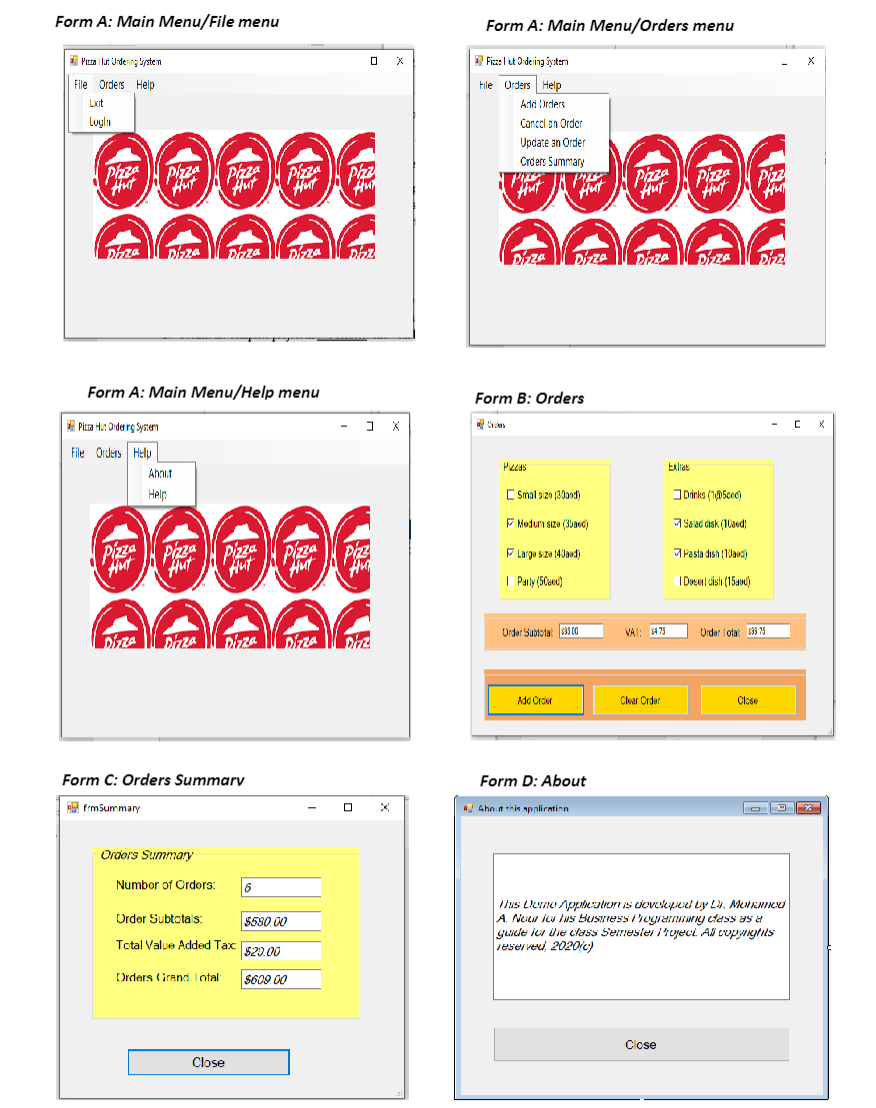
its developers. Below is a brief description of the structure of the program, and a list of screen shots
describing the design of the four forms.
Main menu form:
This form should reflect the menu structure of your application, which should be designed to
look similar to the form design A and include the following menu items only the ones in red
will be programmed This form should be the Startup form.The Orders form:
This form allows each order to be createdadded and total amounts including subtotal of order
items, value added tax, and order total computed and displayed. Additionally, overall totals for all
orders, that include the number of all orders, all orders subtotal, all orders VATs, and all orders
grand total, must also be accumulatedupdated with the additioncreation of each order. These
four totals for all orders will be displayed by the Summary form. The Orders form will have three
buttons, as shown on form design B The "Add Order" button will compute valuesamounts of this
order from all the items and display them on the three text boxes. In particular, it must usecall a
function to compute the value added tax VAT It should additionally accumulate the all orders
amounts totals mentioned above, for summary results. You need to declare the accumulator
variables at the form level for access by the individual procedures, and using the declaration
keyword Public to allow the Summary Form to directly access reference these totals variables.
The "Clear" button must use call a general userdefined Sub procedure to clear the itemsvalues
of the current order for adding another order. The last button is for closing the form and returning
to the main menu. The form must be opened as a modal form
The Summary form:
This form will display the summaries of all orders, accumulated by the Orders form. The form
design below shows what values or totals to be display. The form must also be opened as a
modal form, and the "Close" button to close the form and return to the main menu form.
The About box:
This form should include information about the application and the developers, including your
names and ids, the course name, and the semester. It should include a "Close" button to close the
form and return to the main menu form. This form must also as modal.
Additional requirements include the following:
The main menu form must run in a maximized mode window
The three forms, other than the main form, must all open as modal forms
You may have an imagepicture of your choice, but a relevant one, on the main form optional
Your final completed application should be compiled and made executable outside the Visual
Basic IDE eg in another computer with no VB installed This requires that you "publish" your
application using the publishing wizard, available from the "Build" menu.
Step by Step Solution
There are 3 Steps involved in it
1 Expert Approved Answer
Step: 1 Unlock

Question Has Been Solved by an Expert!
Get step-by-step solutions from verified subject matter experts
Step: 2 Unlock
Step: 3 Unlock
 Study Help