







Question: Project Description: You are given a Node.js project that calculates rabbit population in 1, 10, 30, and 44 months respectively. This project is adapted from
Project Description:
You are given a Node.js project that calculates rabbit population in 1, 10, 30, and 44 months respectively. This project is adapted from the example in the textbook Listing 2-24 on page 29. Your job is to modify this Node.js program (rabbit.js) by adding another entry for 55 months population.
The instructor should provide you the source code in unit04_lab.zipfile in BlackBoard Unit 04 Lab sections. There is only one file in this folder: rabbit.js.
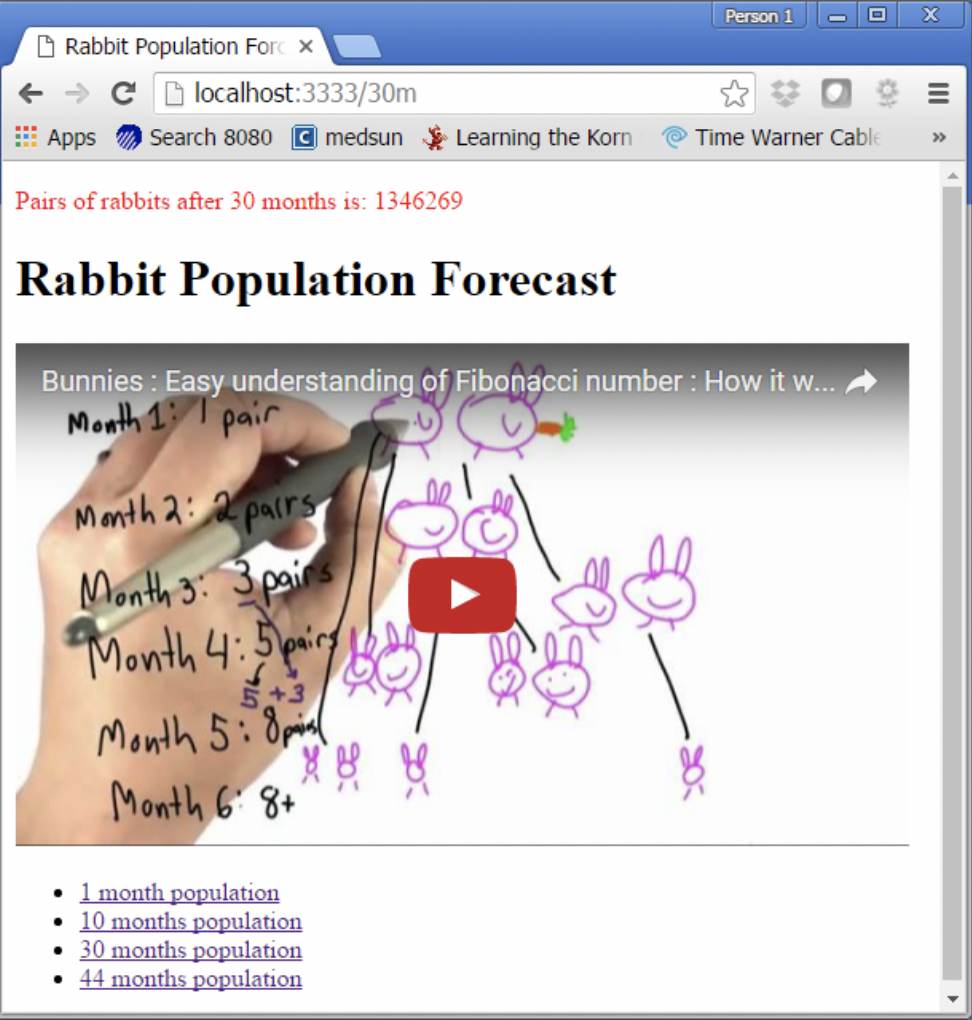
When you run this project, you should see something like this in the browser:
If you click any links at the bottom, you should get something like this:
In the meantime your Node.js server log should give you the number of milliseconds it takes to calculate this number. See screenshot below.
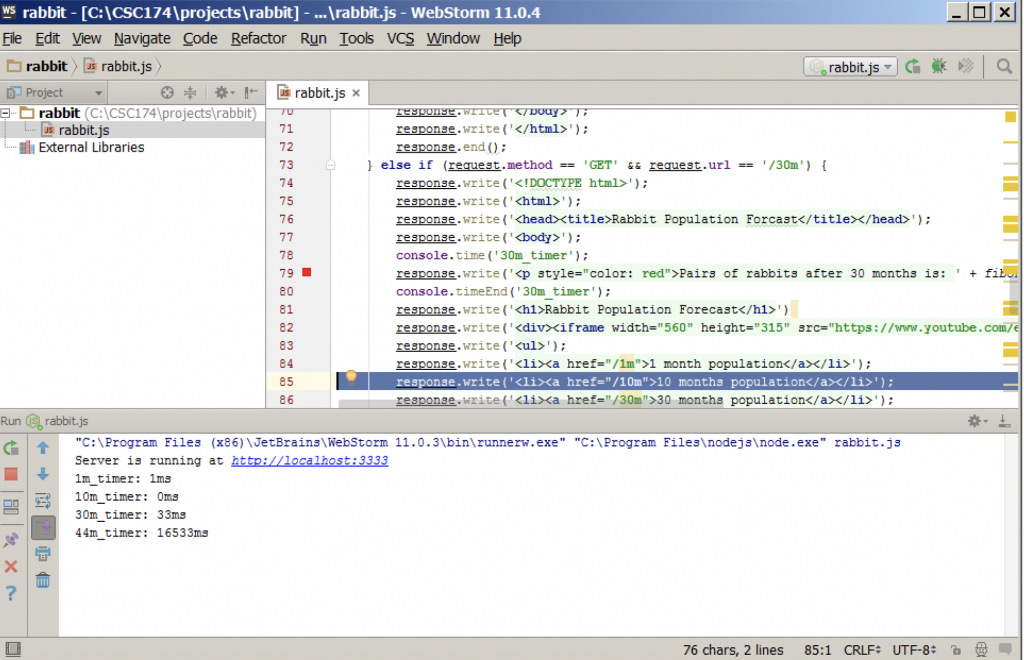
As you can see from the timers, it takes significantly longer to calculate for 44 months. To make the matter worse, when the Node.js is calculating for 44 months population, the whole application gets stuck. This shows that Node.js uses a single thread to process multiple requests, so if one request causes a lot of CPU consumption in Node.js server, other requests have to wait.
Now add another entry for 55 months population, then try to click on it, your Node.js may hang on you and you may never get a response back. This is thread starvation. You have to stop the Node.js server and restart to recover.
CODE
/** * app.js * unit 04 lab * This program is a server-side JavaScript program that * simulates rabbit reproduction using Fibonacci sequence. * This project is adapted from text book example Listing 2-24 starveit.js on page 29. */ var http = require('http'); // function to calculate rabbit reproduction using fibonacci sequence function fibonacci(n) { if (n return 1; else return fibonacci(n - 2) + fibonacci(n - 1); } var server = http.createServer(function (request, response) { if (request.method == 'GET' && request.url == '/') { response.write(''); response.write(''); response.write('Rabbit Population Forcast '); response.write(''); response.write('Rabbit Population Forecast
') response.write('') response.write('- '); response.write('
- 1 month population '); response.write('
- 10 months population '); response.write('
- 30 months population '); response.write('
- 44 months population '); response.write('
'); response.write(''); response.write(''); response.end(); } else if (request.method == 'GET' && request.url == '/1m') { response.write(''); response.write(''); response.write('
'); response.write(''); console.time('1m_timer'); response.write('
Pairs of rabbits after 1 month is: ' + fibonacci(1) + '
'); console.timeEnd('1m_timer') response.write('
Rabbit Population Forecast
') response.write('
') response.write('
- '); response.write('
- 1 month population '); response.write('
- 10 months population '); response.write('
- 30 months population '); response.write('
- 44 months population '); response.write('
'); response.write(''); response.write(''); response.end(); } else if (request.method == 'GET' && request.url == '/10m') { response.write(''); response.write(''); response.write('
'); response.write(''); console.time('10m_timer'); response.write('
Pairs of rabbits after 10 months is: ' + fibonacci(10) + '
'); console.timeEnd('10m_timer'); response.write('
Rabbit Population Forecast
') response.write('
') response.write('
- '); response.write('
- 1 month population '); response.write('
- 10 months population '); response.write('
- 30 months population '); response.write('
- 44 months population '); response.write('
'); response.write(''); response.write(''); response.end(); } else if (request.method == 'GET' && request.url == '/30m') { response.write(''); response.write(''); response.write('
'); response.write(''); console.time('30m_timer'); response.write('
Pairs of rabbits after 30 months is: ' + fibonacci(30) + '
'); console.timeEnd('30m_timer'); response.write('
Rabbit Population Forecast
') response.write('
') response.write('
- '); response.write('
- 1 month population '); response.write('
- 10 months population '); response.write('
- 30 months population '); response.write('
- 44 months population '); response.write('
'); response.write(''); response.write(''); response.end(); } else if (request.method == 'GET' && request.url == '/44m') { response.write(''); response.write(''); response.write('
'); response.write(''); console.time('44m_timer'); response.write('
Pairs of rabbits after 44 months is: ' + fibonacci(44) + '
'); console.timeEnd('44m_timer'); response.write('
Rabbit Population Forecast
') response.write('
') response.write('
- '); response.write('
- 1 month population '); response.write('
- 10 months population '); response.write('
- 30 months population '); response.write('
- 44 months population '); response.write('
'); response.write(''); response.write(''); response.end(); } else { response.write(''); response.write(''); response.write('
'); response.write(''); response.write('
Error: invalid request!
'); response.write(''); response.write(''); response.end(); } }); server.listen(3333); console.log("Server is running at http://localhost:3333");
________________________________________________________________
Part Two: Short answer questions
*All questions are based on the original rabbit.js source code provided by the instructor.
Question 1: What port is this application running on?
Question 2: How many function definitions do you see in this program? List the function names. If its an anonymous function write the function definition.
Question 3: How many global variables are there in this program? What are they? (Hint: Some are programmer defined using keyword varand some provided by JavaScript language implicitly.)
Person 1X Rabbit Population Forc x
Step by Step Solution
There are 3 Steps involved in it

Get step-by-step solutions from verified subject matter experts
 Study Help